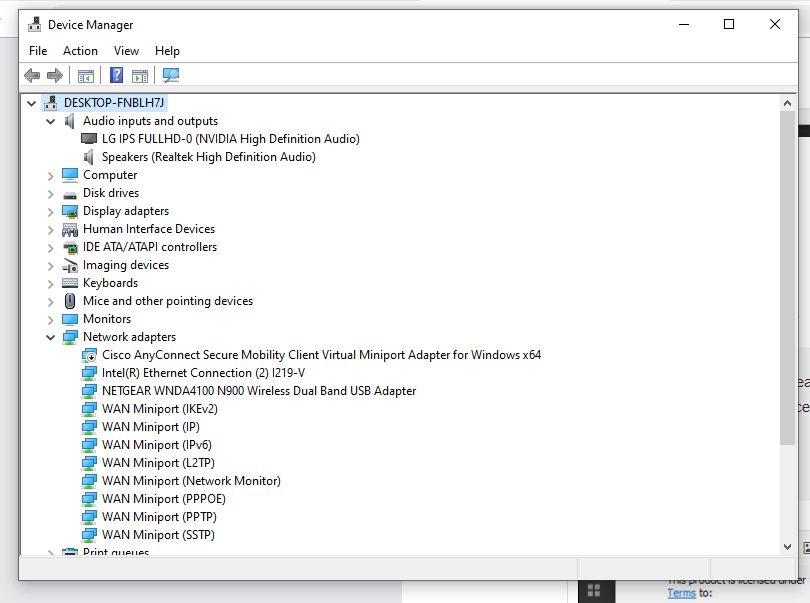
The DDJ-400 doesn't require drivers, but I do see that it has appeared as a control device (see the bottom of the screenshot), so the system has detected it.
Have you applied all the latest service packs and system updates?
I just got my DDJ400 and I'm not getting any sound to come out from my headphones. The DDJ 400 doesn't show up as an audio device at all.

Post is closed for comments.
The DDJ-400 doesn't require drivers, but I do see that it has appeared as a control device (see the bottom of the screenshot), so the system has detected it.
Have you applied all the latest service packs and system updates?
I'm not sure. I just installed Rekordbox yesterday. How do you check for that?
When I select Output Channel 1 on the headphones output, the audio comes out the main speakers not my headphones.
I understand that - but the problem is your DDJ-400 is not appearing as an audio device, meaning I'm not sure it was properly detected and installed by Windows.
Can you open the Windows Device Manager and see if the DDJ-400 appears under the Audio Inputs and Outputs?
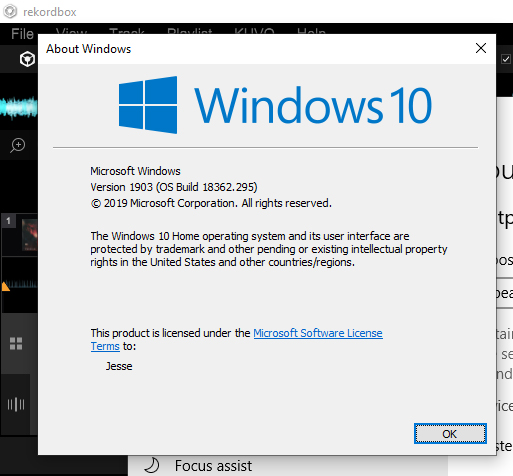
Which version / build of Windows are you using? To find out, press the windows key on your keyboard and R, then type winver and it will show you.
This is what I get when I ask what version of Windows I'm using.

And it doesn't appear that the DDJ-400 appears under Audio Inputs and Outputs

The 1803 build is from last year; please disconnect the DDJ-400, run the system updater to apply all the latest service packs and updates, reboot, then connect the DDJ-400 and try again.
OK, I updated the windows system to 1903, but it doesn't seem to have fixed the problem. 

I got the problem fixed. I ran Windows troubleshooting on my audio devices and the DDJ400 wasn't selected as a default device. That seems to have fixed the problem.
Hi All, I have the same issues, and I'll check this fix procedure asap. But I wonder how it is possible that there is no indication in this regard or updates in the manual to make this situation known to the final user. I bought the console for a week and still couldn't use it and I lost a lot of time figuring out what's wrong.
Very disanpointed
@Marco > Let us know if the steps above resolve the issue.
Yes, after the updates all the issues are solved(I've update the windows version, from Seven to Ten). The consolle works fine.