Official comment

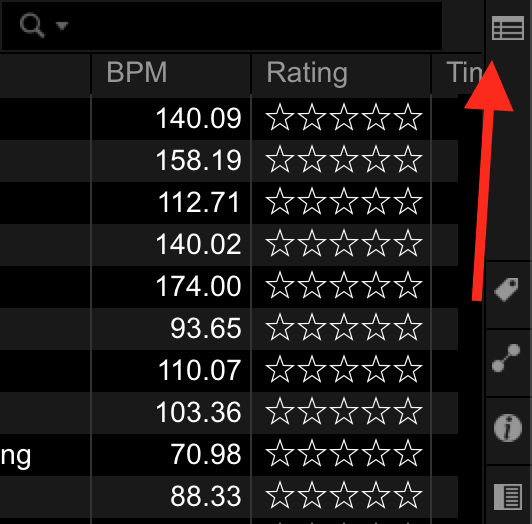
Click the "Show / Hide Playlist Palette" button at the top right of the collection window:


Comment actions

I have the same problem as here: https://forums.pioneerdj.com/hc/en-us/search/click?data=BAh7CjoHaWRsKwiTSGLTUwA6CXR5cGVJIhNjb21tdW5pdHlfcG9zdAY6BkVUOgh1cmxJIl5odHRwczovL2ZvcnVtcy5waW9uZWVyZGouY29tL2hjL2VuLXVzL2NvbW11bml0eS9wb3N0cy8zNjAwMjg3MTkyNTEtU3ViLUJyb3dzZXItTWVudS01LTQtMQY7B1Q6DnNlYXJjaF9pZEkiKWYzNDIzOGI3LTgzYzAtNDg2Yi1hNTg1LTIzNjEwMzQwN2U2NwY7B0Y6CXJhbmtpBw%3D%3D--36a78f1c04d06aae6e1b84c4c0f2a9c0de8a08f3
I have lost the playlists from the sub-browser and all it seems to do is show the entire collection and I can't get it back (the above post says they were "hidden behind the top menu" but it is not clear what is meant by this.
Thanks.
Click the "Show / Hide Playlist Palette" button at the top right of the collection window:
Post is closed for comments.