Post
Follow
Master Database on Cloud
I have found a great way to import Rekordbox Master Database to Google Drive or DropBox or Onedrive (I am talking about Database).
(This is not related to piracy or any illegal work. It is just a tweak).
Also, I only know about Windows (because I don't know anything about Mac).
So, basically, you will have the exact same Rekordbox database on all of your computers.
How does it work?
As you all know, Rekordbox has only the capability to move or set its Master database to one of the available harddrives.
So the algorithm that came in my mind was, if we can somehow virtually Mount the Google Drive Folder or Onedrive Folder or Dropbox folder as a separate Drive, then, Rekordbox will see that as an actual drive and thus will be able to set the location of the master database to that virtual drive which in reality is our Google Drive or One drive or Dropbox 'FOLDER'.
Now, in windows there's a way to mount any folder as Virtual Hard Drive.
This is 100% safe as well.
To do this, go to
C:\Users\<username>\AppData\Roaming\Microsoft\Windows\Start Menu\Programs\Startup
Here “username” is the login username that you accessed at Windows startup
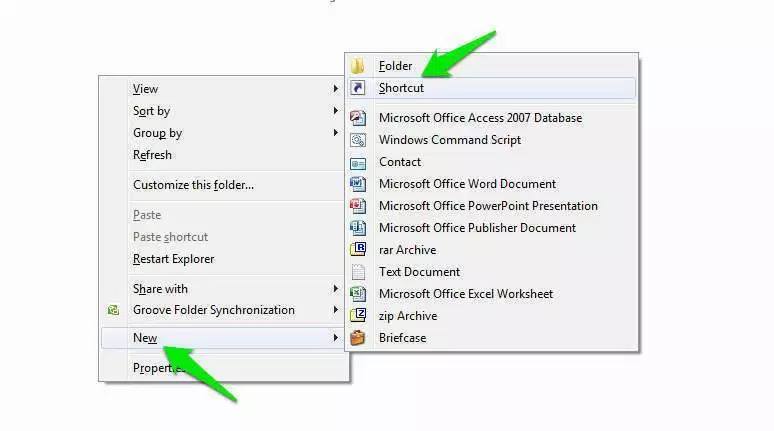
Once in the startup folder, right click in a blank area and from the context menu, hover your mouse cursor over “New”. Now, from the side menu, click on “Shortcut” and a wizard will open up.
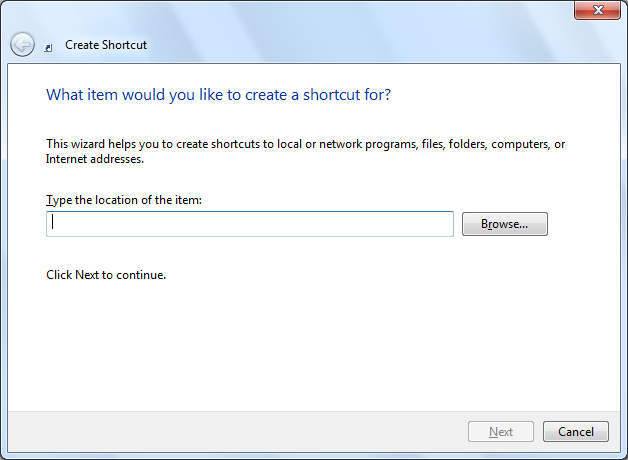
In the wizard, you will see a blank field where you are required to enter the location of the folder which you would like to mount as a drive. Here, type the following command:
subst X: “Location of your Folder”
You need to replace “Location of your Folder” with the actual location of the folder which you would like to mount as a drive (along with the quotes) and “X” with the letter of the drive that you would like to give to the folder.
In our case it will be
subst X: "C:\Users\<username>\Google Drive"
Then Save it and also name it Google Drive.
Double click on the shortcut.
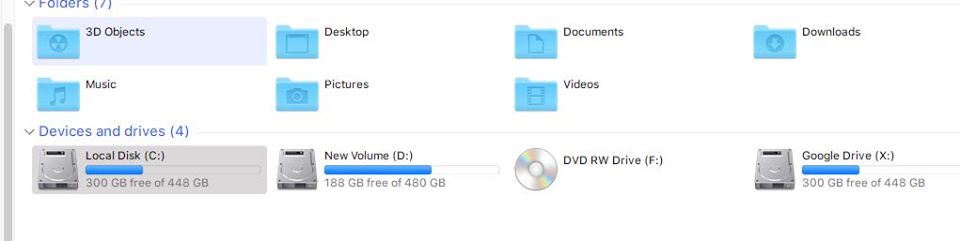
You will get your Google Drive Folder as an actual Drive.
Everytime you start your PC, you will get this virtual drive.
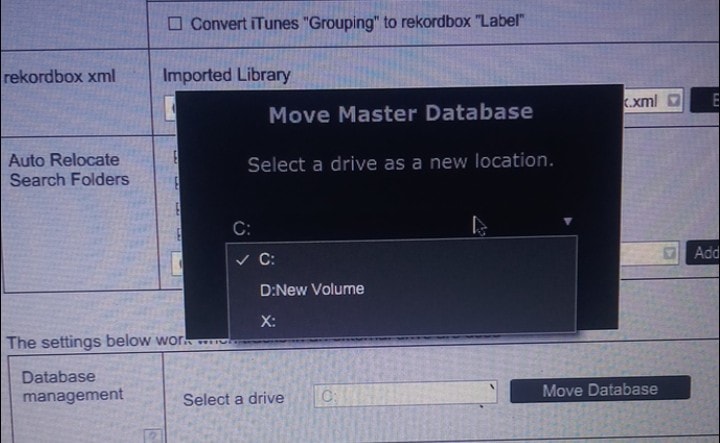
Now select this drive as your Rekordbox Master Database drive.
Also, for all your computers, do this.
What you also need to do is, keep your songs on a separate Harddrive or NAS Drive. ON ALL OF THE COMPUTERS, THAT HARD DRIVE/NAS DRIVE SHOULD HAVE THE SAME DRIVE LETTER.

Post is closed for comments.