Official comment

Yes! Just route the 11/12 outputs from the DDJ to OBS and you're golden.
Comment actions

How can I use DDJ 1000 with 2 Laptops? One using Rekordbox on USB port A, and the other using OBS capturing sound from the DDJ1000 and broadcasting thru OBS?
Thank you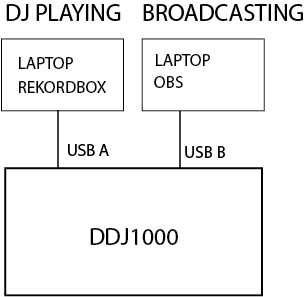
Yes! Just route the 11/12 outputs from the DDJ to OBS and you're golden.
Post is closed for comments.

How do you route those outputs? And will this produce better audio in OBS as compared to going out the RCA master into the line-in on the streaming PC?

I am struggling to get this to work as my OBS PC can see the line in from the usb but it is not recieving any audio. I have tried all the setting here and in the other posts found. Please could you create a step by step video detailing how to use
Laptop - to control / DJ / Preform with DDJ-1000 using USB-A
PC - using USB-B from DDJ to PC taking audio straight into OBS at a high quality
Thank you
OBS can't handle ASIO interfaces unless you have installed the ASIO for OBS plugin.

I don't know if you're still searching for a solution to this, but here is what you do in a bit better detail.
1. Download ASIO for OBS from GitHub in the link @Pulse posted above.
2. Install ASIO for OBS
3. Open OBS.
4. In your "Sources" panel, which should in the bottom middle, right click and a menu list of options will pop up.
5. Select "ASIO", it will be at the top of list.
6. When the ASIO option window pops up, select DDJ1000 ASIO. If that window doesn't pop up for some reason don't worry, just right click the ASIO button you added to sources and select properties.
7. Once you've selected DDJ1000 ASIO, leave "Format" at Stereo, and set Route.0 to DDJ1000 IN 11 and Route.1 to DDJ1000 IN 12 respectively.
...and then you're good!
I had to do the same thing you're trying to do because of CPU load reasons on my laptop. Running OBS, Rekordbox, and then having the Laptop both access my camera and decks...it's extremely CPU intensive and having the PC process the streaming, audio, and video takes such a major load off the laptop and leaves the video far less choppy.
Do understand though, this will not work in Streamlabs OBS...regardless of the fact they are essentially the same program. Apparently Streamlabs has a penchant for purposefully limiting options to users and they chose to just not include compatibility for ASIO. Standard OBS is fine though.