Official comment

Please file an inquiry ticket here and our support team will gather some additional information to assist you in resolving this issue.
Comment actions

When reloading iTunes in Rekordbox 6, and expanding playlist folders. The playlists in the nested folders are not revealed /shown. regardless of how many times the reload /refresh button is pressed.
In order to see the playlist you need to manually move it out of the nested folder and place the playlist in the normal sidebar tree in iTunes.
Considering that i have many, many playlists inside folders (inside more folders like a Russian doll). Its disappointing that a feature that worked in Rekordbox 5 does not work in Rekordbox 6
Please file an inquiry ticket here and our support team will gather some additional information to assist you in resolving this issue.
Post is closed for comments.
Can you provide a bit more detail?
Do you mean you have 3 layers of nested playlists but only the first layer expands? I'm not 100% clear on what you're asking. If you can show screenshots or a video that would help.
When you open iTunes in the sidebar the following in shown where playlist folder is collapsed.

You press refresh button and the playlist folders show up. but the Image below shows that several folder (6) are expanded but no playlists are shown

Only playlists that are in the root library path and not in folders are displayed and show songs
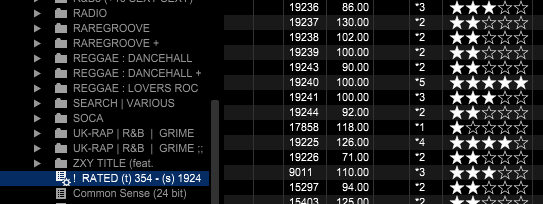
I went back to rekordbox 5 and this problem does not exist and all playlists from any folder work in rekordbox 5.
Rekordbox 6's iTunes integration seems a little broken.
Which OS are you using, and is that iTunes or Music?
Windows 10 latest build 1909 - iTunes Standard (don't use music)

Same here - some folders display one or two 'nested' playlists but nowhere near the whole list. Others are plain empty.

