Have a feature request or suggestion? Post your idea here!

Post

4 followers Follow
0
Avatar

DDJ 1000 Rekordbox \ HP laptop \ sound distortion when is charging

DDJ-1000 Rekordbox - sound distortion when laptop is charging!

I have looked through all the threads and cannot fix my DDJ-1000 sound output problems when my laptop is charging(If I change to ,,best battery life'' everything seems to be ok, even is in charge), when I change back to  ,,best performance'' in power mode - Plug in... there is a lot of distortion and crackling sounds but when i unplug it from power it works just fine. I am not sure what else I could do to fix this issue.

I have disabled Intel turbo boost and played with the latency settings in Rekordbox but its not working.

I have 2 similar laptops, but both of them HP, and I test it on another one and I got the same issue.

My computer should be able to handle Rekordbox:

Laptop HP Elitebook 840 G6 i5 8265u, RAM 16GB, SSD 512GB

Would you please raise a ticket? Can someone help me?

Thank you!!!

DJ RED

Official comment

Avatar

Hey DJ RED,

The problem isn't rekordbox - it's poorly isolated charging circuitry causing this to occur, and it's no surprise that it's the same problem on two different HP computers as they likely share a similar design of those parts. You may be able to use a USB isolator or a DI box on the DDJ output to galvanically isolate the signal, but your mileage may vary.

Pulse
Comment actions Permalink

Post is closed for comments.

5 comments

0
Avatar

Hello,

Thank you very much for your feedback! I will try a USB isolator.
Would you please let me know what means ,, DI box" on the ddj 1000? Is not familiar for me.

Thank you!!

DJ RED 0 votes
Comment actions Permalink
0
Avatar

Or maybe I can use a USB HUB, is this a solution? Usb isolator is very rarely and I'm unable to find them.

Thx!!

DJ RED 0 votes
Comment actions Permalink
0
Avatar
I have the same problem with hp, I tried many things and nothing (latency, etc).
Finally i tried another laptop (lenovo) and it worked
fine.
I will have to change the laptop. It should create a topic about ddj 1000 and
incompatibility with HP.
nomore sun 0 votes
Comment actions Permalink
0
Avatar

Hello,

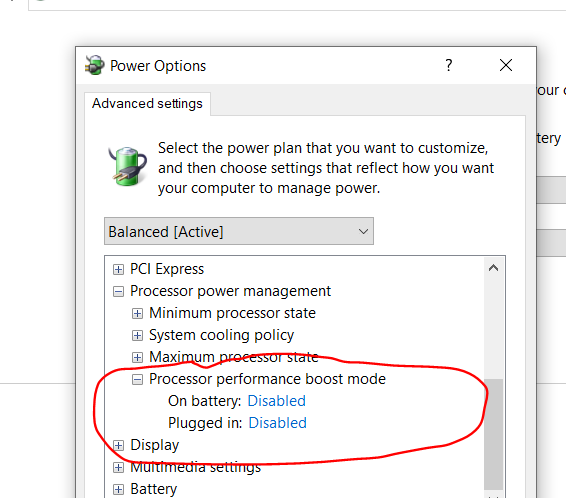
I have resolved this issue, please check with power off, if it works when laptop is unplugged, please try to disable the processor perfomance boost.

If this tab is not appear on your laptop, please look on the internet, you will find a lot of solution to do this.

For me this was the only solution for making compatible with rekordbox.


DJ RED 0 votes
Comment actions Permalink