Have a feature request or suggestion? Post your idea here!

Post

2 followers Follow
0
Avatar

Rekordbox playlists and collection issues

Hi there.

I know you will think I am stupid: 

However can someone help me please? Having imported my mps 3's into the Rekordbox Collection for analysis when all is completed I then export to my portable Fat32 hard drive or usb stick - all good no issues - plays fine.

But 

1 When I then wish to add more tracks to the "collection"  it then is difficult if not impossible to locate the new ones to then subsequently add them to the hard drive or usb!

In other words the newly  imported tracks do not appear at the top or the bottom rather randomly they appear throughout the existing collection - I am assuming alphabetically. 

I end up having to delete the whole collection then adding the extra tracks I want to before exporting again.

2 I have tried moving  the "collection to a "created playlist" by highlighting then dragging and dropping  however when I then subsequently delete the "collection" which is still there the contents of the created playlist also delete.

How do I do this properly its driving me crazy!!!

Any help appreciated..


Andrew Strachan

Post is closed for comments.

3 comments

0
Avatar

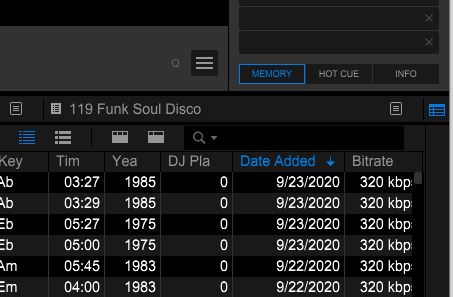
For item #1, add column Date Added to your Collection display and sort descending by date. Your recently added tracks will be at the top of the list.

Item #2, the Collection is "All Tracks" in Rekordbox. If you delete it, you are deleting everything. There should never be a reason to delete the entire collection. I run RB on Windows 10. All my tracks are located in one folder that I import from, 16K tracks. Importing the same folder only brings in new tracks added to the folder. I suggest that you have one primary folder and if you chose to create sub folders for organization of tracks. You can then add new tracks to these folders and import the top folder to get only new tracks.

In Windows Explorer, there is a Date Modified column that acts in the same manner.
DJ Joel 0 votes
Comment actions Permalink
0
Avatar

Hello Joel

Many thanks for your help sorry I took some time to reply.

Not quite there yet i have added the date column as you suggest.

Plus I was unsure how to sort ascending by date order although the ones in the collection were all  added at the same and date however I did try to add a single track this morning but it didn't appear? 

I confirm that I too have dedicated folders I import from to Rekordbox i.e. any new music goes  into "one folder"  its then imported to RB - once all analysed I move these into my "all music folder"  this way I try keep on top of what is done and what's not although there does  tend to be duplicates at times as its hard to keep a good inventory. I do use the Dupe guru app software that is very good ( for the most part) at identifying duplications in the main music folder.

Thoughts?


Andrew Strachan 0 votes
Comment actions Permalink
0
Avatar

Click on the Date Added header to change the sort order. The sort order descending should show a down arrow. This will display tracks added at the top of the list.

If you move your music files after they have been imported, RB will show the files as missing. Do you Relocate them after moving? I put the files into their final location before importing into RB and don't move them unless their is an issue. This process will complicate your library management.

DJ Joel 0 votes
Comment actions Permalink