Have a feature request or suggestion? Post your idea here!

Post

2 followers Follow
0
Avatar

Rekordbox 6 move database file location on same machine

Hi all,

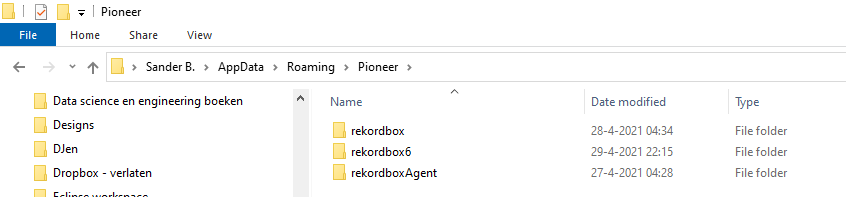
I've tried to follow the steps mentioned on https://forums.pioneerdj.com/hc/en-us/articles/115005245643-How-to-create-a-cloud-database-for-rekordbox-beta- but it doesn't seem to work, the library was completely empty and I had to recover from a backup. I think this is due to it written for rekordbox 5 and since rekordbox 6 also has a seperate folder in the AppData/Roaming/Pioneer location (also see the screenshot below), this tutorial doesn't work anymore.

Is there any other way I can move all the database files to a different location?

Operating system is Windows 10 (64 bit) and the new location is om the same SSD as the windows installation, so it's not an external hard drive.

Sander

Sander Breukink

Post is closed for comments.

1 comment

0
Avatar

Hi, 

I followed Pulse's guide but adjusted it for rekordbox 6 as it was written for 5.

The differences are as follows.

The rekordbox3.settings file will be under folder.  ...\AppData\Roaming\Pioneer\rekordbox6

edit this line to point to your cloud path (mine is this) <VALUE name="masterDbDirectory" val="G:\My Drive\RBDatabase"/>


Files to copy 

from:  ...\AppData\Roaming\Pioneer\rekordbox

to: your cloud path as specified in the config file above

Files:

  • automixPlaylist6.xml ,
  • ExtData.backup.edb,
  • master.backup.db,
  • master.db,
  • masterPlaylist6.xml.

Copy the folder named "share" , this contains all the artwork etc for the files in your database. If you have a large library there will be a lot of files in here.


Phil Foggs 0 votes
Comment actions Permalink