Comentario oficial

If you change the target to be the master deck and it will do that now.
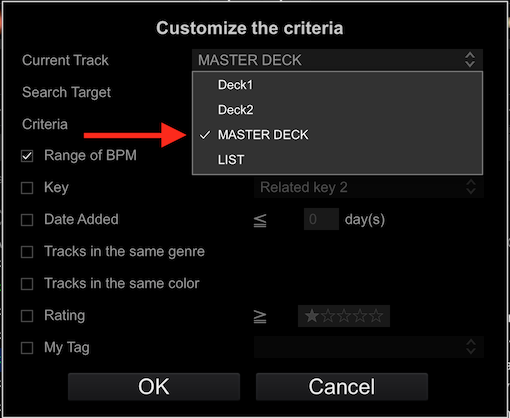
The matching tracks will dynamically update when the master deck is changed.


Acciones de comentarios

I like the potential of the track filter option. With one quick push of a button I can see all the tracks that I can suitably mix into the one I'm playing right now. Oh, no wait, I can't. First I have to edit the track filter to reflect the BPM and Key of the track I'm currently playing. Please make an AUTO option on the BPM and Key that adopts the values from the track that is currently being played.
Example: I'm playing a track at 100 BPM and set the filter to 100 BPM ±5 BPM. The filter will now show tracks between 95 and 105 BPM (yay!). I switch to a track at 125 BPM and the filter option now still shows tracks between 95 and 105 BPM (rather useless I'd say). I have to manually tell it my track is playing at 125 BPM to get the desired filter results.
What it should be: I'm playing a track at 100 BPM and set the filter to AUTO ±5 BPM. The filter will now show tracks between 95 and 105 BPM (yay!). I switch to a track at 125 BPM and the filter option now shows tracks between 118.75 and 131.25 BPM (Wow! Much awesome!).
You can imagine something similar for the Key value.
Fixing this would be greatly appreciated!
If you change the target to be the master deck and it will do that now.
The matching tracks will dynamically update when the master deck is changed.
La publicación no admite más comentarios.