Have a feature request or suggestion? Post your idea here!

Publicación

3 seguidores Seguir
0
Avatar

DJM 850 recording sets

I am trying to record my set to make a promo mix i have a djm 850 and I thought it would be as easy getting wires for the record out and putting it into my laptop and opening logic but im having so much trouble. Can someone help me, i need to know basically everything. what wires do I need. also if you could help with the preference i would need in logic to help record this. i dont have any other software as im not a laptop dj so through logic is my only option. thanks

Josel Rodriguez

La publicación no admite más comentarios.

7 comentarios

0
Avatar

The DJM850 features a built-in USB audio interface -- that would offer better quality than going out the analog REC output.  Have you ever used the mixer with your computer over USB before?  If not, you'll need the management software, then configure the input routing for the input channel 1 to be the REC source.  Within Logic you configure it to use the 850's audio device and record from those inputs.

Pulse 0 votos
Acciones de comentarios Permalink
0
Avatar

okay thank you so much i just downloaded the software, i dont know how i never saw knew about that and ive had the mixer for 3 months now i'll try it when i get a chance tomorrow cos im so busy today but thanks a lot of hopefully this will work perfectly

Josel Rodriguez 0 votos
Acciones de comentarios Permalink
0
Avatar

is there any other wires i need? or just the usb from the mixer cos i tried everything and i cant seem to figure out how to get it still. and when i put the cd/line over to usb music stops coming out of my speakers so i dont know how to set that up as cos im playing out of channle 2 and 3 but i follwed your steps and put channle one to record out so maybe my problem is within logic but even there i put the input to djm 850

Josel Rodriguez 0 votos
Acciones de comentarios Permalink
0
Avatar

@Josel > The music stopped because you selected the INPUT for that channel to be USB.  You need to set the OUTPUT for the mixer within the driver software; pick outputs 1/2 to be the REC OUT and then select the same channels within your recording software.

Pulse 0 votos
Acciones de comentarios Permalink
0
Avatar

1/2 on REC OUT


what about the others? I connected the djm 850 with two Cdj900 and I'm trying to record  either with audacity either with ableton live (I have a MacbookPro v. OSX Yosemite)


Thank you! 

Augusto Proto 0 votos
Acciones de comentarios Permalink
0
Avatar

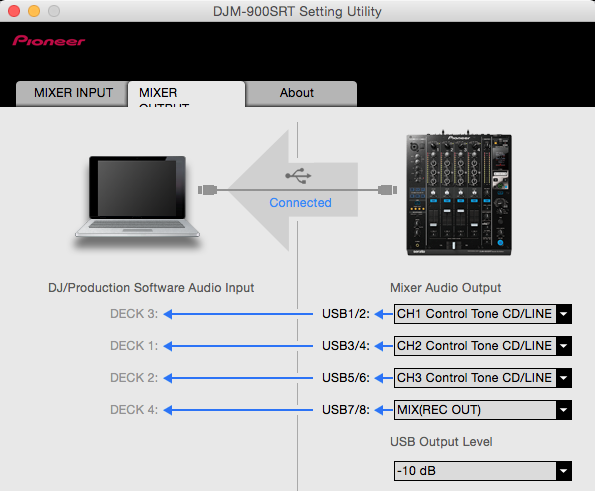
@Augusto > Simple! First, open the DJM Settings Utility and configure one of the channels to send the REC OUT back to the software.

In this case, I have configured CH4 to be (inputs 7/8) to be the REC OUT:

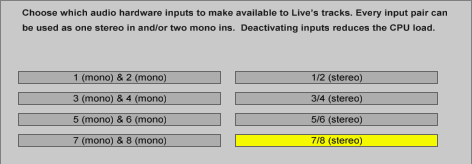
Next, in your recording software, select that same input as your recording source. Here is Ableton Live:

Then assign that input as one of the channels, and be sure to arm it for recording.

If you're using Audacity, you'll want to configure inputs 1&2 to be the REC OUT source in the DJM Utility as it has issues with using multiple channels. Then in Audacity, select the DJM as your input, create a stereo recording and ... presto!

Pulse 0 votos
Acciones de comentarios Permalink