Hi Marco,
It is possible to edit the phrase names.
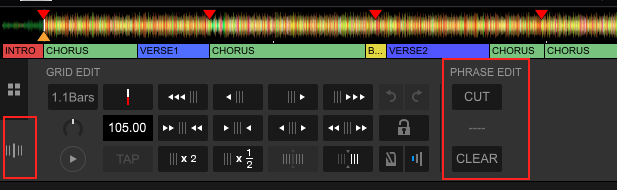
First click on Display BPM/Grid to get the display below.
Click on a phrase you want adjusted, between Cut and Clear a dropdown menu will apear. You can adjust the phrase here.
Hello Rekordbox team,
why isn't it possible to edit the phrase names? My songs using very different names, which aren't available in other songs.
In some songs you have "Up" and "Down" which are missing in another one completely but you have "Verse 1, Verse 2, ... , Verse 4", which are unusable for most of the tracks.
Can you give me some feedback, if this option is planned in the near future?
La publicación no admite más comentarios.
Hi Marco,
It is possible to edit the phrase names.
First click on Display BPM/Grid to get the display below.
Click on a phrase you want adjusted, between Cut and Clear a dropdown menu will apear. You can adjust the phrase here.

Ok got that! Thanks.
But is there no way to rename the phrases?
Because when I analyze a song, it gives me phrases like "Intro, Verse 1-5, Chours, Bridge, Outro" and if I do the same on another song, the result is something like "Intro, Up, Down, Bridge, Main".
This is a bit confusing, beacuse I'd like to arrange my songs by naming the phrases the way I prefer.
Is there no feature planned in the near future to do this?
Hello Rekordbox Team,
I have the same issue. Did you have found a resolution for that in the last 2 years?
Thanks in advance!
The system still defaults however you can edit them, just not rename them.
any news on this problem?
the thing is: it depends on the type of mood. if your track gets (automatically) analyzed in mood mid you have the choice between intro/outro/verse/bridge/chorus/etc. when the track gets (automatically) analyzed in mood high you have the choice between up/down/chorus1/chorus2/etc.
the big problem is that you can't change the mood afterwards without manually editing the database. you can change the bank but sadly not the mood. when will this get fixed? it's really horrible to edit the phrases afterwards.