
Have a feature request or suggestion? Post your idea here!

Publication

3 abonnés S’abonner
0
Avatar

Genre How I can change the data base of genre

Hello I tried to change my genre (see picture in the right hand) and nothing change in my genre left side ?

Can we edit genre ?

Best regards

dom 
 

Pisino Répondu

Commentaire officiel

Avatar

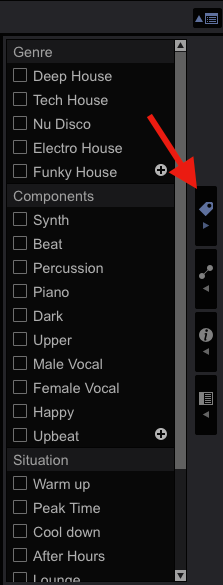
@Dom > The picture you attached shows the Category Filter.  Those genres on the left side are simply a list compiled of all the genres that your tracks are tagged with.  

For example...
Let's say your entire library only has 10 tracks in it.  If 5 of those tracks are tagged with the HOUSE genre, 2 of them are tagged with ELECTRO, and 3 of them are tagged with TECHNO, the category filter would show you 3 genres.  House, Electro and Techno.

I hope this helps.


@JP > Actually, what you're referring to is the Track Filter.  The My Tag configuration window is not show in his picture.  
Mark Gallo
Actions pour les commentaires Permalien

Cette publication n’accepte pas de commentaire.

3 commentaires

0
Avatar

The first 3 colums are the "Category Filter"

With "Track Filter" you can choose what you see @ "My Tag"


You can choose that above the text "Album" @ your picture.


I hope this helps...


J.P. Ownman 0 votes
Actions pour les commentaires Permalien
0
Avatar

@Mark: Correct!

I hope that explains a lot.


I refer @ the button you can see the My Tag filter what you see as "4th" My tag configuration window @ the picture.


If you want to change the "main" genre, change it in your "Collection". If you want add a sub-genre, simply do that in "My tag configuration window"


Then you see the difference.

J.P. Ownman 0 votes
Actions pour les commentaires Permalien