Commentaire officiel

@Tobi Eilers : Try this way see if this might help u ;)


Actions pour les commentaires

Hi Community,
Is there a setting to change the default colors of the 8 Hot Cues available within Rekordbox? I mean I alwasy wanna have Hot Cue A in the same color and all Hot Cues in the same Order of Colors and not randomly like the default setting. I hope you get the question. Thanks in advance! Cheers!
@Tobi Eilers : Try this way see if this might help u ;)
Cette publication n’accepte pas de commentaire.
Thanks for your answer! Yes, I figured out that I can manually change the color. I would have prefered to set a specific color per Hot Cue in the settings somewhere. However, I found 3 different color schemes one can choose from. Not the ideal solution but I can work with that... Thanks again!
You're welcome!!!

How about on a Mac???

I would also want this feature! Is it possible? =)
Now I do as athour of this post, choose one of the "color schemes". But I want a certain color for my "first beat" and it would save time (and energy) just to be able to have right color immiditly.
Makes a ton of sense to have one color for every part that we use regularly. Like one color for strings, or acapella, or a beat drop

I understand the desire for a custom set of colours so you don't always have green hot cues. I'll pass this along to the planning team to see if it's possible to customize it in the settings.
Hey guys I figured it out. So after you have set your hot cue place your cursor over the hot cue and with 2 fingers tap your mouse pad. It acts as a right click on a mouse. Give it a go!
@Dustin > Yeah, if you have the right-click set to "two fingers" as opposed to "bottom right corner" ...

I also would like to see that Rekordbox assigns different colors to each cue so we don't end up with only green cues. This would really save us a lot of time and less clicks
Go into EXPORT mode, open the preferences, and change this:
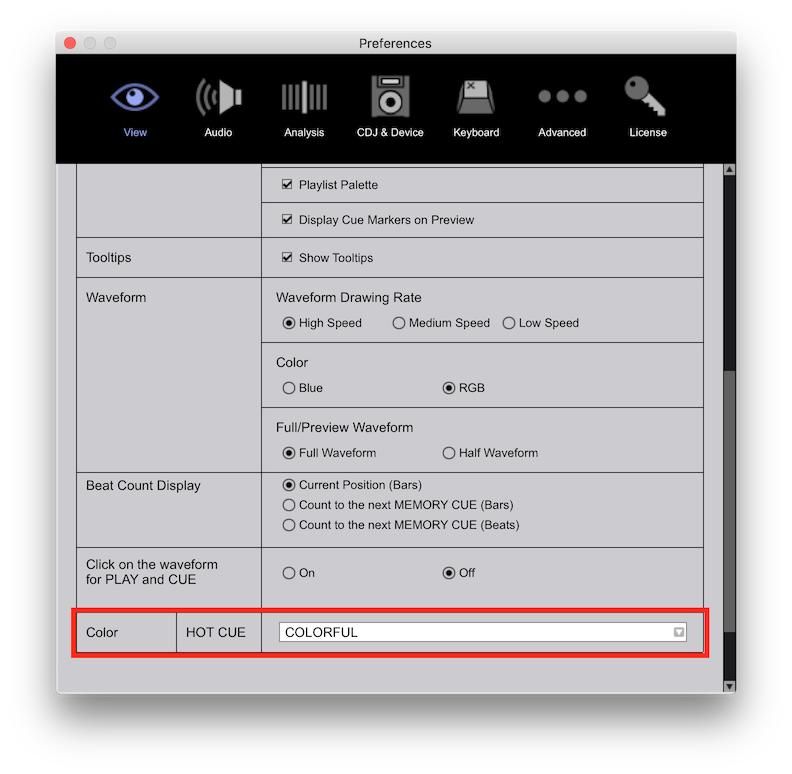
I'm not near my computer now but what does "COLORFUL" do?
Makes the hot cues more colourful than blues / greens / purples.

I would like to have another option for the color of the Hot Cues - called user-defiend or something. So that anyone can choose his specific color for Hot Cue A, B, C and so on, in order to save a lot of time because for instance my Hot Cue A has to be purple, Hot Cue B has to be green, C red and so on.
Wouldn't it be possible to add this feature in a future update of rekordbox?
Defaults can not be set at this time, sorry.

Is this still the case at the moment?
Is there a way to change the default colours?
E. G load point yellow, intro orange etc?

why i dont get the same icon for hot cue like yours we see some light all around the button
@Yan > Which version of rekordbox, and are you in EXPORT or PERFORMANCE mode?

I tried everything in Rekordbox and still can't change hot cue color settings to be in the order which I wish. For example:
1. Hot CUE A - I want to be always blue
2. Hot CUE B - I want to be always green
3. Hot CUE C - I want to be always green
4. Hot CUE D - I want to be always red
Unfortunatelly I need to set hot cue for each track and every time change colors manually which is very annoying and time consuming. Can we have a feature to set our own hot cue colors pattern? Am I doing something wrong?
I have DDJ 1000 ver 1.07
Rekordbox ver. 6.5.0

Has anyone found out on how to overwrite the default color in settings (or any file) like desribed above?
I just imported my lib from engine prime and hat the second hot cue always orange , this is what i want to keep for example
Sorry, hardcoded unless you use an XML export / edit / import to change them.


