Commento ufficiale

@Sjoerd Roelofs > Please file a rekordbox ticket here and our support team will be happy to assist you in resolving this issue.
Azioni per commenti
@Sjoerd Roelofs > Please file a rekordbox ticket here and our support team will be happy to assist you in resolving this issue.
Il post è chiuso ai commenti.

Hello,
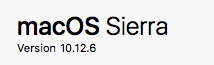
Symptomes on MAC Sierrs 10.12.6
Master level works on the controller. Output works on controller.
No other knob works. Downloaded all-inds of updates... no effect.
Owner: fed up and frustrated
Also, being on 13" laptop... Have i screwed up by purchasing pioneer rekordbox?

Did you install the audio driver for DDJ-RB into your Mac?
https://www.pioneerdj.com/en/support/software/ddj-rb/#drivers
Hello, i have done that. Numerous uninstalls/reboots/installs.
Also updated the firmware of the DDJ-RB
No success
Perform the following checks.
Reload Audio MIDI settings.
(1)Connect DDJ-RB to your computer and turned it power on.
(2)Open [Applications] folder, [Utilities] folder and [Audio MIDI Setup.app].
(3)Open [Audio Devices] window. Confirm that [Audio MIDI Setup] is displayed on Menu bar.
Click [Window] and choose [Show MIDI Studio] or [Show MIDI Window]. (The displayed name depends on OS version.)
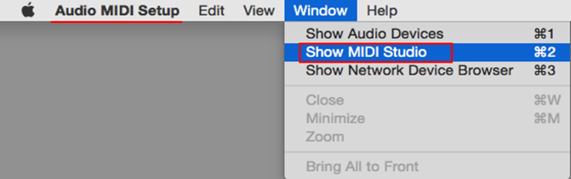
(4)[MIDI Studio] window opens up, click [DDJ-RB] icon. The icon turns to blue color, click [Remove Device].
"DDJ-RB" icon disappears and comes back again.
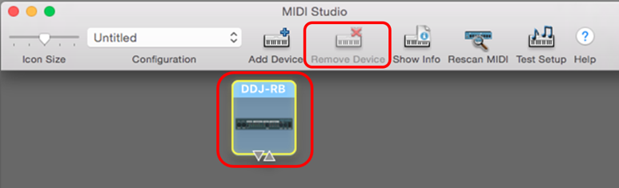
(5)Close [Audio MIDI Setup] and turn DDJ-RB power off.
(6)Turn DDJ-RB power on and run DJ Application.
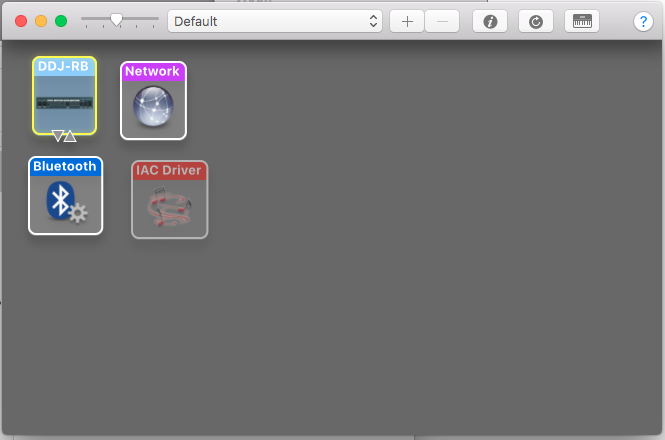
The minus-sign is inactive
Did you activate the rekordbox dj lisence key?
open [Preferences] > [License] > [rekordbox dj], click [Activate] and enter the license key to activate it.


Hello,
I'm facing the exact same problem.. cant remove my device from midi studio and my license is active.. any help?


