


After you´ve done step 6, you must activate (hit the "button") each criteria you like to match (bpm, key. rating), when a criteria it´s activated it´s red surrounded.
コメントアクション

I am having trouble getting the "MATCHING" function working on the NXS2.
Imgur album with images linked inline below shown in easy-to-read order here: https://imgur.com/a/YJ1fM
Here's the steps I take:
1) Enable "MATCHING" on your USB in Rekordbox: https://i.imgur.com/tngQI8n.png
2) Set the "MATCHING" criteria in Rekordbox: https://i.imgur.com/5RuzJ3s.png
3) Ensure "MATCHING" is working by looking to see if Rekordbox generates a list of songs that match: https://i.imgur.com/TOpS0fs.png
4) Eject USB and plug into CDJ NXS2
5) Load song in Player 1: https://i.imgur.com/04Ibtbn.png
6) Select "MATCHING" function on Player 2: https://i.imgur.com/dDc56sv.png
7) Select Player 1 song as the song to find matching songs from: https://i.imgur.com/XRfNIF7.png
8) List doesn't populate any tracks: https://i.imgur.com/dEzX0CX.png
Not sure what I'm doing wrong here. Any suggestions?
投稿コメントは受け付けていません。
After you´ve done step 6, you must activate (hit the "button") each criteria you like to match (bpm, key. rating), when a criteria it´s activated it´s red surrounded.
What is the "button?" My CDJ's have like 300 buttons.
When you have selected the Matching function, the matching page apears. First you have the tickboxes on the left, tick the the criteria you like to use, then on the right side, inline with the tickbox, are the buttons were you can define the value of the criteria. These buttons should be hit and activated. If they are activated, a red surroundig is shown.
What you are talking about sounds a lot like the "Filter" function.
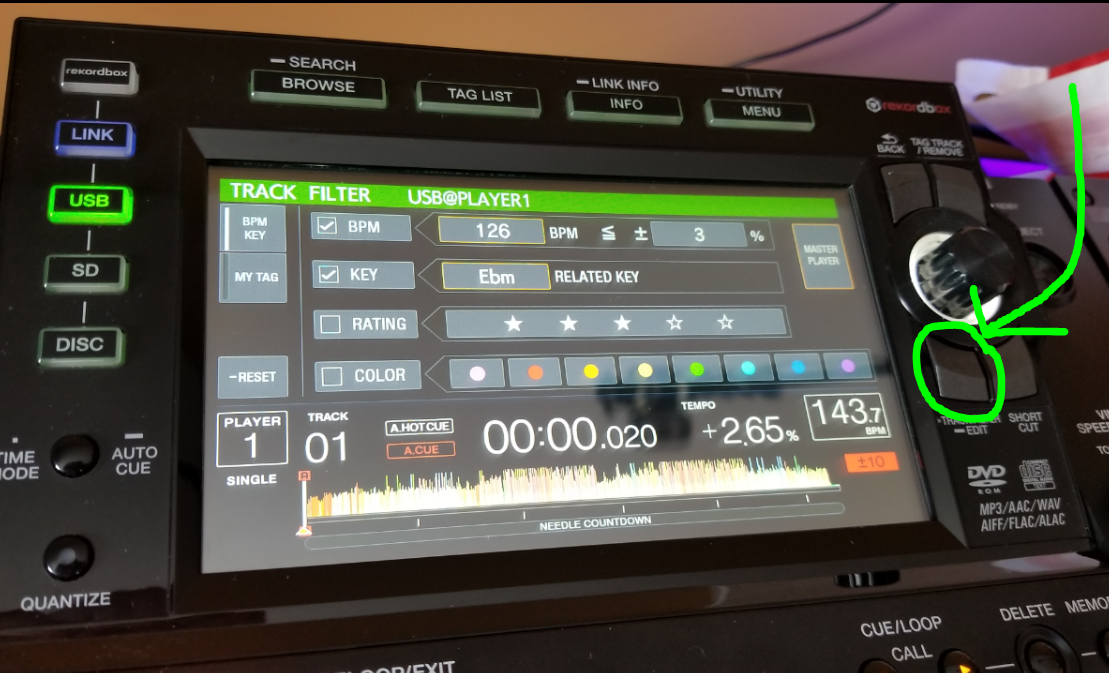
I guess the Filter function works.. but I think the "MATCHING" function is basically an auto-filter so you wouldn't have to go in and do this.
When it´s once configured you don´t have to go in this menue. In the browse mode, just hit the filter button and only the matching tracks are listed, hit the filter button again and all track are listed .
Right. That is track FILTER. It's not the same as MATCHING.
What do you expect from the matching function, that is not already covered by the filter function?
Yeah, not sure! I guess it's the same damn thing just an extra click or two. I've been using it in lieu! :)

Rather useless feature, i use the old way to match my tracks, i read the keys and bpms, thats it.
Makes it easy if your not on a NX2 setup. Cause not many clubs i dj at have yet taken the step to purchase one. Except me ;)
The plain and clear fact, that every Setup requiers a specific workflow, does not mean for me, that a feature wich isn´t available on every Setup, is useless. For me it´s a big advantage to have the Option to search in a tracklist that contents only matching tracks, instead of scrolling thru a bunch of unsuitable tracks. This option makes it much more comfortable to play freestyle and to react on the crowd. If there is a setup without this filter, I handle it manually, like you.
I'd guess the vast majority of us use the "old way" to beatmatch.. still shouldn't stop you from trying out other features and see if they help your workflow. I love the FILTER now.. my rotary selector is logging a lot less miles now :P

I also use my ears and the knowledge about my collection to find matching tracks - but I am always keen to find out how things work and what the outcome is. And I haven't been able to get the matching feature to work, too (and that annoys me loads). So if someone knows how to use this function, please let us all know :).

@Dirk > It's another tool in your arsenal. It allows you to be more creative with your mixes, either quickly displaying your manually matched selections, or providing matches based on genre, era, tempo, rating, etc.
It's like the MyTag feature - if you're not already using it, you're leaving a very powerful ability of rekordbox aside. Learn the advanced functions of the software in order to make the most of your abilities as a DJ.

