
same problem here m8.
コメントアクション

i updated to the new drivers and im getting no audio in pc mode. i went back to the old drivers and now they arent working either.
however when i open rekordbox and select pioneer asio driver it works in the programme, but it wont work in windows.
please help. thankyou.
投稿コメントは受け付けていません。
same problem here m8.
Found a shirt gap solution. Remove the driver then use something like ccleaner to remove the entries from the registry. Then reinstall the original driver. I tried with new ones but they definitely don't work. Atleast it's working again.

Same problem for me too.
Where can I get the old drivers?

same issue, please revert ASAP!
I installed driver 1.103 and firmware 2.10, it says 1.103 is not installed properly, i went back to 1.000 and it's the same, now PC is not connected
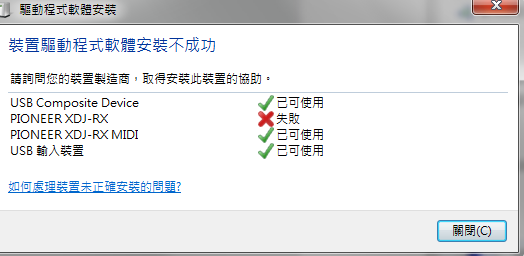
Hi there so for late reply, i still had the old drivers on my desktop so i was lucky. here we go ill post a link.
hi Simon, thanks for the update, however, 1.000 also won't work for me now
for gods sake Pioneer are you not looking at this?
right here is what I did. get ccleaner and uninstall the driver with it. then got to registry cleaner and run that in the programme, this will remove all the bits of the programme that are causing this to fail. now you should be able to reinstall the driver. good luck

We recommend using the driver's uninstaller tool to remove any previous remnants in order to reinstall properly.
Please ensure your Windows system updates have all been applied as well, and if you are wanting to use the PC output simultaneously, you may consider manually installing the Pioneer_MIX_Driver.exe by going to rekordbox > Preferences > Audio and click the Drivers button, a window will open where you can locate the MIX driver and install it.


