Comentário oficial
That's really weird ... it USED TO be there, but is now missing! I even looked it up in an old manual and found this:
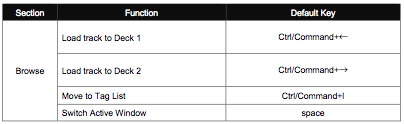
I'll bring it up with our rekordbox team, thanks for the heads-up.
What is the default shortcut to load a track when in Export mode?
I tried to set a new shortcut in the preferences but couldn't actually find the function! The closest I found was:
Link Export -> Load track into player 1.
However that didn't work.
Can anyone tell me please?
That's really weird ... it USED TO be there, but is now missing! I even looked it up in an old manual and found this:

I'll bring it up with our rekordbox team, thanks for the heads-up.
Publicação fechada para comentários.
A year later and there still appears to be no shortcut... Right clicking you'll see the Load tab is grayed out as well...
Sorry, it got passed on to the team but I haven't seen any feedback on its inclusion - I've asked for an update.
Thank you for forwarding the info to the team. I bought Rekordbox because of how diligent you all are. Your Work is Much Appreciated.
I just realized that in:
Export Mode > Preferences > Keyboard > Drop down for Player A > Next Track =[Command + Down Arrow] or Previous Track = [Command + Up Arrow]
...This loads the tracks!
I am stoked!
**You have to drag the first track in and then after that the key commands work.
Okay, so here's the deal... it will be added in a future update for customization, but for the time being, there is a default - you can load a track to deck 1 by ENTER, or SHIFT + ENTER for deck 2.
Has this been addressed yet? Whilst the above works it is frustrating...
3+ years later haha :X
No custom, but you can use the defaults to load a track to deck 1 by ENTER, or SHIFT + ENTER for deck 2.