
Comentário oficial

Could you try to reload Audio MIDI settings of your Mac as follow steps?
(1)Connect DDJ-RB to your computer and turned it power on.
(2)Open [Applications] folder, [Utilities] folder and [Audio MIDI Setup.app].
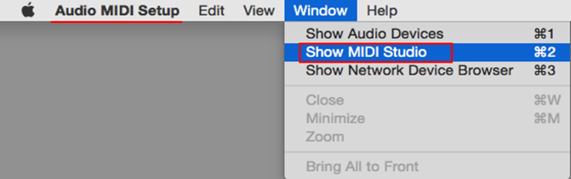
(3)Open [Audio Devices] window. Confirm that [Audio MIDI Setup] is displayed on Menu bar.
Click [Window] and choose [Show MIDI Studio] or [Show MIDI Window]. (The displayed name depends on OS version.)
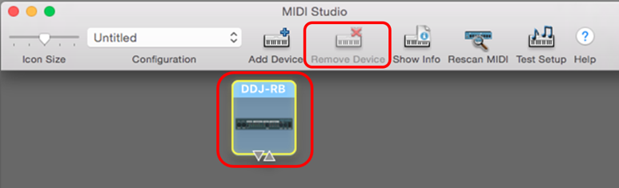
(4)[MIDI Studio] window opens up, click [DDJ-RB] icon. The icon turns to blue color, click [Remove Device].
"DDJ-RB" icon disappears and comes back again.
(5)Close [Audio MIDI Setup] and turn DDJ-RB power off.
(6)Turn DDJ-RB power on and run DJ Application.


Ações de comentário