Have a feature request or suggestion? Post your idea here!

Publicação

2 seguidores Seguir
0
Avatar

Important Changes in updates of rekrdbox

Hello from Greece!

I notice that every 2 weeks you make changes to the rekordbox, but I do not think you make any major changes to the program. For example (I've written it on another post), the search function should be enabled in every folder or playlist for our entire collection whenever we look for a particular song, that may not be in folder or playlist we are browsing.

Maybe you should add another column so we can put some songs there because we want to play them after one or two songs. So we don't have to look for them again. I read somewhere here about automix. I think that this column can work for that.

Another thing is with the section of releated tracks. If we choose a song in our library then we can choose a song of releated tracks. But if we want to choose another releated track from this section what are we going to do??? We have to search for the song (the one we choose from releated tracks) in library click it and then the section of releated tracks show us other releated tracks. I hope you understand what i mean.

I work in export mode through ethernet cable with xdj rx.

VasilisGiotis

Comentário oficial

Avatar

Big changes take more time, resource, planning, testing, and execution. Small changes and bug fixes are easy. The updates aren't on a schedule, and certainly aren't every 2 weeks.

If you're looking to make suggestions, please post them in the Product & Feature Suggestions forum section. There's no guarantee that if you post it here, it will be seen by our product teams. If they've already been posted, then they may already be under consideration for future implementation. But to answer some of your comments...

The way search works is fine. What if I want to search within a playlist? If I wanted to search my whole collection, it's not hard to click on Collection.

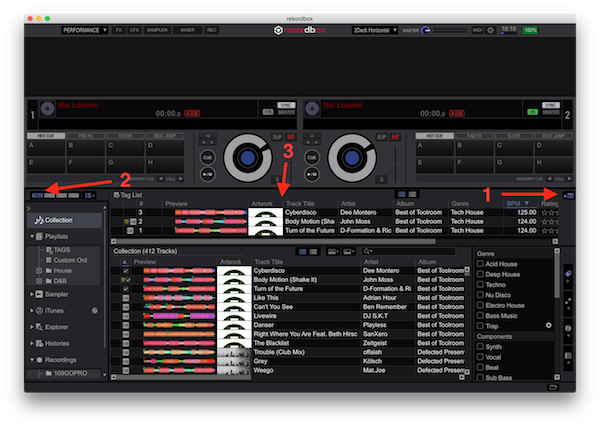
There is already a Tag List feature for exactly what you're asking for - to temporarily hold a song that you want to play later.

No, there's currently no automix function, and personally, I hope they never include one... but that's just my opinion.

The related track feature is to find tracks related to one of 3 locations: The master player, one of the decks, or the track currently selected in the list. If you found "LOVE" in the collection and it matches "HOPE" but now you want to see what's related to "HOPE," it's in the results list - you are correct in that you must either search for it or load it to a deck. The reason it doesn't allow an easy cascade to the track related to that track (2nd relation), is that related track may not work with what you currently have playing.
Pulse
Ações de comentário Permalink

Publicação fechada para comentários.

4 comentários

0
Avatar

Thank you very much for your answer!

How tag list works????

VasilisGiotis 0 votos
Ações de comentário Permalink
0
Avatar

1) Click here to open the Playlist Pallette

2) Click the TAG box to make sure the tag list is showing

3) Any track you "tag" will appear in this part of the window.

Pulse 0 votos
Ações de comentário Permalink