Comentário oficial

Or you can control-click (that acts as a right-click).
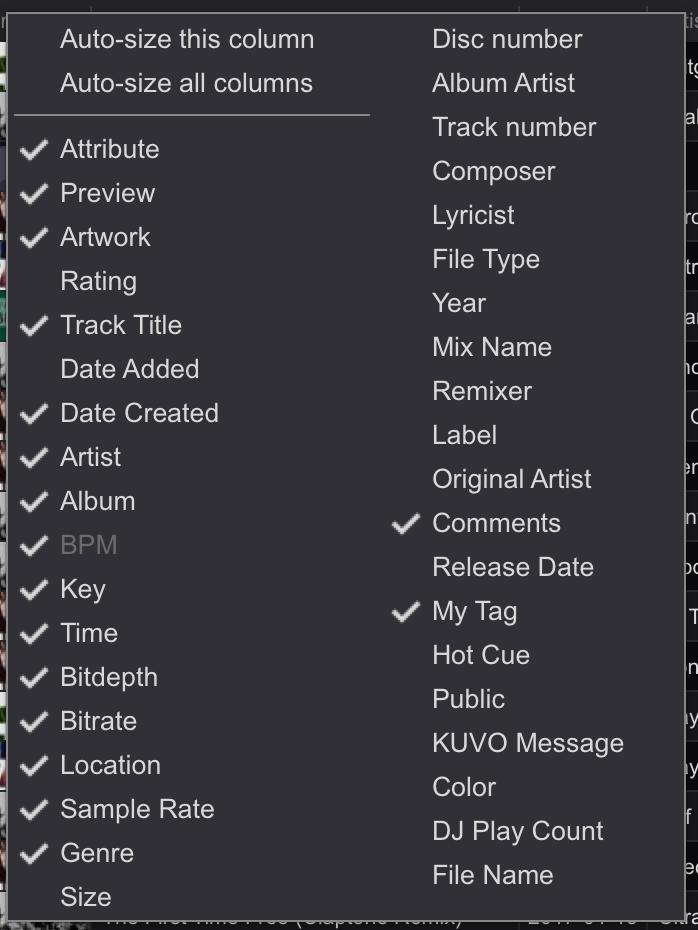
As @Jay says, right-click on the column header and simply un-check the columns you no longer wish to see:


Ações de comentário

Hello there.
Can somebody tell how can I display or hide the items (exp:Date Added) on the Collection List, Rekordbox? I have gone through the User's Guide and I notice it could be done by ''Click the right button" on the selected item but since I'm a Mac user, I don't see I can use right button....please help and thanks in advance.
Regards,
DJROMEO
Or you can control-click (that acts as a right-click).
As @Jay says, right-click on the column header and simply un-check the columns you no longer wish to see:
Publicação fechada para comentários.

I use a Mac but have right click enabled so that's what I was going to tell you. Can you try hovering on the columns and see if the choices comes up?
If you have a MacBook (Pro and Air included), from 2008 or later, your trackpad can be enabled to right-click, either by tapping or pressing a specific part of it, or by tapping or pressing with two fingers. This option can be enabled in System Preferences, as follows: Open System Preferences and then click
Hey guys, many thanks for the knowledge. I didn't realize Mac user could also do the right-click stuff. Now the problem is solved and I am so grateful. Happy DJying.
Regards,
DJROMEO