Have a feature request or suggestion? Post your idea here!

Publicação

2 seguidores Seguir
0
Avatar

Help with rekordbox not recognising external hd

Hi,

I've been having problem after problem with rekordbox and need help before I reach Hulk smash mode!!!

Basically I was having problems with cdjs hanging after every track when playing. So after a little research it seemed getting a more powerful computer was the answer.

I bought another laptop and plugged in my external hd which was where I had chose to keep my database from the beginning and went to preferences, move database but nothing happens when I click on the tab.

Then I tried making sure both laptops had the same version of rekordbox and trying to import/export though backing up the database but when I came to import the database on the new drive there didn't seem to be any folder that rekordbox recognised.

So, to cut a long story short I cant seem to get anything working on the new laptop. I've tried following ever video and post I can find but nothing seems to be working.

Can anybody help please?????

Spectra Respondido

Comentário oficial

Avatar

You can use any number or sub-folders and then simply drop the parent folder into rekordbox - it will only find the new files and ignore the rest.

If it comes time to move the drive / database to a new computer, when you relocate, you can MASS relocate because the structure of the folders doesn't change, just the location of the parent folder. Eg.:

Old: X:\MyOldDrive\Music\Folders\Files

New: Z:\MyNewDrive\Music\Folders\Files

The difference between the two is everything to the left of "Music" - relocate one track, tell it to relocate ALL tracks using the same shift, and presto.

Pulse
Ações de comentário Permalink

Publicação fechada para comentários.

7 comentários

0
Avatar

@alan > If you already have the database on the external drive, does it work properly with the old computer?

If you connect the external drive to the new computer, does it allow you to LOAD the database (to play from it)?

If you were trying to move the database, did you follow the instructions in my video here?

Pulse 0 votos
Ações de comentário Permalink
0
Avatar

Hi Pulse,

It will work on the old laptop except for the hanging problem when played through equipment (djm 2000nxs, cdj2000nxs2 and xdj).

I do apologise if it turns out I'm being completely thick here but no it doesn't load, not can I find any options to load.
I have watched your video.... A lot.... But here's where it goes wrong for me, I can't relocate the tracks because on the new laptop I have none.
If I try to click on the move database there is no life in the tab.
I've tried uninstalling around 4 times now and I really don't want to start loading in the thousands of tracks from scratch... Trying not to weep!

Any ideas?

Spectra 0 votos
Ações de comentário Permalink
0
Avatar

@Spectra > I'll ask a few more questions so I can get a better assessment of your situation...

- You say you tried to relocate the tracks, but have none - did you copy the move the music?

- Do you have the music files on your internal hard drive (of either computer), or the external drive?

- When you open rekordbox to the Database option in the preferences, does the current database location point to the external drive?

Pulse 0 votos
Ações de comentário Permalink
0
Avatar

Hi Pulse,

I didn't copy and move the music as they were already on an external hard drive (never used the internal)

Yes I had the location pointed to the hard drive.

OK, I got last the first step although I'm not sure how it worked unless I missed something.
What I did was turn off the laptop and pull the battery out and leave it 15 minutes, then turned everything back on and reloaded.
I still had no option to select a database location in preferences but this time export/import worked for me.

Success?
Well.... Not really.
The next step was to relocate the tracks but because I'm organised I have many files for different genres etc for around 10000 tracks and although I tried different ways of doing it; it seems RB has no option to scan the parent file so I have had to admit defeat and am currently in the process of breaking down all the files and dumping them in one ugly dump file I will then drop back into RB and start from scratch....... More than a little irritating.

I have thought of another question though that will no doubt come to bite me in the future..... And that is if I can only use one file with RB, what happens when I add more tracks to the file because when I drop them in from the downloaded file won't they be jumbled up in the RB file? Which would mean I'd have to hunt for them individually to drop them into the collection to analyse?
Or is there an easy way to do this?

I apologise if it's simple, I'm rather new to this!

Thanks

Spectra 0 votos
Ações de comentário Permalink
0
Avatar

I think where part of your problem arose is that your external drive had a different drive letter than the database was expecting. One way around this is to manually assign a drive letter through the disk manager (eg. "X:" as it's further down the lettering scheme and would likely never be used by default), so it's the same every time.

You shouldn't need to go through the process of moving or re-importing; it CAN mass-relocate:

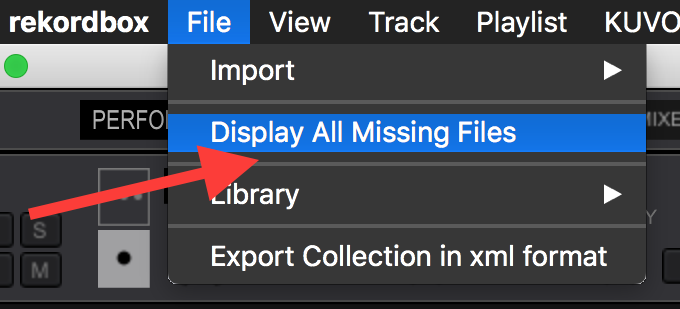
First, Select File > Display All Missing Files

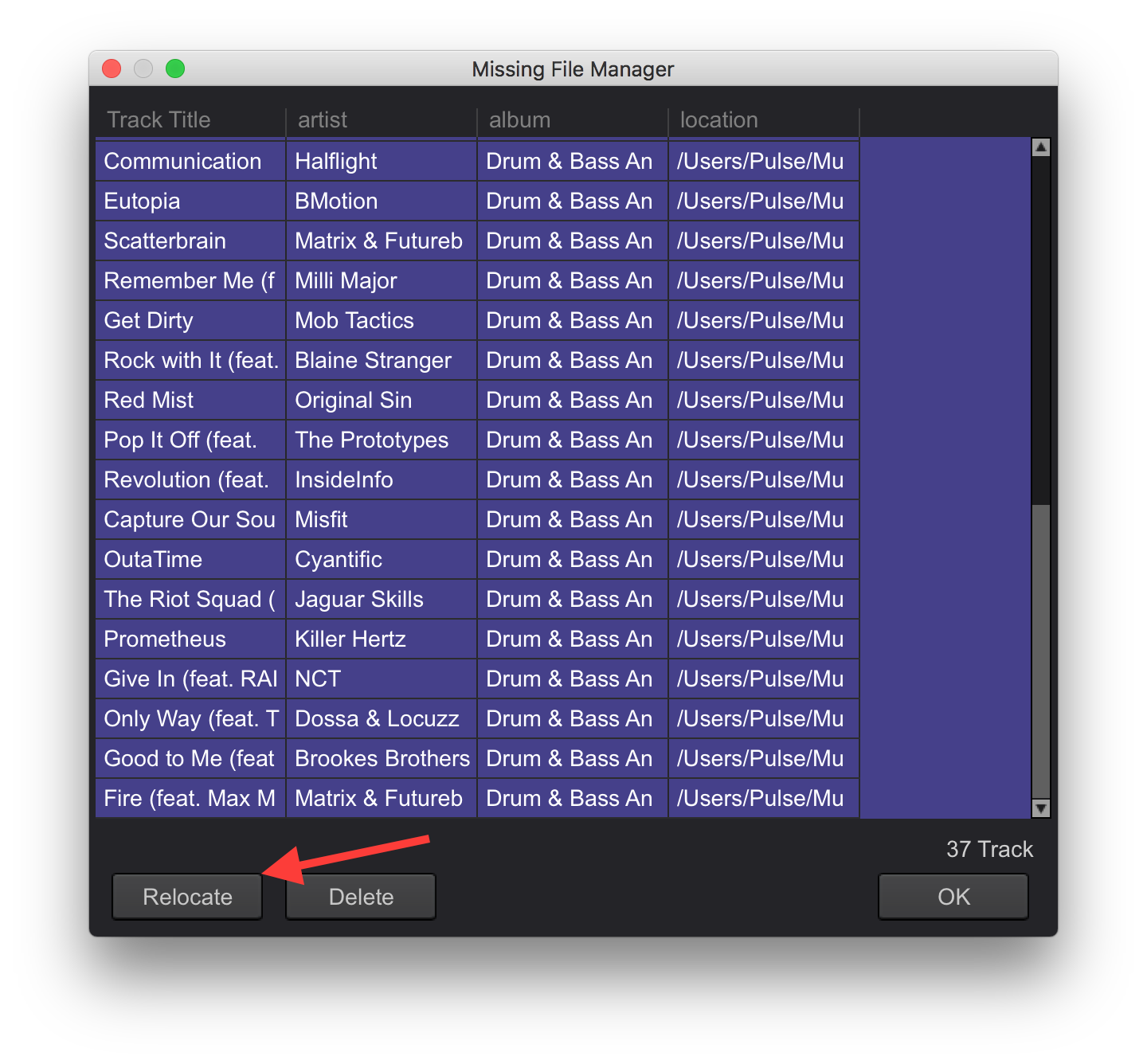
All your missing files are shown, click Relocate

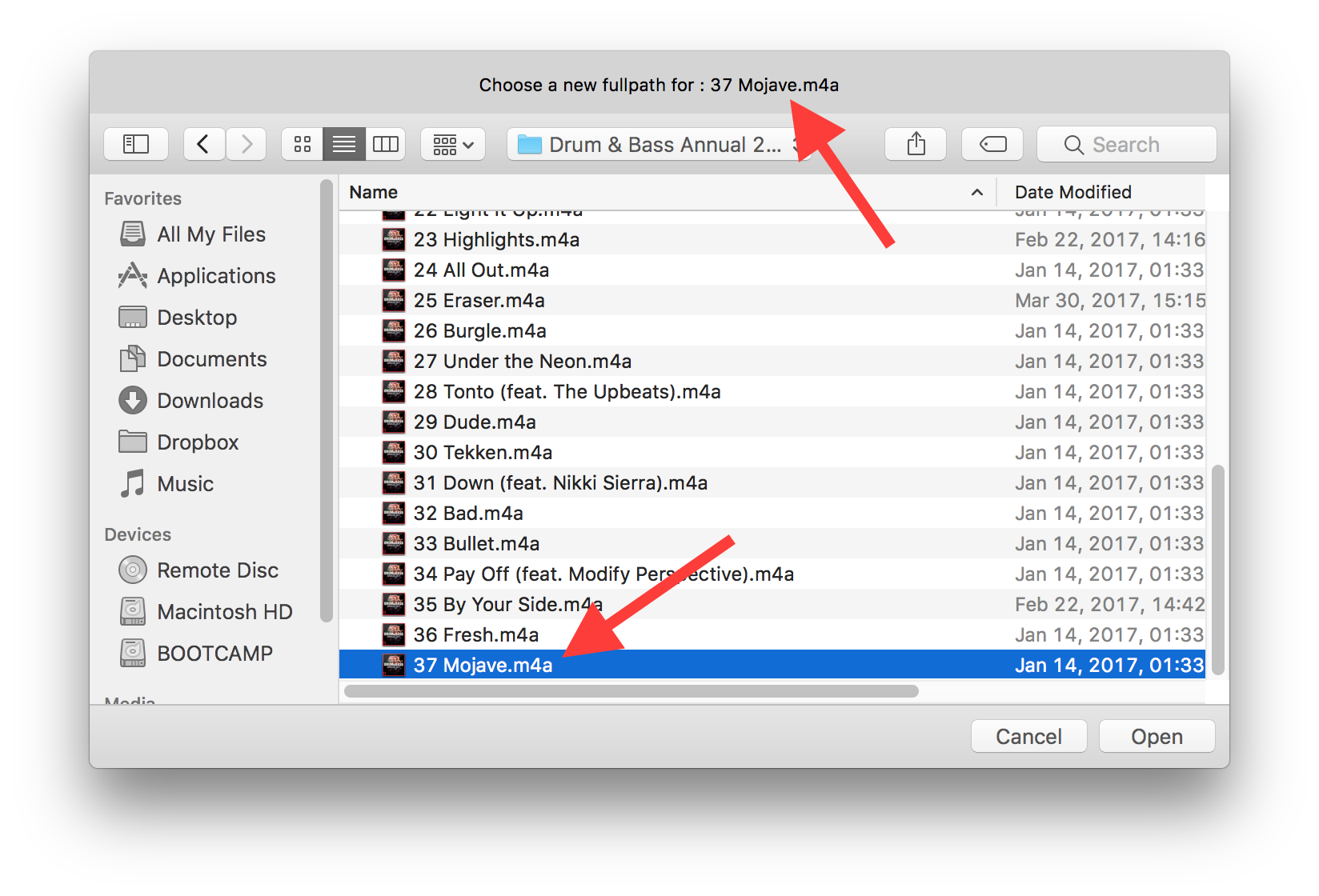
You are prompted to locate one of the files (sometimes the first, sometimes the last in the list), manually locate it in the Explorer or Finder:
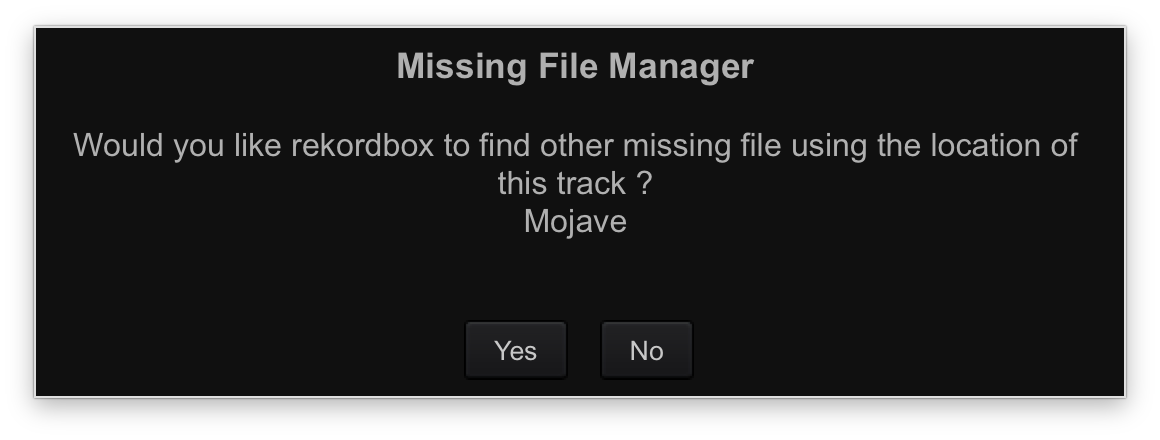
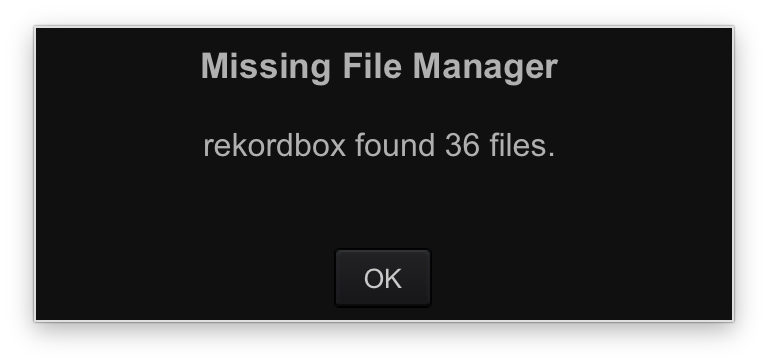
It will then ask if you want to use that same location to find all other missing files. Assuming you have moved everything in the same scope, click Yes.

It will then find the rest of your missing files and give you a summary.

That's it.

Pulse 0 votos
Ações de comentário Permalink
0
Avatar

Hi Pulse,

I had already named the external HD X as I had read this tip in one of your other posts 👍.

I tried to do exactly this but because of how many different folders I had I was really struggling to find each track I was being prrompted for and after a miss click or 2 pointing the wrong title to a track I figured that I'd be better off starting from scratch and putting all of my tracks into only 1 folder.

My question is, after I create that folder and drop it into RB; what's the best way of adding new tracks to it moving forward?
For instance if I buy 50 new tracks and drop them into my music file I will use with RB they wont stay together, they would be automatically sorted alphabetically or whatever and I can See Me sifting through the folder in order to drop them into the collection.
The only other way I can see around it is separate folders IE Jan 17 etc but in a few years time if I need a new PC I'll be in the same position with 50 or so folders trying to relocate tracks through them all.

Is there an option to scan/analyse only tracks which have not previously been analysed? therefore it wouldn't matter if I dropped the new tracks in that one main folder.

Spectra 0 votos
Ações de comentário Permalink