
I had same issue before.
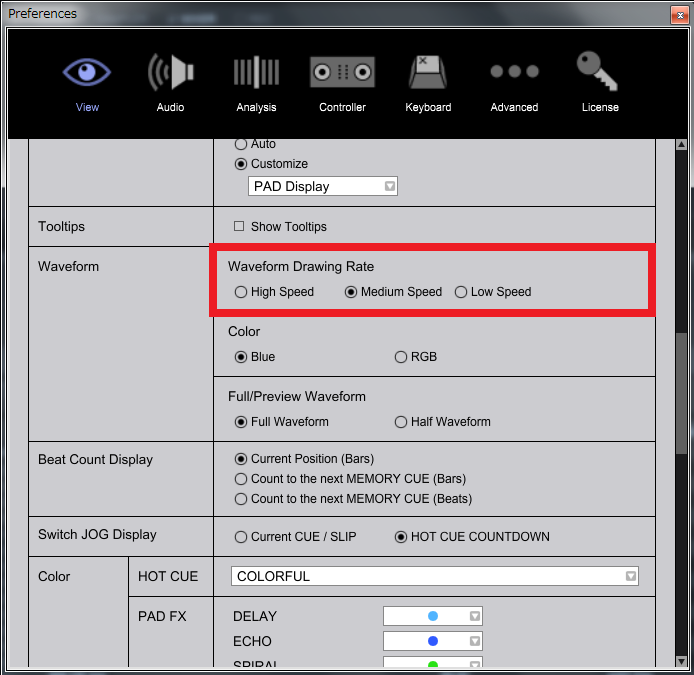
Try to change the setting of "Waveform Drawing Rate" from High to Mid.


Ações de comentário

Hi Pioneer,
Running Rekordbox 5 , I have noticed the following
There is a lot of lag in the performance of it –
* This can be visible immediately after start up or mid-way through mixing, overall sluggishness in navigating around
* The first signs of this are the waveform on second deck where it begins to lag and slow down noticeably , audio is not impacted
* Hanging/stuttering when dragging a track onto a deck – you have to move the mouse really slowly to drag the track onto a deck
* When using the effect dial on echo and then changing to another track on the same deck and using the effect dial again on echo it holds onto the previous tracks audio e.g. using echo is not using the current track but a faint version of the previous track
* Jogging of wheel does not reflect real time on the deck – you can see the cue mark being a few seconds behind particularly if spinning jog wheel backwards
* A lot of the issues seem to be more visible on the right deck.
* Shutting down Rekordbox and re-starting seems to resolve the performance problem but not always. It something I am having to do more often than not.
This is running Rekordbox on a high spec PC , with nothing else runnning in the background other than anti-virus software. In Rekordbox 4, I could have several apps running at the same time with no impact to performance.
Specs are : A DDJ-RB controller running Windows 10 on a Dell XPS 8700 Intel Core i7-4770 CPU @ 3.40GHz with 16GB of RAM
Cheers
Publicação fechada para comentários.
I had same issue before.
Try to change the setting of "Waveform Drawing Rate" from High to Mid.
Thanks Tom, gave that a go, mixed for an hour and didn't get any waveform lag since! it was normally about 10-15 mins in it would start.
Sambo Robinson - The pitch control is default, I haven't adjusted them. I can't actually find where you adjust them. One thing that has definitely improved is the pitch control / jog wheel control on Rekordbox 5 given the DDJ-RB pitch controls are short. The whole general sensitivity, touch-up's and slow-downs when mixing, specially on non 4/4 stuff on the jog wheel are much more realistic and less clunky

@David > The other thing you can check is your audio buffer setting; if it's too low, it could be running out when other functions start using system resources.

@DAVID ILL TELL YOU EXSACLEY WHAT THAT PROBLEM IS YOUR PROCESSOR IS USING INTEL TURBO BOOST TECHNNOLGY HERES HOW TO DISABLE IT GO INTO POWER OPTIONS SELECT YOUR POWER (BALANCED OR HIGH PERFORMANCE ) THEN CHANGE PLAN SETTINGS, THEN GO INTO ADAVNCED POWER SETTINGS THEN PROCESSOR POWER MANAGMENT SET YOUR MINIMUM PROCESSOR STATE TO 80 PERCENT AND YOUR MAXIUM PROCESSOR STATE TO 90 THIS STOPS INTEL TURBO BOOST TECHNOLOGY BOOST ACTIVATING LET ME KNOW IF SORTS THE PROBLEM THANKS
@SAMBO > TURN OFF YOUR CAPS.