Comentário oficial

Just posted about 7 streaming guides - here's the DJM + DVS for Mac.
Ações de comentário

Any information from anybody how to stream through Rekordbox DVS to any internet broadcasting service? Would love to stream sets through Facebook live but I can only get the control tone out of my DJM450.
Mac OS X user here.
Just posted about 7 streaming guides - here's the DJM + DVS for Mac.
Publicação fechada para comentários.

I believe chew.tv is the only platform that allows you to stream copyrighted music, Facebook will block your stream if it detects copyrighted music.
But to answer your question, OBS does not support multi-channel audio interfaces, which means it can only capture audio from channel 1 (USB 1/2). If you use Rekordbox DJ without DVS, or if you have a 4-channel mixer and channel 1's input is unused, you can assign REC OUT to USB 1/2 in the DJM setting utility, but otherwise you're out of luck.
Mac guide coming today!
Pulse are you planning on releasing the DVS guide? I noticed on your Windows guide you said you were working on a DVS workaround.
DVS for Mac should be a yes, DVS on PC = not possible with just one audio device (or VERY messy with more latency and CPU cycles needed than most users will have available).
Great. Really looking forward to the article thanks!
@Pulse I have followed the instructions and while I'm able to get music to stream through OBS I can't eliminate the control tone over top of the output.
Hmmm... are both channel input selectors set to USB?
Yep. USB 1/2 <-- CH1 Control Tone Phono
USB 3/4 <--- CH2 Control Tone Phono
USB 5/6 REC OUT
USB 7/8 FX SEND
Its streaming both the music internal to Rekordbox and the Control tone.
Do you think it might be an internal setting in Rekordbox? I feel like there is some sort of cross over from the driver and the output.
So i tried to do some more trouble shooting and it seems like its something to do with Soundflower. Pulse have you tried doing the DVS setup using a set of PLX-1000s instead of CDJs? It could have something to do with the phono vs. line control tone.
I know what it is that causes that, and for the 450 it could be a simple fix, but I'm currently testing the instructions across a variety of mixers and have already had to make some changes to the guide. I'll post another reply when the guide is updated.
Perfect. Thanks, I appreciate it.
I've just posted the T1 guide, please give it a whirl, it should be similar in application for the 450. I'm grabbing lunch then going to test, edit, and post the S9, DJM-900NXS2 and DJM-900SRT guides. Sadly I don't currently have a DJM-450 here to post those specific instructions, but I feel it should be similar to all these other guides.
And the S9 guide is up as well - slightly different, but they're all very similar.
Pulse I'm getting the same issue. I tried the s9 and the T1 guide and both configurations in JackPilot still produce the control tone cross over on the audio coming out of Rekordbox.
Do you possibly have a device other than your built-in output / built-in microphone configured as the main output / input devices? In your Audio Devices window, check the assignment:

Everything looks the same from my view.
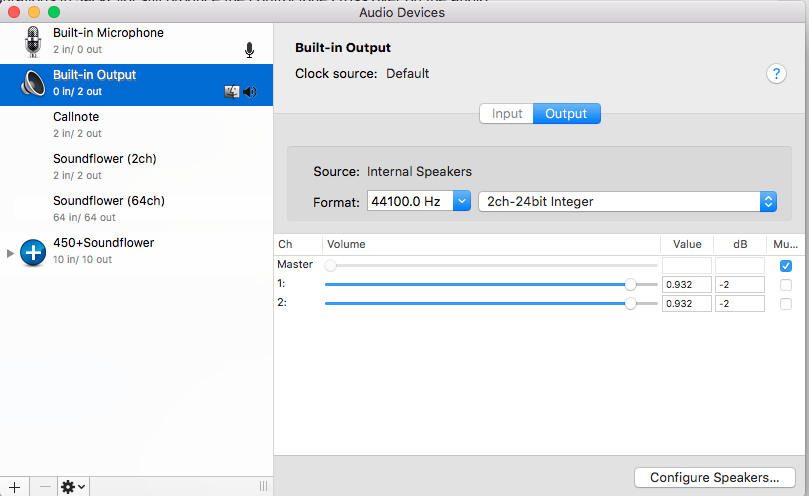
Can you post up screenshots of the rekordbox config (audio page; two shots showing inputs and outputs), DJM settings (output page), the JackPilot routings (two shots showing the system and rekordbox mappings), and finally, the audio page from the OBS settings?
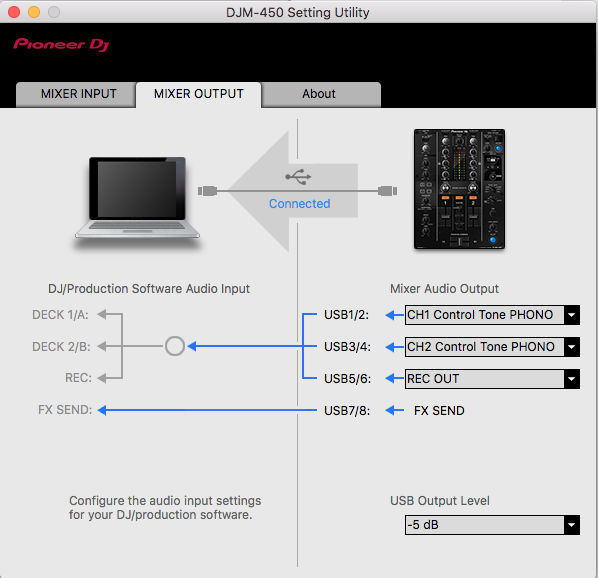
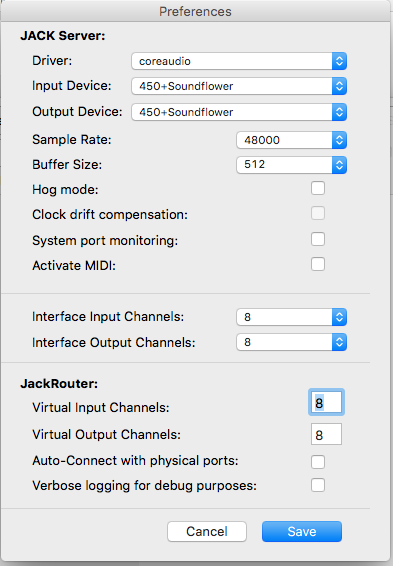
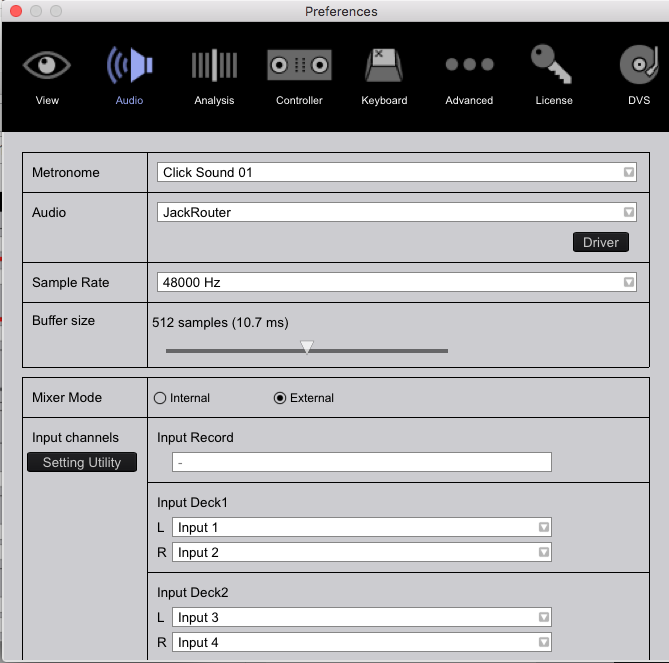
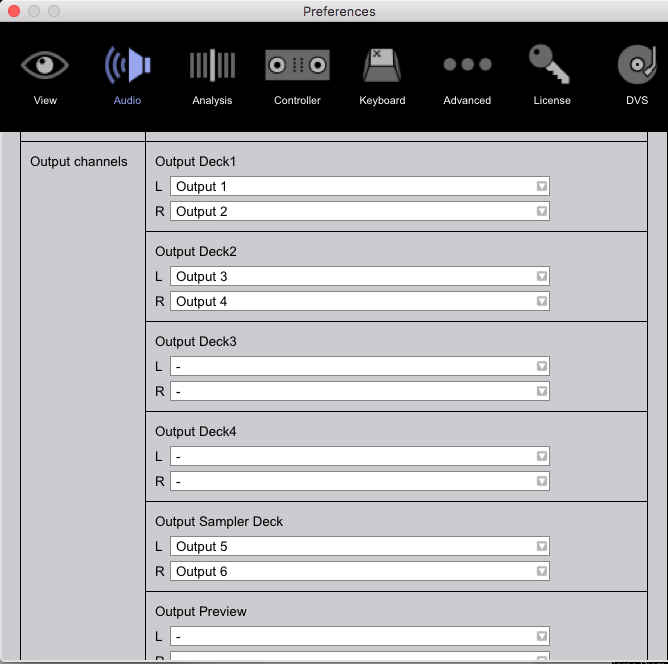
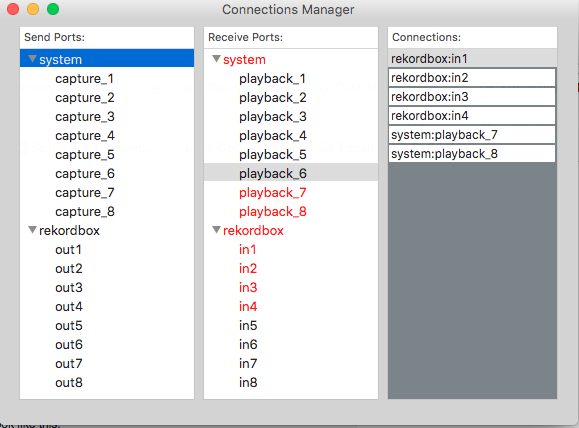
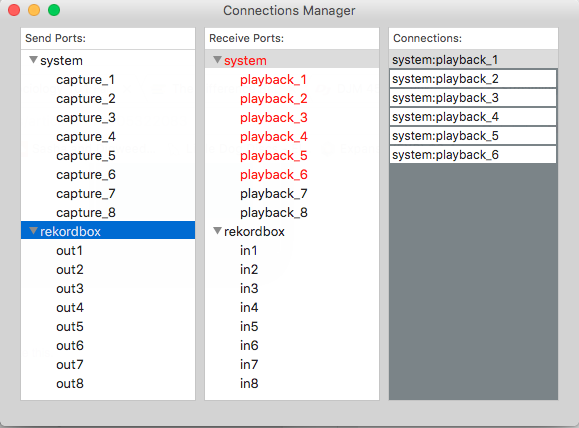
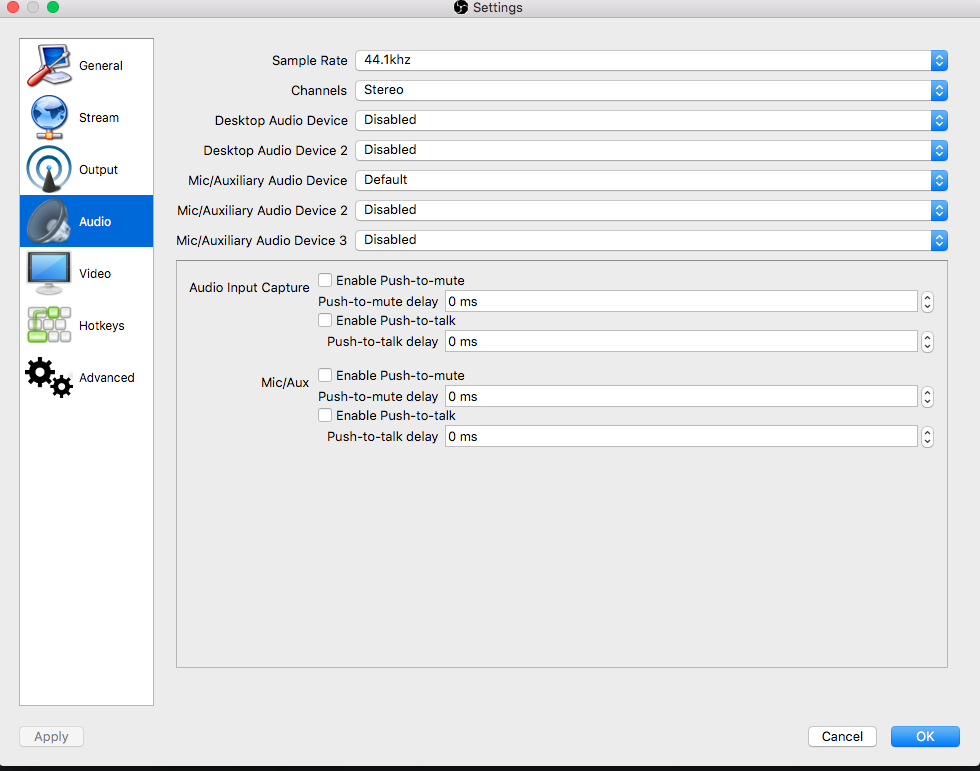
So interesting new piece of evidence. When I put my channel fader 1 down, it removes the music output from rekordbox but the control tone from my deck is still being output through the broadcast in OBS and presumably my DJM-450
Any update on this? Still no luck getting it to work.
Shoot me an email, let's try and find a time to connect via remote connection.
pulse|a|t|djpulse|d|0|t|ca
Shot you an email.

Is there a windows/laptop DJM450 DVS guide? I can't seem to get any audio into OBS
@AJ83 > There's no guide created for Windows + DVS because it's SUPER SLOPPY trying to get signal into the mixer, to the software, out to the mixer, and then back into the computer for streaming. The best solution is to use a secondary audio interface to capture the master output from the DJM and route that to OBS.
This issue has never been fixed. The only way I've found to get it to work is by using an external soundcard which completely defeats the purpose of the USB-OUT option for DVS users on the DJM-450. It's yet another faulty piece of equipment by Pioneer who seems to have mastered the pattern of getting outclassed by their competitors these days.
Sorry, but I have to disagree on the simple premise that what you're asking the hardware and drivers to do are something they're not intended to. It's not "faulty," just not intended for that use.
Yes, I can smash a nail with a wrench, but it ain't gonna be pretty.
That's such a classic Pioneer response. "Let's sell you a product that leads you to believe it can do a simple function that we advertise about (e.g. USB audio out from the master) and then when we can't figure out/won't invest the resources to actually make it work, we'll gaslight you into believing there was never an intention to have this functionality to begin with." Don't ever change Pulse.


