Have a feature request or suggestion? Post your idea here!

Publicação

2 seguidores Seguir
0
Avatar

Show tracks on player, latest on top

Dear Forum!

I use Rekordbox a lot, and I quite like it.

WORKFLOW

For my workflow, my mother-database is iTunes. I than import the files to Scratch Live/Serato where I have my playlists sorted by the latest Date even Time (a function that I miss on the rekordbox)

The tracks are now listed chronological from top to bottom.

Of course the latest track has now the highest number in the row. The next step is to copy every changed playlist from serato to the right one in rekordbox. There the tracks are also chronological, but the latest one starts to count at 1.Therefore, if i open the playlist on a CDJ, the latest track is shown on top. 

As I don't need serato anymore, I'd like to import the files directly into rekordbox, but having the latest files on top.

PROBLEM

How to import tracks so that the latest one is always shown on top on the playlist?

I've seen the function where I can renumber the tracks in a playlist, but this is not helping much when i have to do this every time I import a new track. Is there any workaround?


Max Kraenkl Respondido

Comentário oficial

Avatar

@Max > I'll address things through your post as you wrote them..

1) Even Serato DJ doesn't have a function to sort crates, you must be thinking of histories?

You can manually sort the playlists in rekordbox to have them in any order.

2) If you want to re-order the tracks, follow this example. Here is a sample playlist, sorted by play order, ascending - note that I've also set it so the tracks are in alphabetical order to match the numbered order:
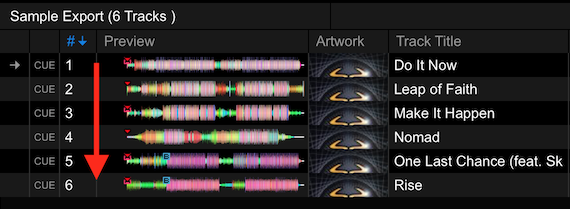
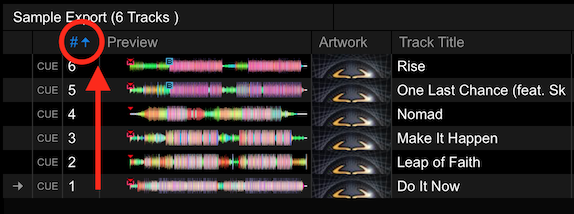
Click the column header of the # column to reverse sort:
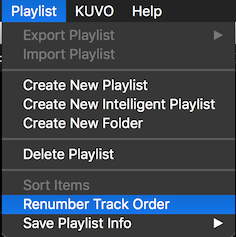
Next, click Playlist > Renumber Track Order and the play order will now change for the tracks:
 

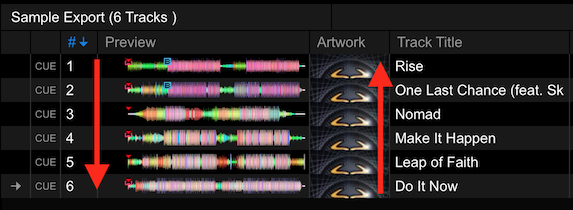
Note that the numbered order is ascending, but the alphabetization is now reversed, showing that the list has effectively been inverted.
If you want to have the newest tracks at the top, you could do this with date added.

Pulse
Ações de comentário Permalink

Publicação fechada para comentários.

4 comentários

0
Avatar

Hello Rekordbox-team!


Thank you for your reply.

True that! Serato can't do this. But Serato can sort its creates with date added. When you than copy a create to rekordbox the computer starts at the top, no matter what number. Therefore the playlist is 'correct' at the rekordbox.

Therefor I'm looking for a function that can do exactly this.

I now added the 'sort by date added' to my external devices. I hope this is a kind of progress.

Max Kraenkl 0 votos
Ações de comentário Permalink
0
Avatar

Dear Rekordbox Team, 

I haven't found a way yet. Even with Rekord Buddy 2 there is no chance to change all track numbers in different playlists at once.

Do you think you and your team would be able to ad a function that renumbers ALL playlists at once so you don't have to do this for each single one?


best wishes!

Max

Max Kraenkl 0 votos
Ações de comentário Permalink
0
Avatar

Sorry, not possible to renumber all playlists at once.

Pulse 0 votos
Ações de comentário Permalink