
Can you check the audio buffer setting and try to adjust it?
Ações de comentário

Hi. I've just taken delivery of a DDJ-RR today, first impressions are pretty good. I've come up against one big problem though. The mic input appears to have a pretty huge delay on it, ....we're looking at half to one second here!
I'm hoping this is some really obvious config thing that i've messed up, otherwise this could be a deal-breaker for me.
Anybody got any suggestions for fixing this? ....a fair portion of my work is standard "mobile disco's", so i need a decent mic channel.
Edit - I've just read the post below. ...this doesn't look promising. I've got to say, i agree with the poster, this is an advertised feature & should work. Also i don't really buy in to the latency argument. If latency was an issue, then surely this would make the unit unusable for DVS, & mixing with other external sources?
Publicação fechada para comentários.
Can you check the audio buffer setting and try to adjust it?
Yes, ....i've already dialled the latency down as low as i can. I'm at work at the moment, so not sure what it's set at, but it's relatively low.
This delay was so severe, the first thing i did was check i hadn't got an echo effect on the mic (I havent). It was literally saying "hello" in to the mic, & hearing the same word come back at you AFTER you'd said it. ....so i'm estimating something like .7 seconds or so. I'd understand a slight delay (a couple of hundred milliseconds), in fact i've experienced that when routing a mic in to a live deck on Traktor. But the length of the delay in RekordBox is considerably more than i'd expect it to be.
As i said on my previous post, i fully understand latency. But surely this amount of delay would make the phono / line level inputs unusable for turntable / CD inputs, & also non-workable for DVS usage (I haven't had a chance to try these inputs yet).

Yes it's dreadful but don't expect them to fix it!
The only workaround is to use the PC Mix switch in the off position so the mic doesn't go through the software - you don't get any EQ but you also don't get any delay
Make sure the status of "PC MASTER OUT" icon on the top of rekordbox GUI near the master volume. And try to switch it OFF.
Thanks, Tomoharu.
That appears to solve the problem. I now have a workable mic input. :-)
I have to say though, this possibly could have been clearer in the manual.
@Ian Laverick - Here's the answer mate. Click on the button in my attached screen-grab.
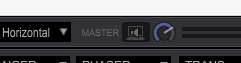
@ian Williams
I'm confused?! Why would the PC Master Out be switched on? That would make the audio come through the PC speakers. My PC Master Out is switched off because I want the output to come through the controller into my PA system?
I don't claim to understand, but i do know it's solved my problem.
Here's how i'm set up;
PC mix "on", on the controller (switch on the back).
The button on the GUI is labelled as "PC master out" if you hover your mouse over it. You want this "off".
I now have everything working as i want.... Mic going through the software, with full control of EQ, & an acceptably small amount of latency / Line level inputs doing the same / Outputs from XLR's on controller.
Give it a go.

@ian Williams
I'm grad that this was solved.
Please let a little more questions.
・Do you use Windows? or Mac?
・Which OS do you have installed?? (32bit? 64bit?)
Hi.
Macbook Air, 1.6 GhZ i5, 4GB memory.
OS X El Capitan 10.11.6 (which i think is only 64 bit?)
@ian Williams
Thanks , Yes, Rekordbox DJ for Mac OSX is only 64 bit.
Did you connect multiple USB AUDIO IF with DDJ-RR?
If you didn't, I think Master Output Combobox has been displayed like this:
"DDJ-RR:MASTER + Built-in Output"
If you did, I think Master Output Combobox has been displayed like this:
"DDJ-RR:MASTER + XXXXX(NAME OF OTHER USB AUDIO I/F)"

