Have a feature request or suggestion? Post your idea here!

Publicação

7 seguidores Seguir
0
Avatar

Rekordbox dj doesnt properly show bpm

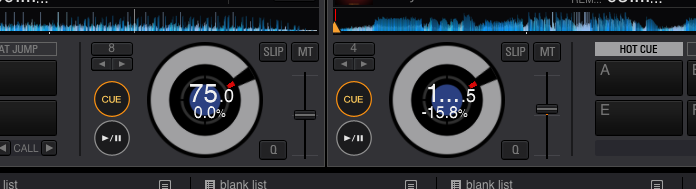
 I recently purchased RB-DJ and i have a few issues with it, the most stressing is the fact that anything over 99.99bpm doesnt show fully.  It will show 1...9 for a track that is 121.9 for example.  Any suggestions?

Thanks

Lonewolf Lopez

Comentário oficial

Avatar

- The fonts all look weird within rekordbox (OS X)
If you are using FontExplorer or another font manager, it may have messed around with the default system fonts. Please uninstall that application, and then from the system Font Book application, select 'Restore Standard Fonts' from the File menu. Please note that this will disable non-standard fonts in your system (they are put aside in the Fonts(removed) folder).

- The fonts all look weird within rekordbox (Windows 10)
Some of the fonts used by rekordbox that were available in previous versions of Windows as default fonts were removed by Microsoft, but can be re-added for free. Follow the instructions in this article for more information.

Mark Gallo
Ações de comentário Permalink

Publicação fechada para comentários.

8 comentários

0
Avatar

When you say you can't see the entire BPM, are you referring to the BPM displayed in the track list or the BPM displayed in the performance area?

Also, per usual, please provide you complete system specs (Make/Model, OS, RAM, CPU, etc.).

Cheers.

lostnthesound 0 votos
Ações de comentário Permalink
0
Avatar

I am having can't see the BPM inside of the wheel within rekordbox.  In my list its fine, but once you load the track, anything over 5 digits (including the .) gets cut off as you can see in my pic. 


i am running a late model 2011 Mac with El Capitan 10.11.3

2.8gh processor

4gb ram


any ideas on how to shrink those characters?


Lonewolf Lopez 0 votos
Ações de comentário Permalink
1
Avatar

Hey buddy, I had the same issue. My arial font was missing so the text doesn't render correctly. Look at your font book and see if you have Arial either missing or disabled. I am yosemite, but it should be the same for you. 

Nogui Aramburo 1 voto
Ações de comentário Permalink
0
Avatar

@nogui NAILED it.  The Arial font was off and once activated and restarted RB, it works perfect!  Thanks!


Lonewolf Lopez 0 votos
Ações de comentário Permalink
0
Avatar

Pulse you should add this to the knowledgebase. Thanks!

Nogui Aramburo 0 votos
Ações de comentário Permalink
0
Avatar

I have got the exact problem! my Arial is well installed and enabled in my fontbook. any idea what mught be the issue?

Tuli Schvarcz 0 votos
Ações de comentário Permalink