Have a feature request or suggestion? Post your idea here!

Publicação

5 seguidores Seguir
1
Avatar

rekordbox DJ - Bugs + Requests

First off, I really appreciate the support you Pioneer reps are providing in these forums, and the effort it seems the development team is putting into improving rekordbox DJ.  I know you take our feedback seriously.

Saying that... as a new Pioneer DDJ-RX owner and user of rekordbox, I've been awfully disappointed.  The hardware is fantastic.  The Performance side of rekordbox is currently unusable in a live setting, in my opinion.  There are just too many things that can go wrong and features that don't operate as they should.  I feel like the software is still in Beta, but it's being marketed as a stable, viable contender to other existing DJ software.  It's getting close, but at the moment it falls short.  It appears that Pioneer DJ is working hard at improving it, which is the only reason I haven't returned my DDJ-RX.  I look forward to rekordbox DJ being refined and perfected.

Again, thank you for taking our feedback seriously and your help.


Bugs:

  1. I am browsing far down iTunes "All Tracks" within rekordbox DJ's browser. I load a track using the LOAD button on my DDJ-RX. The track loads into the deck, and the track highlighter in the browser jumps back to the top of the All Tracks list, forcing me to search and scroll back down to find the location I was just at. Please stop it from resetting to the top. So far I've only seen this happen while browsing in the iTunes section.
  2. Inaccurate beatgrid analysation in both Normal and Dynamic analysis. Sometimes the BPM is wrong. More often, the beatgrid is not accurately placed on the beats. Using the grid adjust/slide features on my DDJ-RX to try to get the beatgrid accurately placed is maddening, and so far, impossible. No problems in Traktor analyzing the same tracks.
  3. Opening the Options window when a deck is playing causes the music to freeze for a second.  This only seems to happen the first time Options is opened after launching rekordbox DJ.
  4. Waveform display on the decks is lost when switching rekordbox DJ to fullscreen mode. The waveform reappears once a track is reloaded. Obviously, this poses a problem for tracks already playing that cannot be reloaded mid-song.
  5. Hot Cue quantization is broken. Pressing a Hot Cue pad even a millisecond after the downbeat of a playing track causes the cued track to be one beat faster than the playing track. Refinement of the Hot Cue functionality in rekordbox DJ is urgent.


Requests:

  1. Dragging and dropping tracks from a deck into playlists. Currently, nothing happens.
  2. When dragging and dropping a song into a playlist, with the cursor hovering over the destination, the playlist should open in a preview style, so users can place the song at a certain position within the playlist (such as in Traktor). Currently, no playlist preview opens and the song is always added to the end of the playlist. This leads to a LOT of manual playlist switching, scrolling, and song rearranging. Very time consuming.
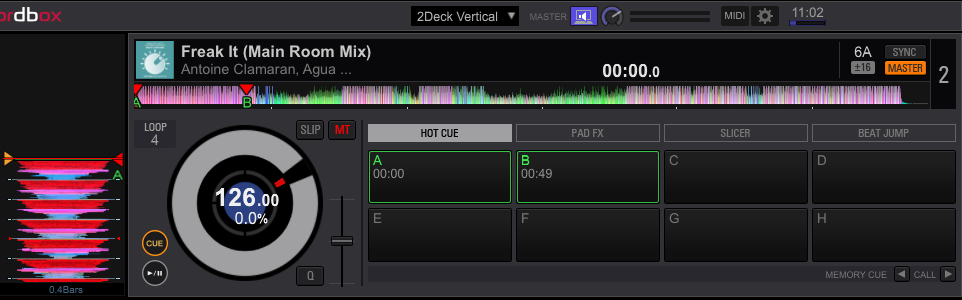
  3. BPM display on the decks is currently to only one decimal place. With the browser expanded, two decimal places are shown. Please add the option to show the BPM to two decimal places, ie. "126.98" with the browser window collapsed as well.
  4. Display total play time and file size of all songs in a playlist, perhaps at the bottom of the browser window.
  5. Before a controller is powered on and detected by rekordbox DJ, the Headphone Mix and Volume knobs are enabled and adjustable. When a controller is detected, they are grayed out and disabled. Please allow these software knobs to be adjusted whether or not a controller is connected. This is absolutely necessary when an audio device other than the controller is being used.
  6. Hot Cue pads should function in the same way the Cue button does. Currently, a tap on the pad causes the deck to auto-play from that Hot Cue position, even if the deck is paused. The deck should not auto-play, but jump to that position in the song until the Play button is pressed. As they function now, I find the Hot Cue buttons unusable.
  7. The option to not have audio effects "trail off" after disabling an effects deck. Currently, effects can be heard trailing off, with the only way of preventing this being to turn each effects knob down the zero individually. Disabling an effects deck with a single button press could accomplish the same.
  8. View adjustments for the full track waveform display on the decks. Currently, they are very skinny and difficult to interpret on smaller screens. Making them taller would be a major help.
  9. Currently, clicking on the track length in a deck will change the displayed time between elapsed time and time remaining.  This setting is not saved when rekordbox DJ is closed and has to be manually clicked again when the program is relaunched.  Please allow this to be saved.
  10. The CFX Parameter knob setting is not saved between closing and relaunching of rekordbox DJ as well.  Please save this setting.
  11. Having a dB display on the Master Output and Record Level knobs would be nice.
  12. As there is no Browser Expand button on the DDJ-RX, I have it mapped to SHIFT + Deck 2.  If Deck 4 is selected, and SHIFT + Deck 2 is pressed to expand or collapse the browser window, the focus is changed to Deck 2, even though SHIFT is being held.  Please fix so that the focus is not taken off of Deck 4 if it's being used.  Same goes for Deck 1 + 3, should users MIDI map those buttons with the SHIFT modifier.
Sheen Sayer Respondido

Comentário oficial

Avatar

Thanks for the feedback and input!

You can report suspected bugs to the rekordbox team here.


In regards to your suggestions:

  1. Noted
  2. Noted
  3. This all depends on the size of user's screen
  4. This is already a feature.  Info is in bottom right corner of the screen
  5. It becomes grayed out because the hardware knobs are now in control
  6. This is how Hot Cues work.  You can change them to "gate playback" in preferences
  7. This is how FX are supposed to work.  That's how they work on our DJ mixers.
  8. I don't understand what you mean
  9. This setting is not saved on CDJs either. Will pass this along.
  10. Noted
  11. Noted
  12. I don't understand what you mean

Moving forward, please keep issues and suggestions separate so we can keep the forum more organized and easier to navigate.  

Suspected bugs go here: rekordbox support inquiry

Product and feature suggestions go here:  Product & Feature Suggestions

Mark Gallo
Ações de comentário Permalink

Publicação fechada para comentários.

8 comentários

0
Avatar

Hi

You are running 4.2.0c which is still not stable. Take a look at the forums and there is a link posted for 4.1.2 which is the latest stable release.  It lacks a few things from 4.2 including video and parameter control of CFX, but 4.2.0 is too unstable for use.

The hot cue quantization bug was first pointed out by me in the very first release (4.0.0). The engineers solved it partly -- it works as it should when a track is stopped but not when it's playing.  Again, you need to go back to 4.1.2 to see this.  It's been requested over a dozen times, so i'm sure a fix is on the way.

I think software controls get removed when a controller is plugged in so there is no conflict between hardware and software dials. This makes sense and is the way it should be.


DJ Chase 0 votos
Ações de comentário Permalink
0
Avatar

"I think software controls get removed when a controller is plugged in so there is no conflict between hardware and software dials. This makes sense and is the way it should be"
In my setup, and I'm sure that in the setups of many others, this does not make sense.  The two headphone knobs on the controller are hardware specific.  They cannot control the software headphone values.  There is no reason to have them deactivated since they will do and change nothing when the DDJ-RX is being used as the audio device, with the headphones plugged into it.  The case may be different for other controllers, I don't know.  Regardless, the option to adjust the software headphone knobs should always be available.

Thanks for the info and support link.

Sheen Sayer 0 votos
Ações de comentário Permalink
0
Avatar

Hi,

I support the request to save the settings made in Rekordbox, so you do not need to set them again and again when closing and re-opening it (like request no. 10).


Peter 0 votos
Ações de comentário Permalink
0
Avatar

In regards to your suggestions:

"3. This all depends on the size of user's screen"
I have a 24" screen and it only shows one decimal place.  How do I view two decimal places without expanding the browser?

"5. It becomes grayed out because the hardware knobs are now in control"
I know.  That's the problem.  I'm not using the Pioneer hardware as the audio device and NEED to use the software headphone controls.  The DDJ-RX's headphone knobs cannot control the software headphone values.


"8. I don't understand what you mean"
The waveform display of the entire track - the one used for Needle Search.  It's too short and difficult to see waveform details of longer songs on smaller screens.  A size/height adjustment would solve this.


"12. I don't understand what you mean"
The DDJ-RX does not have a Browser Expand button.  Many users have mapped it to SHIFT + Deck 1, 2, 3, or 4.  Problem is, if you are on Deck 4 for example, and want to expand the browser which you have mapped to the SHIFT + Deck 2 button, the controller will switch the focus to Deck 2 even though SHIFT is being held and this isn't the desired action.  The controller should stay focused on Deck 4 unless the Deck 2 button is pressed without SHIFT being held.


Thanks.  I'll forward all of the feedback along to it's appropriate destination.

Sheen Sayer 0 votos
Ações de comentário Permalink
0
Avatar

3.  I also a 24" screen and I see two decimal places.  

You can try this solution:  

- The fonts all look weird within rekordbox (OS X)
If you are using FontExplorer or another font manager, it may have messed around with the default system fonts. Please uninstall that application, and then from the system Font Book application, select 'Restore Standard Fonts' from the File menu. Please note that this will disable non-standard fonts in your system (they are put aside in the Fonts(removed) folder).

- The fonts all look weird within rekordbox (Windows 10)
Some of the fonts used by rekordbox that were available in previous versions of Windows as default fonts were removed by Microsoft, but can be re-added for free. Follow the instructions in this article for more information.

5.  I'm afraid this is simply how the software/hardware is set to function as most users are using their controller as their audio device.  This cannot be changed by the user.

8.  Noted.

12.  You can simply press the space bar on your keyboard to collapse the decks and expand the browser.  

Mark Gallo 0 votos
Ações de comentário Permalink
0
Avatar

Hello

I am having the same issue as your first point.

I am  using DVS with a DDJ-XP1 and when I load a track it automatically backs me out of the playlist section and put the focus onto the folder tree section.

This is really annoying and is stopping me from loading tracks quickly in my sets...

I want to load the track that comes directly after my previous track.

Why is this a problem and how do I fix it.

Thanks 

Vestax2000 0 votos
Ações de comentário Permalink