Have a feature request or suggestion? Post your idea here!

Publicação

3 seguidores Seguir
0
Avatar

DDJ RX Crossfader curve too cut and hard, is normal?

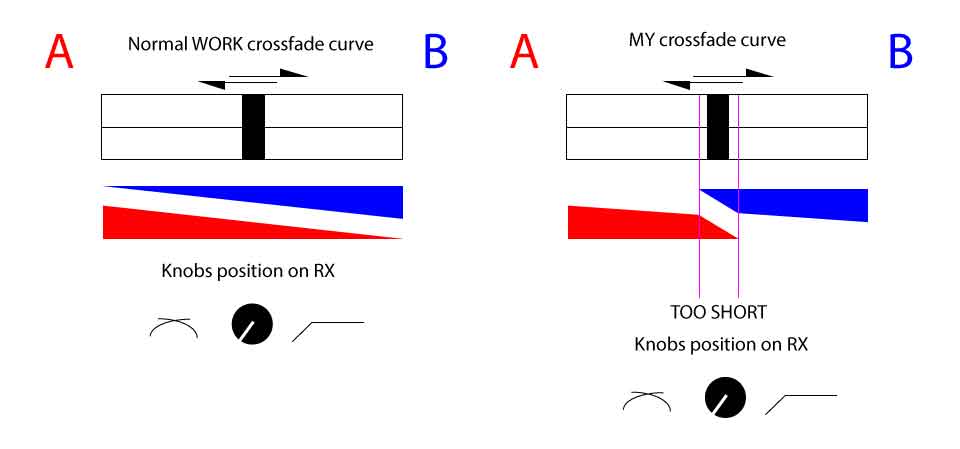
The DDJ-RX has a hardware crossfade curve knob on the front panel, adjust the curves do not work.

In the picture I attach expressed as placing the curve of 'soft' the cuts crossfader remains almost net placing it in the middle, even lowering the volumes of both tracks.
crossfader is a problem? It must be replaced?

thanks for help and reply


Cisco Inter

Publicação fechada para comentários.

13 comentários

1
Avatar

http://docs.pioneerdj.com/Manuals/DDJ_RX_DRI1328A_manual/?_ga=1.132570188.373403245.1398974662 

See Manual Page 26-27
Utility Modes
*Adjusting the crossfader cut lag*

Its possible to change the Fader on the unit, Buy the InnoFader Mini PNP P

 Mini Innofader PNP P offer the features you demand on a long life fader:
1) Precision 0.15mm step cut-in adjustment on both sides
2) 3 standard curves - soft, linear, and sharp
3) Output reverse
4) Up to 8mm total height adjustment


roBRoy 1 voto
Ações de comentário Permalink
0
Avatar

Thanks for reply, i have read the manual:

Adjusting the crossfader cut lag

Adjust the cut lag on both edges of the crossfader. It can be adjusted between 0 (0.5 mm) and 52 (5.7 mm) in increments of 0.1 mm. • The above cut lag position for the cut lag setting is a guide and it may not match the position at which the sound volume becomes zero. • By default, it is set to 5 (1 mm). Turn the rotary selector. The current setting (0 to 52) is displayed by the lit condition of the channel level indicator. • Number of lit segments of the [CH3] channel level indicator Ter's place • Number of lit segments of the [CH1]

channel level indicator One's place

i don't hunderstand, but this is a Hardware modify?

Should I remove the fader and set it?

if i rotete simply the knobs the effect is too hard cut (as in the example image)

thanks for help me

Cisco Inter 0 votos
Ações de comentário Permalink
0
Avatar

Both Fader needs to be Adjust by yourself, the factory Parameters should be ok but not  in your Case.

The Innofader has a Button on the Backside that needs to be PUSH until you MOVE the Fader to set the CUT in settings.

You can Adjust the Fader Both Sides, for LEFT - (CH1 LED of the MIXER should INDICATS the Value of it) by Turning the Rotary selector (Big Nob on Top of the unit)

the LEDs should ads more ore Less even the Direction you Turn the Rotary.

Try some Settings, make a PHOTE from the UNITS leds..... Save the settings by Power OFF + Power ON the Unit ... Start Serato and see what happens...


The real handwork installation of the Mini PNP P takes on my SX 10min. but i tryed 1 mio Times to set the Cut in & Cut out parameters for Each side :D

Good luck

roBRoy 0 votos
Ações de comentário Permalink
1
Avatar

Ok i try this operation/calibration in my case is not Serato but Rekordbox

Thank you very much!

Cisco Inter 1 voto
Ações de comentário Permalink
0
Avatar

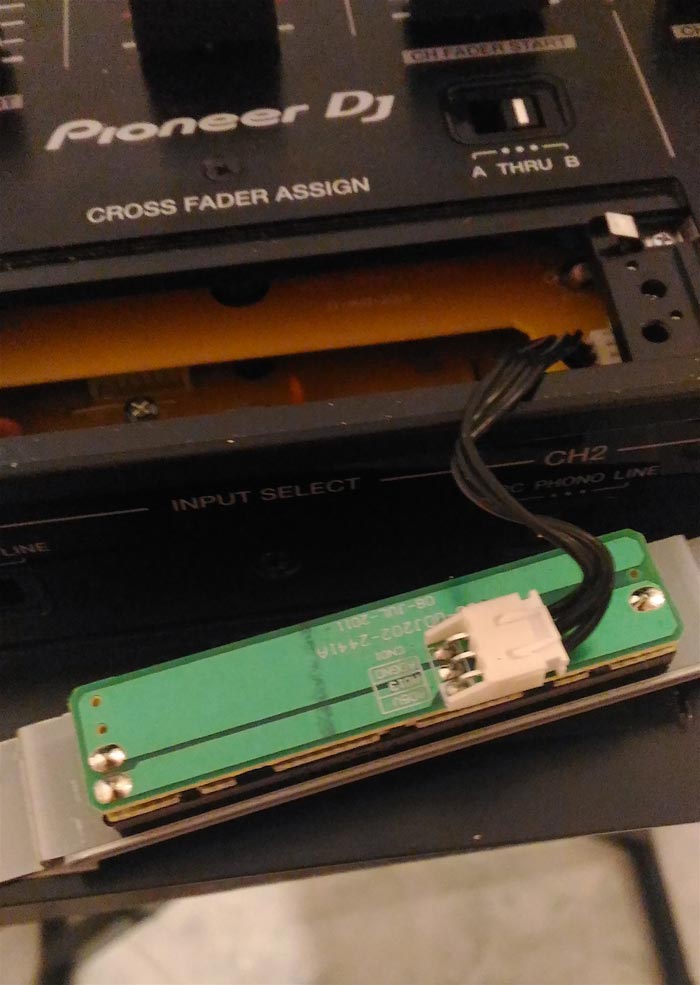
Sorry in my DDJ RX the fader is this...but is not innofader...don't have button for setting...

Cisco Inter 0 votos
Ações de comentário Permalink
0
Avatar

well you miss understood my words in the first place, I only want to explain YOU how other Crossfaders get calibrate.
Sure you have the original Pioneer fader inside so you have to Calibrate the Fader like the Manual told you! *Utility Mode*

Sorry for my non well English knowledge, i gave all the best to help out ^^

What kind of Curve settings you want !???


:)happy scratching

roBRoy 0 votos
Ações de comentário Permalink
0
Avatar

no problem, indeed I thank you for the help, I would like to give a smooth curve, as in the first image (vector picture) from A to B channel 100 to 0, while from B to A 100 to 0, placing the crossfader the center a = 50 B = 50 ... then the classic soft curve.

The crossfader is original of DDJ RX.


Cisco Inter 0 votos
Ações de comentário Permalink
1
Avatar

@Cisco > I understand what you're trying to accomplish, but I should point out, the left-most position of the dial is not the curve you've described in the curve below "I WANT THIS SOFT CURVE" in the image above, it's more like the triangles below it; a linear fade with about 50% power at the mid-point. If you want a gentle curve like your drawing, it should be more toward the 12 o'clock position.

Could you record a video of the fades with the knob position at far left, middle, then far right?

Pulse 1 voto
Ações de comentário Permalink
0
Avatar

certainly register a video, in any case, by placing the knob at 12 you do not get the desired effect, I would understand if the problem is in the crossfader or in the system, to intervene with the guarantee

Cisco Inter 0 votos
Ações de comentário Permalink
0
Avatar

Can you explain how to do so in PRACTICAL this setting?

FROM THE MANUAL

Adjusting the crossfader cut lag

Adjust the cut lag on both edges of the crossfader.
It can be adjusted between 0 (0.5 min) and 52 (5.7 mm) in increments of 0,1 mm.

• The above cut lag position tor the cut lag setting is a guide and it may not match the posrion at which the sound volume becomes zero.
• By default. it is set to 5 ( 1 mm).

Turn the rotary selector.

The current setting (0 to 52) displayed by the lit condition of the channel level indicator.

• Number of lit segments of the [CH3] channel level indicator: Ten’s place
• Number of lit segments of the [CH1] channel level indicator: One’s place

thanks for reply.

Cisco Inter 0 votos
Ações de comentário Permalink
0
Avatar

Problem SOLVED!

The problem was in an electronic integrated on the motherboard that regulated the electric fader pulse of the crossfader.

Replaced at a cost of 35€

Cisco Inter 0 votos
Ações de comentário Permalink