Comentário oficial

This has nothing to do with the MIDI mapping; it's to do with your audio configuration. Please change your audio settings within the rekordbox preferences.
Ações de comentário

When I listen to cue1 I get both decks, cue2 is not working at all.
It´s not the headphone mixing that is set wrong. And I´ve found
where to map, but the LEARN function doesn´t listen to the headphone cue
buttons.
I´ve played around trying to change the midi in/midi out numbers, but it doesn´t work.
The picture shows how it is right now.
What is the proper MIDI number for the XDJ R1´s headphone cue1 and cue2?
(If anyone see´s this and have the same rig, please tell me your numbers if you got this things functioning. You´ll find it in the MIDI button next to the batteri icon, under the tab mixer) <3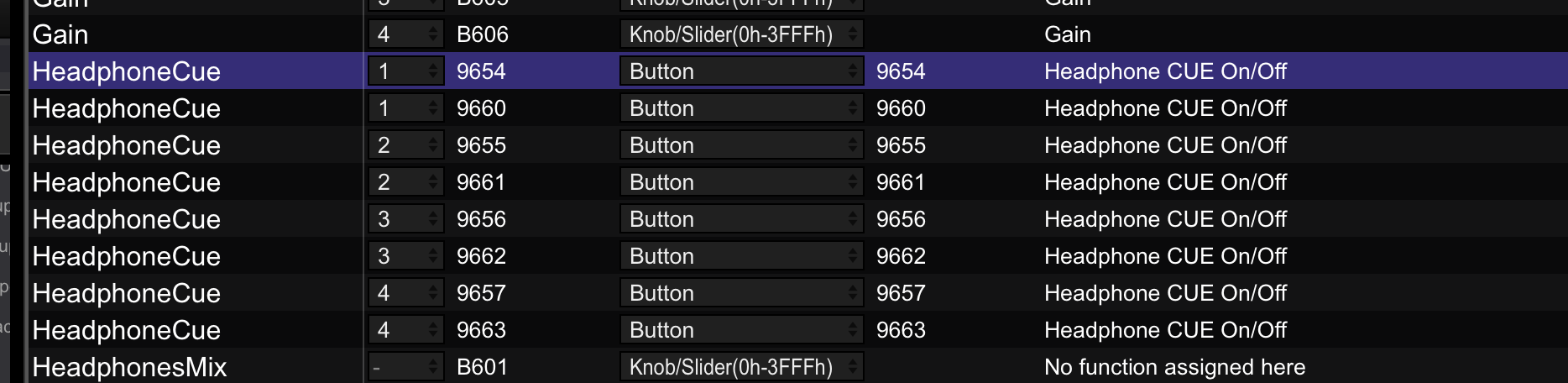
This has nothing to do with the MIDI mapping; it's to do with your audio configuration. Please change your audio settings within the rekordbox preferences.
Publicação fechada para comentários.
Just found the sollution! AND a bug that you could fix dear Pioneer.
Mix mode was automatically set to PC on deck 1, but at deck 2 it was still at mix mode XDJ-R1. I changed the mix mode on deck 2 and now it works fine.