Have a feature request or suggestion? Post your idea here!

Publicação

2 seguidores Seguir
0
Avatar

Faders not working

Hello,
I am introducing me to my new DDJ-RR (or vice versa) since some days.

Interesting, good sound, fun, ...

But: there is one thing that I can´t get working correctly: the 3 faders in the bottom middle of the device (arranged in a u-form) for cross fading and channel level of deck 1/2 or deck 3/4 do not work. I can not fade between the decks or influence the level of the current title. Sound is there, level indicator leds shine, track loading and everything else works, but I can adjust the volume only with the rotating trim knobs in the upper part of the mixer section.

On my computer I can move those faders, and everything is working like it should be.

Is there any feature in the setup or a switch to change that? Or ist this a hardware  problem?

Would be great to receive some hints for that, because of course using the RR this way makes no sense.

My system:

- windows 10

- ddj rr

- rekordbox dj plus rmx fx

- updates for firmware (1.07) and driver (1,210) installed

Help needed!

Regards - Markus

Markus Netz

Publicação fechada para comentários.

6 comentários

0
Avatar

I just want to confirm a couple of things...

- You're using rekordbox in performance mode?

- You have the DDJ-RR configured as the audio device in the rekordbox preferences?

- Are you running internal / external mixer mode?

- Lastly, have you tried resetting the MIDI mapping by clicking the MIDI button (top right) and then clicking DEFAULTS on the MIDI window?

Pulse 0 votos
Ações de comentário Permalink
0
Avatar

Hi Pulse,

thx 4 the reply!
I tried to check what you wrote:

1) yes

2) I am not really sure where to find that adjustment. Anyway, I can  hear sound via my system where the DDJ is connected to, so I think this adjustment should be correct (?)

3) if you mean the small switch on the back side (close to the phone/line selector): I tried both positions, no changes

4) yes. No success

Meanwhile I had the idea to try another program. With Virtual DJ I can use al the Faders, so there seems to be no mechanical defect. The only strange thing is that the LED-Lines for the decks are always on, as soon as the music is on "play", no matter which position the faders have. But volume control is possible. Maybe a V-DJ problem...
Strange .
Any more ideas???

Markus Netz 0 votos
Ações de comentário Permalink
0
Avatar

@Stu >

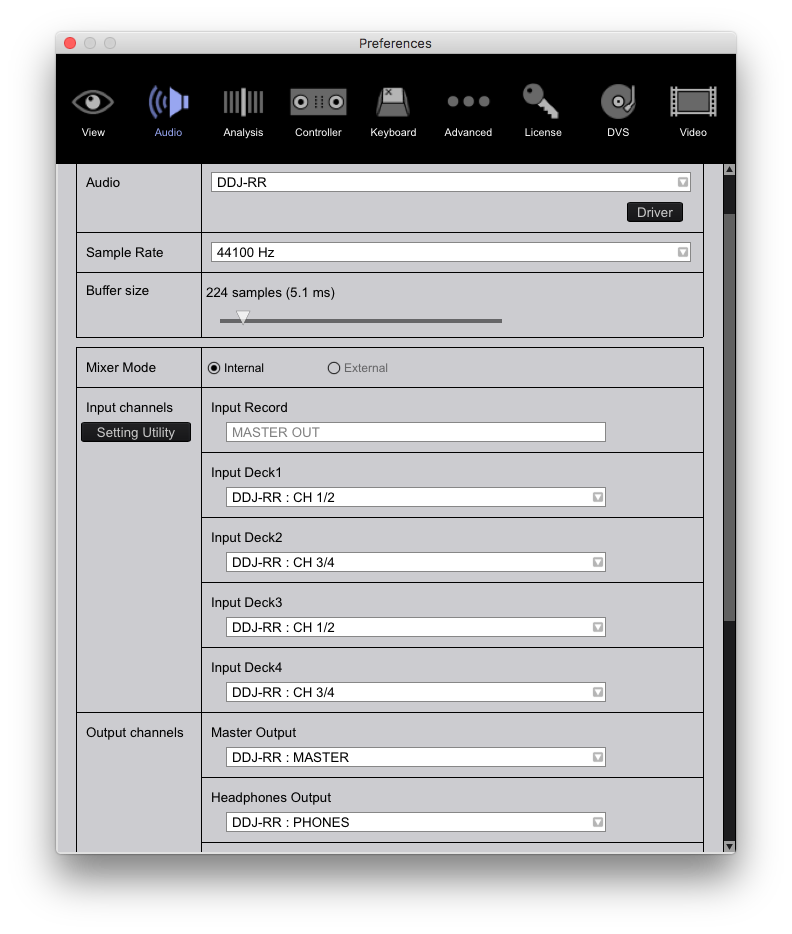
2) Open the PREFERENCES and go to the AUDIO tab, you'll see this:

See that it's assigned the same for the OUTPUT section (near the bottom), the inputs don't matter much as you're not using them.
3) It should force you to INTERNAL mode, but if, for some reason, it had given you that option, it would appear on that ^^ page.

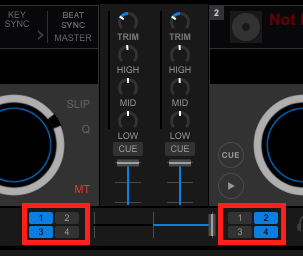
Open the MIXER section of rekordbox and see if these faders respond to your hardware movements, and also check the assignments of the crossfader inside the red boxes here:

Pulse 0 votos
Ações de comentário Permalink
0
Avatar

Hi,

I am not sure what happened, but now everything is working as it should be.
I checked some functions, my computer had an update, I did update the windoes driver once more, and I made a pic of the audio settings :

They do not lok like the ones you posted, my driver is the recommended ASIO.

Well, now all three faders do what they are intended to do. Simultaniously the faders in rekordbox are moving. Fine.

Thanx for your support until now !

The only remaining question:
when I press the start button of one deck and the music is playing, I always see  the related LED line full on for the channel lighting and indicating that there is music - no matter in which position the channel faders are . The double LED-column for master volume in the middle is indicating the level adjusted with the position of the channel faders, that´s ok.

I am used to see the channel level LEDs indicating a volume like adjusted with the channel fader. Can this be changed?

Markus

Markus Netz 0 votos
Ações de comentário Permalink
0
Avatar

No, the driver page would be different - mine's from a Mac, but you do have the configuration set properly.

Yes, the channel meter should show signal even if the fader is down; that meter is "pre-fader" so you can gauge the level of the audio before you mix. Adjust the channel trim/gain to get those levels peaking around the 0dB mark, and then when the fader is all the way open, adjust the master output level so the master meter also shows the same levels.

Pulse 0 votos
Ações de comentário Permalink
0
Avatar

OK, so I understand that I better should get used to that, if Pioneer wants it to be so. At least I can stop searching for an adjustment to change that.
Its a bit irritating that the basic problem has repaired itself without giving me a clue about the background. I hope it will not return!

The device is nice to handle and easy to use, to summarize the first contact and experience.

Anyway - thanks again for the support. Good forum ...

Ragards - Markus

Markus Netz 0 votos
Ações de comentário Permalink