Have a feature request or suggestion? Post your idea here!

Publicação

3 seguidores Seguir
0
Avatar

Adding a track to dvs decks on ddj 1000

Hi. I am really interested in purchasing a DDJ 1000 but would add dvs to it to satisfy my need to scratch on vinyl. How do you add a track to decks 3 and 4 if they were set up as dvs? I haven't seen many videos of this type of set up so any advise would be much appreciated. Hopefully this can be done without touching the laptop as I would prefer that to manly be there as a screen just so I can see the tracks I am choosing.
Thanks

Dj Foxxy Respondido

Comentário oficial

Avatar

My recommendation would be to press the deck select button:
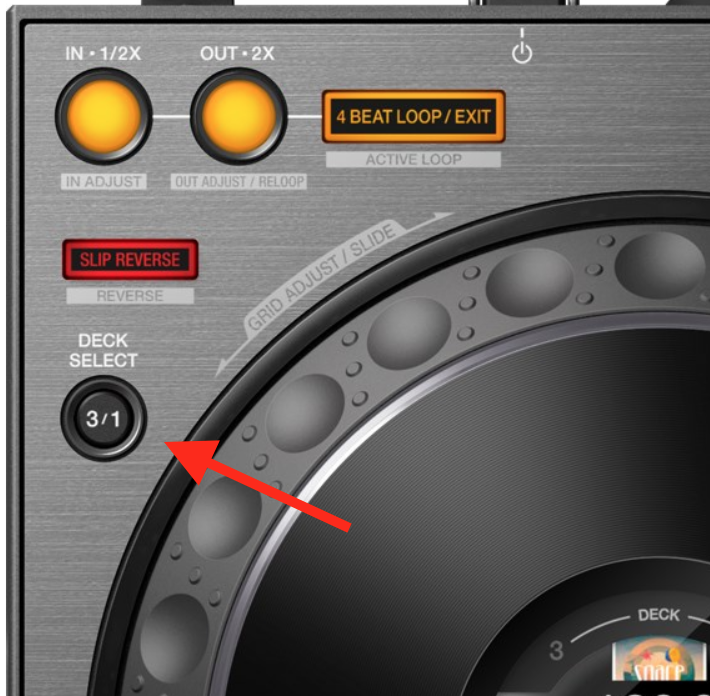
...then load the deck using the encoder to select, load button to call the track, then toggle back to the other deck. This will allow you to use the DDJ to select and load the track, and manipulate the deck and playback with the DVS.

Pulse
Ações de comentário Permalink

Publicação fechada para comentários.

4 comentários

0
Avatar

yes. your dreams have came true my friend.

You need to activate dvs in rekordbox and make sure that decks 3&4 are set to absolute or relative.

loading tracks is same by using the encoder to scroll and load your tunes on each deck.

I use full browser view so i dont see moving wave dsplays (just static is all i need to read the track) i mix with absolute mode for that authentic feel.

Ravinstomper 0 votos
Ações de comentário Permalink
0
Avatar

Thank you both for your comments it's been a great help! My new ddj 1000 will now be with me next week along with the DVS plus pack :) Cannot wait!

Dj Foxxy 0 votos
Ações de comentário Permalink