Comentário oficial

The DDJ-1000 only has two phono inputs for DVS (ch3/4), so there is no routing option.
Ações de comentário

Hi,
Having trouble getting DVS working with two turntables and ddj 1000. For a start, I don’t seem to have the routing options in the DVS tab in preferences. Only the calibration features
The DDJ-1000 only has two phono inputs for DVS (ch3/4), so there is no routing option.
Publicação fechada para comentários.
Thanks for the reply. Of course, my bad.
So why when everything is connected and calibrated do I not see the drop down options for choosing style of control on channels 3 & 4?
Sorry, "style of control'? What do you mean?
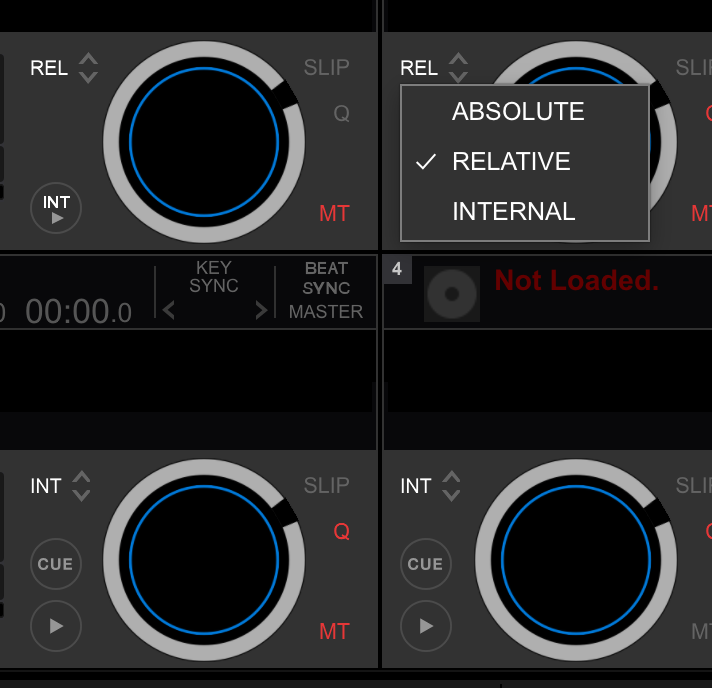
I mean as in the DVS mode. The manual says to select the mode using the drop down bar on the deck. And select either ABS INT or REL. I have no drop down option on any decks. It’s shown on page 15 of the manual
Ah, you mean this:
Are you sure that this box is checked?
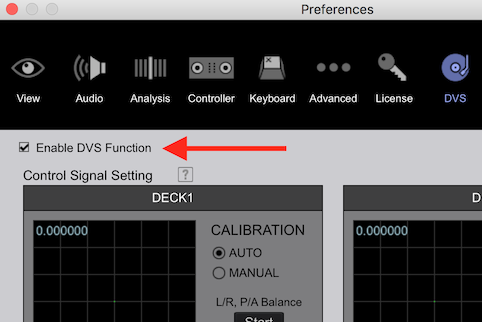
Yep that’s the one. Yes I’ve definitely got that box ticked
And with 4 decks visible, none of them are showing that INT / REL / ABS drop-down to the upper-left of the jog, as pictured above?
Ok just been back to try again and I have the drop down option. However, the deck doesn’t seem to be recognising the signal from the turntable. It’s does if I try to run a calibration, but when I switch to performance mode the deck number doesn’t light purple as shown on page 15 of the manual. I have the channel on USB A. But can’t get playback to work
Playback works in absolute and relative mode. Nothing on INT, is that right?
INT is INTERNAL, and nothing should work there from the timecode; press the play button in the software for it to operate.

just got hands on some turn tables myself and ordered the controller vinyl and have the ddj-1000... will the pads on the 1000 work for hot cues on the DVS?

Just got the DDJ 1000 and Im on DVS 30 trial. Now, after enabling DVS in the preference, theres no signal from the timecode in the calibration settings. What am i missing? Everything is connected and it is on USB A.
Dwayne - Yes they will but you will need to have the deck set to internal mode


