Comentário oficial

I don't have mine plugged in ATM, but I believe press-and-hold is what you're looking for to scan the track, as opposed to just pressing, which jumps tracks.
Ações de comentário

Not sure if it’s been brought up already, when a track isn’t playing the search button moves to the next song on the playlist and loads it (as you’d expect) however when a track is playing the search button moves along the track that’s loaded but it also scrolls the playlist at the same time
I don't have mine plugged in ATM, but I believe press-and-hold is what you're looking for to scan the track, as opposed to just pressing, which jumps tracks.
Publicação fechada para comentários.

+1 I'd like to ghet rid of this search load functions 'cause they are just problems for me!
Yeah, that is what happens but when you hold the key and it starts to skip along the track it also moves the playlist and displays the red bar at the bottom saying load lock is activated.

i don't have that problem. just curious, on what OS are you on?
Mac 10.13.4

I can confirm the behaviour.
Am on MacOS as well. I noticed that it jumps back or forward to a track when you press the button xx seconds after the initial press.
So the track is playing, you press forward or backward and the track jumps back/forward. Press forward/back after a second or two and see the the highlight move to another track in the playlist/collection.
It isn't something that hampers the experience but seems slightly odd.
When you PRESS it will jump, when you press and HOLD it will scan; it's in the manual:
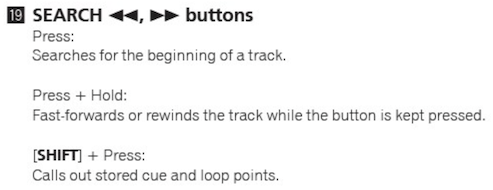
I think this is a good case of user expected behaviour vs intended behaviour

just imagine the search buttons from years of use on many different pioneer hardware, then on this one you change it.
change it back, its horrible!
and while your at it make the search quantized like beat jump :)
im Not sure you understood Pulse, there was an issue, as described above, this however hasn’t happened in the new version of rekordbox so this thread is now pointless, as is trying to further explain the issue.

I solved this by deleting the midimapping for "next" and "previous" track.

