Have a feature request or suggestion? Post your idea here!

Publicação

3 seguidores Seguir
0
Avatar

Changing pad colours of Hot Cue for all tracks in rekordbox

Hi

I would like to know how does one change the pad colours of the Hot Cue for all tracks in rekordbox.


And is it possible for the changes to reflected on tracks to be hot cue-ed in the future?

Like for example, I changed the pad colours as this way:
Hot Cue A = Red
Hot Cue B = Blue
Hot Cue C = Yellow

When I hot cue tracks in the future, I would like the colours to be set like that automatically when I hot cue and not manually. Is that possible?

Thank you!

Vanille Altzy Respondido

Comentário oficial

Avatar

It won't help you for existing tracks as there's no way to change them (except manually -- there may be a way to edit them via XML, but that's a bit more than you want to get into).

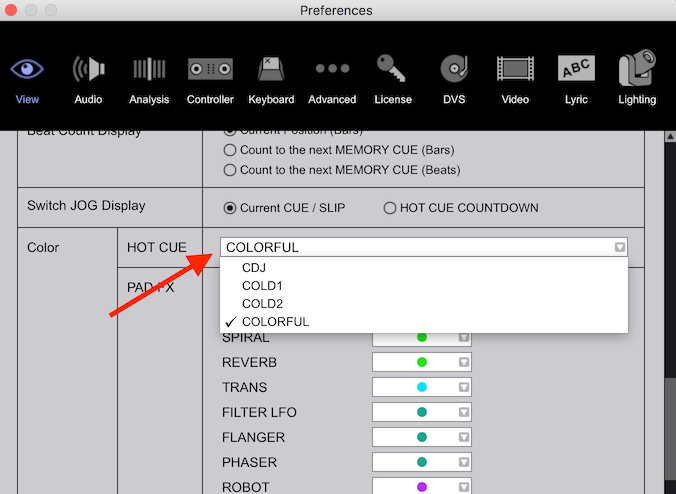
You can ensure future hot-cues are created in a different colour-scheme by changing this preference:
Pulse
Ações de comentário Permalink

Publicação fechada para comentários.

4 comentários

0
Avatar

Thats kind of disappointing. But thank you for the tip.

Hopefully one day rekordbox could enable us to change hot cue colours of multiple tracks.


Thanks!

Vanille Altzy 0 votos
Ações de comentário Permalink
0
Avatar

Actually.

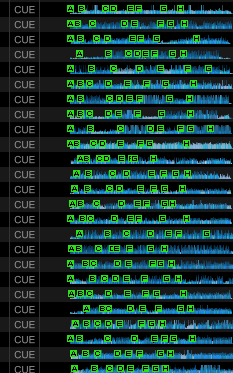
The colourful option is fine. It changes all the tracks's Hot Cue colour into different individual colours. Better than seeing all of the Hot Cue colours as green.


Thanks!

Vanille Altzy 0 votos
Ações de comentário Permalink
0
Avatar

@Pulse

When importing from Mixed in Key all my cue points are blue. But I like the different colour option and am not afraid of some XML tweaking. Is there a way to RESET al the cue point colours to default?

Peter Ywe van Bruggen 0 votos
Ações de comentário Permalink