
Noticed this in a house mix but I haven't done more recording to confirm it.
Will try recording something in the next few days to see if it happens again.
Ações de comentário

Hello!
I recently upgraded from a DDJ-RB to a DDJ-1000. But each time when i'm recording a mix in rekordbox, the audio makes a "popping" sound somewhere in the mix.
It's random when this sound occurs. I've tried recording the same mix 3 times, and each time this problem occurs when i'm playing or mixing a different song. It already happend at the begin of my mix or halfway through. It's getting really frustrating.
This is a sample of the audio problem(Be warned it's raw hardstyle)
https://soundcloud.com/trooper-10/audio-problem/s-dn9vJ
So this issue occurs for like 30 seconds but then for the rest of the mix, the audio is just fine. But of course the mix is ruined .
I really don't know where this issue is coming from. I've recorded many mixes with my old controller in rekordbox and never had this issue. My eq's are normal and my channels are never playing in red.
These are my audio settings in rekordbox:
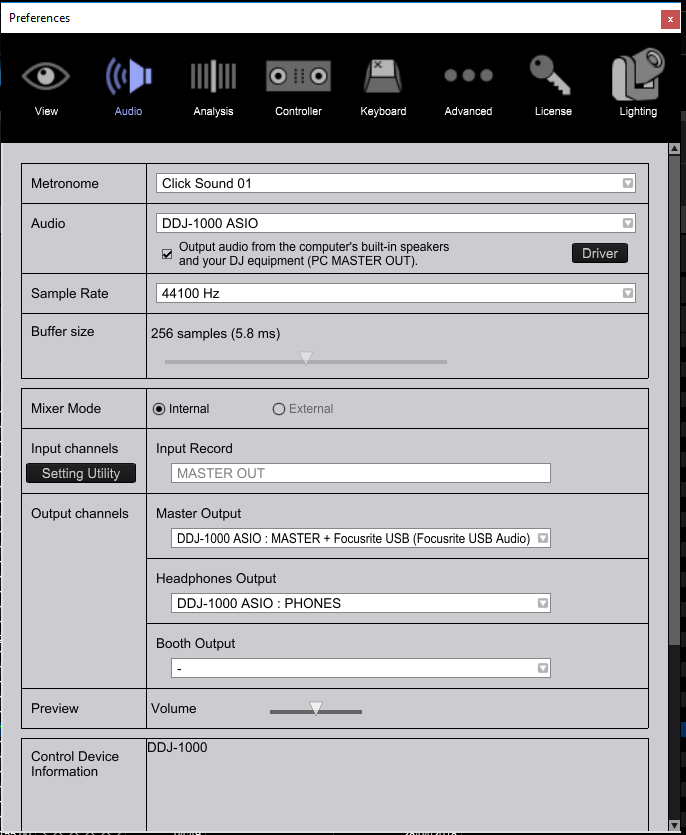
My DDJ-1000 has the latest firmware update and My rekorbox version is 5.4.0
I also use a Focusrite Scarlett 2i2 as soundcard for my audio instead of the soundcard from my pc.
Thanks in advance!
Publicação fechada para comentários.
Noticed this in a house mix but I haven't done more recording to confirm it.
Will try recording something in the next few days to see if it happens again.
Ok thank you! I will try and test some more as well.

We have this exact same problem using this controller - issues with popping (particularly when using FX) during recording
A quick update!
I've recorded 2 more mixes, but this time i've connected my controller directly with my monitors instead of using my external soundcard by routing it through my pc as u can see in the screenshot above.
And this time while recording the mix went perfect, no audio issues! Might there be a compatibility/interference problem when using a external soundcard?
I will try to record another mix with the old setup again, to see if the audio problem comes back.

Get rid of the Focusrite - it's been the source of issues for other users and that may be what's causing your problems here as well. Let me know if the situation improves once you disconnect it.
Hey!
I did some more testing without the Focusrite and there were no problems!
Seems like this is the way to go.
Thanks!