Comentário oficial

When you installed the drivers, did you bypass the OS driver security?
Ações de comentário

i got a used DDJ-RX from guitar ctr. I was finally able to get the firmware to update however the mac never saw the device as an audio device.
never available in rekordbox.
the ddj-rx is greyed out in the audio midi setup and indicates offline.
Previously the online checkbox was flashing online/off.
it behaves s if the usb cable or port on the mixer is bad.
Same results with various cables and ports.
its as if i'm missing a step to get the usb to "see" the controller.
When you installed the drivers, did you bypass the OS driver security?
Publicação fechada para comentários.
the site says drivers are not needed for mac and i believe...not provided.
no?
"Mac OS users:
You don't have to install this driver software. Mac OS standard audio driver will be automatically installed when your DDJ is connected to your Mac with a USB cable."
https://www.pioneerdj.com/en/support/software/archive/ddj-rx/#drivers
now the icon flashes grey/blue = on/ off as does the offline/offline checkbox.
friggen bizzare...
still no option in system audio for ddj-rx.
same in rekordbox.
not available to the os or the app.
when i hit the driver button in rekordbox audio prefs.. i see drivers for 10+ devices. the RX drivers are not listed there, indicating they dont exist and or are not needed.
i'm totally stumped.
never seen any device behave like this on any platform.
looking at my macs system info: hardware>usb...
i see traktor s4, my external hard drives and usb hub.
the ddl-rx is not listed here.
i have tried not using the hub and no other devices. did nothing to help.
the s4 just plugs and plays. no drivers.
i tried to run the ddj-rx on my win 7 laptop as a test:
after the drivers were installed the controller was attached and rekordbox says:
error while opening DDJ_RX ASIO.
I have NO intention of using windows even if i can get that to work.
Sorry, my brain was in XDJ-RX land. You're correct; no drivers are required for the DDJ-RX.
Here's what I want you to do...
If the DDJ-RX is not appearing in the USB devices list on the Mac hardware list, try using a different cable / port. If it DOES appear, try the following:
- disconnect the DDJ-RX
- open the Audio MIDI Setup app
- open to the MIDI Studio window
- Click the drop-down to select the configuration and click New Configuration...
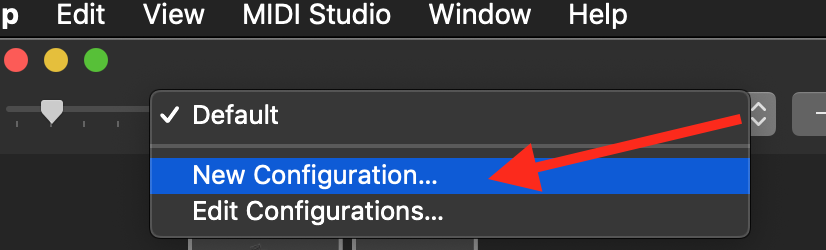
- name it whatever you want
- connect the DDJ-RX; does it appear in the MIDI Studio?

Yes I tried all that and it shows as soon as connected or power on but still just flashes the icon every few seconds.
Then it's possibly a hardware issue; please contact Pioneer DJ technical support in your region to have your hardware inspected and/or serviced.

