Comentário oficial

Exactly as it says -- to tap the tempo for that particular deck.
Ações de comentário

In DDJ-1000 manual (DDJ-1000_manual_EN.pdf), page 9:
Headphones CUE button
[SHIFT] + Press:
The tempo for each deck can be set by tapping this button. (Tap function)
___
In which situations and how exactly do I use this feature?
Your device manuals certainly could be a little bit more descriptive. Just a short sentence for a knob, fader or button etc. isn't too far away from the captions on the frontpanel of this controller ;-) ...
Thanks!
Exactly as it says -- to tap the tempo for that particular deck.
Publicação fechada para comentários.
Thanks, Pulse. It may be a stupid question from your point of view, but I still do not know how it works and what exactly that should be.
Can I slow down or speed up a track with it, or is it just a way to get an approximate BPM value?
I ask because I have conflicting insights here.
Sometimes, when I press Shift and tap the Channel Cue button, the BPM value changes on the jog wheel, but the track does not slow down or speed up.
Sometimes changing the BPM value on the jog wheel does not change, even though I press Shift while tapping the Channel Cue button.
Especially weird: sometimes the BPM value of the track changes in the playlist afterwards.
Does my question now make sense to you?

The track doesn't speed up or slow down when you use TAP. It only affects your BPM value. So no you can't use it to slow down your track. You have to use the Jog dial or pitch fader.
When you press and the value doesn't change it can mean you are tapping at the same BPM that is already shown.
Thanks Ves, this was really helpful!

Lets say I changed tempo of track one with tap button. How can I go back to auto value. With Fx section there is dedicated button for that but for separate track not. Do I need to reanalyzed track ? During performace it is not an option and it is very difficult to do it by just tapping when some effects are engaged.
Thank you
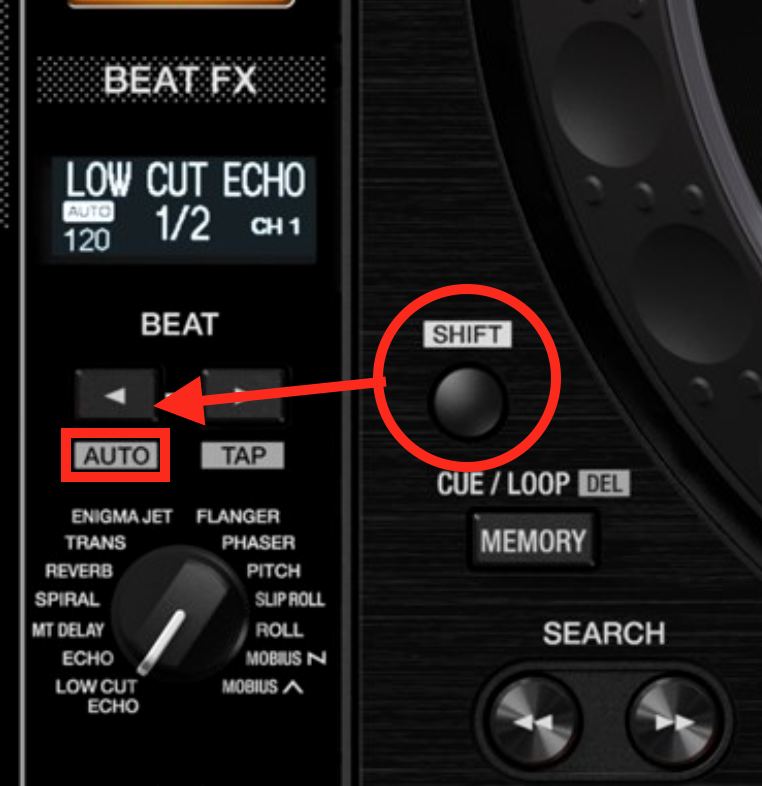
Press the AUTO button by pressing SHIFT + < BEAT
You are wrong. It doesnt work that way for tracks. Auto button on picture affects only FX section. If I use tap button on individual track it chenges entire grid of that track (shrink or expand that grid) which affect any effect assigned to that track. I am assking if there is a way to go back to 'original' grid( one that you get after analyzing track) without analyzing track again.
What function are you using to tap for the track? The CUE+SHIFT tap?
yes SHIFT+CUE(tap)


