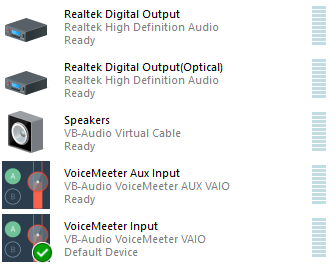
This tells me there could be an issue with your default Windows audio device. Click into the Sound panel and check to see which device is listed as your default. Post a screenshot of that if you don't mind.
Whenever I go into the audio settings of rekordbox and click the "output audio from the computer's built in speakers and your DJ equipment (PC Master Out)" box it stops for a bit and the audio drop down box selected goes from DDJ-400 WASAPI to No audio device. I have tried many things like reinstalling or updating rekordbox, restarting my computer, and disconnecting my DDJ-400 and plugging it into different USB ports but nothing seems to solve my problem. I was wondering if I'm missing anything?
This is what it looks like before I check the box
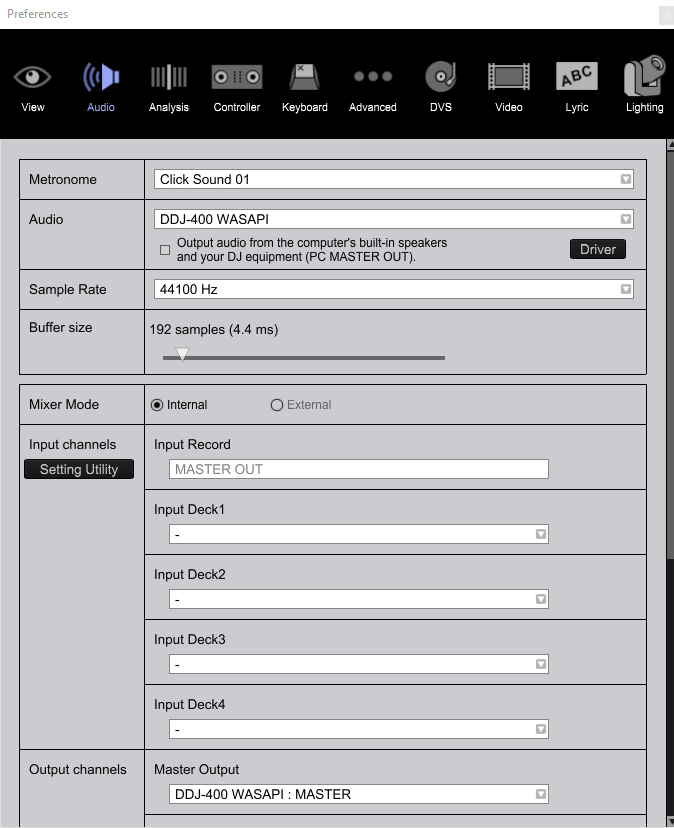
and this is what it looks like after I check the box

Thanks in advance for any help!
Publicação fechada para comentários.
This tells me there could be an issue with your default Windows audio device. Click into the Sound panel and check to see which device is listed as your default. Post a screenshot of that if you don't mind.
This is my sound panel.

Ah - you have Voicemeeter set as your default, but that can be configured in so many different ways it may be causing the problem. You could use the VB-Audio Virtual Cable as the default, then wire that through Voicemeeter.
I just tried that with no success. I also tried to uninstall voice meter and VB virtual cable to see if that was the problem but I still ended up with the same issue.