
Are you possibly using an 11th gen Intel CPU?
Ações de comentário

Hi everyone,
I tried using my DDJ-400 after a while of not even touching it, and I'm having some difficulties while trying to use the "PC Master Out" option.
If I enable the "PC Master Out" option (since I want to use my speakers connected to my PC, because they don't have RCA input), sound only comes from my speakers but not from my headphones (which are connected to my console). As soon as I disable the "PC Master Out" option, the sound starts coming out from my headphones (The channel I choose by pressing the Cue button) but not from the speakers anymore (which is the expected behavior).
I used to have the "PC Master Out" option enabled when using my controller and I was able to listen to the cues in my headphones and the master in my speakers, now I cannot find a way to make it work.
I've already updated the firmware of the controller to the latest version, updated Rekordbox to the latest version too, and deleted the DDJ-400 from my device manager menu and plugged it in again to have it installed again, but it still doesn't work properly.
This way I can listen to the cue in my headphones but not to the master in my speakers:
If I enable the "PC Master Out" option like this, I can listen only to the master through my speakers but no sound comes from my headphones: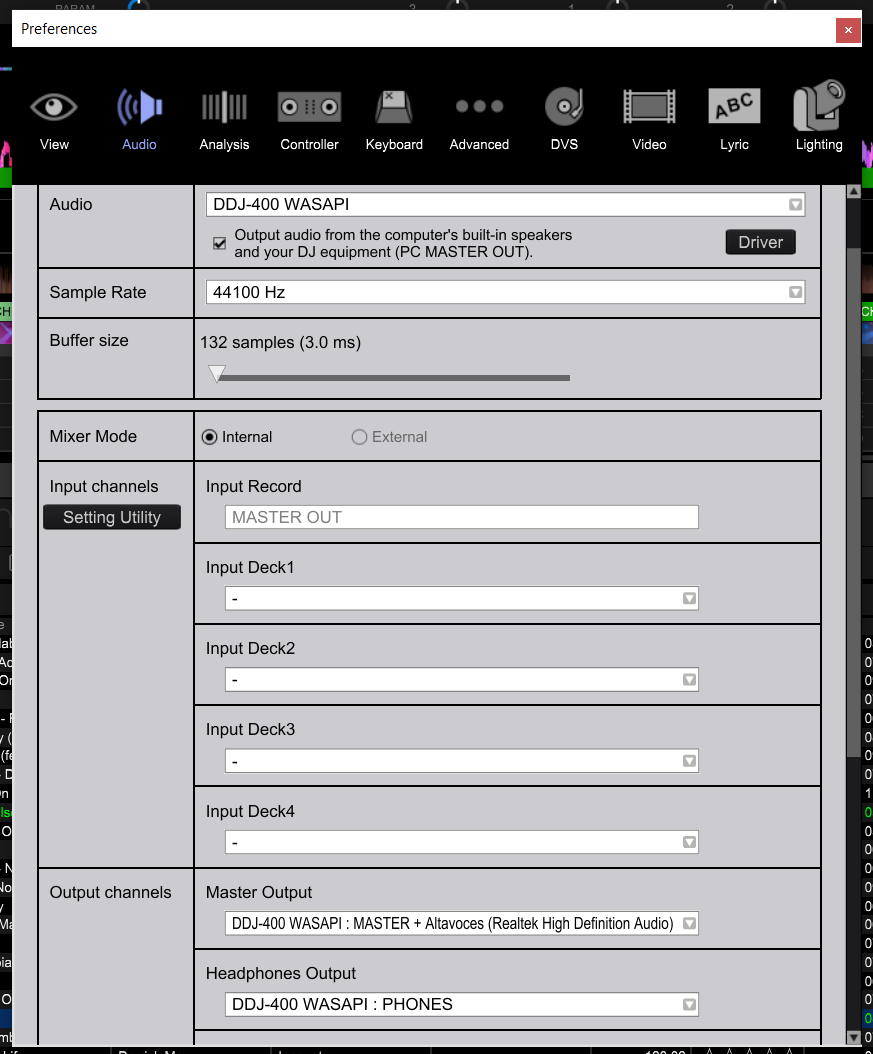 (Altavoces is my predefined audio device)
This is how I have all the knobs and buttons configured in my controller:
I also tried enabling the CUE for master but yet nothing happens.
Any idea of what could I be doing wrong?
Publicação fechada para comentários.
Are you possibly using an 11th gen Intel CPU?
Hi, no, these are my PC specs:
Intel i7-7700k
16GB RAM DDR4 3200MHz
512GB SSD SATA
Asus Z370 Motherboard
GeForce GTX 1070 8GB
Fixed it! The problem was being caused by two programs I had installed and running in background, these were "Asus Sonic Studio" and "Asus Sonic Radar". Had to uninstall them and now I'm able to use rekordbox as expected.
Thanks for the help!
That'll do it! Glad you were able to find it. :)

Hi! I am having the exact same issue, tried everything and used the same controller settings as above and yet still no luck. I am on the latest rekordbox update, I'm using a late 2020 MacBook Pro (M1 chip). I was using Rekordbox 5.8.5 without any issues until it began crashing every single time I opened it as of a few days ago.
Everything seems to work on v 6 except the cue function, cannot get any audio via various headphones or tweaking the settings I can think of. External headphones option when selected lets me use my speakers with no issues, just no cue function at all! No luck with master cue either. Please help!!
EDIT: Zero audio programs running in the background, no other applications or downloads ever run while I use Rekordbox
@Karan >
Unfortunately, per the news announcement updated on December 22nd, we still do not recommend users upgrade to Big Sur at this time, as we have not yet verified compatibility for our products. As you can see from this list, we aren’t the only ones still in the process of validating our software and drivers.
There are two options available for most users:
1) Wait until the updated drivers are released. We expect the validation to be completed soon but do not have a timeline available. Any driver updates will be released as they are completed.
2) Downgrade your computer to Catalina. The problem with this option is it's a destructive downgrade requiring the formatting of your drive. There are instructions available online for backing up your user data, then installing Catalina and restoring the data, but we are not responsible for that process. This is not an option for users with the new Apple M1 CPUs as Catalina will not work on those computers.
Please watch our social media channels and news page for announcements.
Thank you for your patience,