Have a feature request or suggestion? Post your idea here!

Post

3 Follower Folgen
0
Avatar

CDJ2000NXS & DJM2000 WITH REKORDBOX VIDEO SOFTWARE

I bought the Rekordbox DJ Video Software, but crossfading is not working from the DJM2000. Any advice how I can set it up, so that I can crossfade from the DJM2000 instead of manually doing it from the MAC.

Reuben Omari

Post ist für Kommentare geschlossen.

11 Kommentare

0
Avatar

I'm also having issues with the DJM 2000 with rb dj with Sierra macos. The sound card does not work properly and from time to time it is necessary to restart the program. The crosfader I was able to make work with the installation of the last drivers but also there have been problems that I can not reproduce to report correctly. Yesterday I tried to reproduce the problem of midi signal loss and it was not possible. But the sound card insists it does not work. The solution for now was to use the CDJ 2000 Nexus sound card.

Doctor DJ 0 Stimmen
Aktionen für Kommentare Permalink
0
Avatar

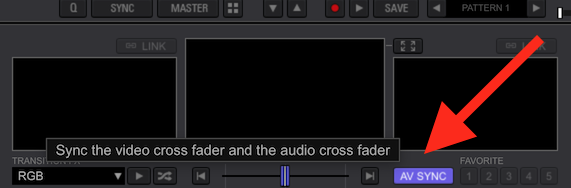
@Reuben > Are you talking about the video not crossfading with the audio? You can set that up by clicking here:

@Doctor DJ > How do you have the DJM-2000's audio device configured? Is it set for 6/2 or 8/0?

Pulse 0 Stimmen
Aktionen für Kommentare Permalink
0
Avatar

I performed the test with both options and the problem occur in both.

One problem detected is that the USB port of the DJM 2000 can not be in a usb hub. It has to be in a single connection.

This is a big problem to use on a macbook where I have to connect two CDJ 2000 nexus and the DJM 2000 mixer because the macbook only has two ports available. I have not yet got a hub that does not cause this problem.

But even with the use in an exclusive usb port the problem persists in happening.

Doctor DJ 0 Stimmen
Aktionen für Kommentare Permalink
0
Avatar

@Doctor > Correct, the DJM should always be connected directly to a USB port, rather than through a hub. The CDJs can be connected to the hub without issue.

You're not quite clear as to what the audio problem is... the MIDI problem is separate from the audio problem, can you elaborate?

Pulse 0 Stimmen
Aktionen für Kommentare Permalink
0
Avatar

What happens is that from time to time (without having a specific reason) a sound channel is mute, without leaving audio. The channel is also random. It's like sending a MUTE command to the channel.
As for the MIDI signal, the problem is the same. From time to time the MIDI signal is not sent.
When these problems happen the only way to get back to work is to close the program, turn the equipment off and on again and then open the program again.

Doctor DJ 0 Stimmen
Aktionen für Kommentare Permalink
0
Avatar

Have you experienced the same problem using a different computer or USB cable?

Pulse 0 Stimmen
Aktionen für Kommentare Permalink
0
Avatar

I did tests with a mac mini that I own and there were no problems.

The specifications of the mac mini are: i7, 16 gb memory, 1 TB HD, video card onboard.
Already the macbook I usually use is an i5, 16 gb memory, 1 TB HD, mid-2011.
Switching cables does not solve the problem.

Doctor DJ 0 Stimmen
Aktionen für Kommentare Permalink
0
Avatar

Quote:

@Doctor DJ > How do you have the DJM-2000's audio device configured? Is it set for 6/2 or 8/0?


UnQuote:

How do I set the DJM2000 for 6/2 or 8/0

Reuben Omari 0 Stimmen
Aktionen für Kommentare Permalink
0
Avatar

@Reuben > You set that in the DJM-2000 widget found in the Mac's System Preferences, but that has nothing to do with the MIDI. Did you try what I noted above?

@Doctor > Regarding the MIDI issue, If you only have the problem with one computer and not the other, I would be willing to bet there is a problem with that machine and the MIDI device. Try removing / re-adding it - be sure to follow all these steps in this order:

1) Unplug the DJM-2000 from the USB

2) Open Audio MIDI Setup (Applications > Utilities)

3) Find the DJM-2000 on the MIDI Studio window, select it, delete it

4) Download the DJM-2000 drivers for your OS from the product page

5) Open the driver disk image and run the Uninstaller tool

6) Reboot your computer

7) Once restarted, open the driver disk image and install the drivers

8) Reboot your computer and connect the DJM-2000's USB cable

9) Once restarted, open the Audio MIDI Setup app again to the MIDI Studio window

10) Click the Rescan MIDI Setup button from the tool bar at the top of the window, the DJM-2000 should appear if it did not already

11) Test the MIDI functionality.

Can you post a screen shot of the rekordbox audio configuration?

Pulse 0 Stimmen
Aktionen für Kommentare Permalink
0
Avatar

I performed the reinstallation and will do tests. Initially it is working properly.

Doctor DJ 0 Stimmen
Aktionen für Kommentare Permalink