
Hi there,
You may want to adjust the USB output level for your usb outs 5/6. I'm guessing you're recording in Serato via those channels?
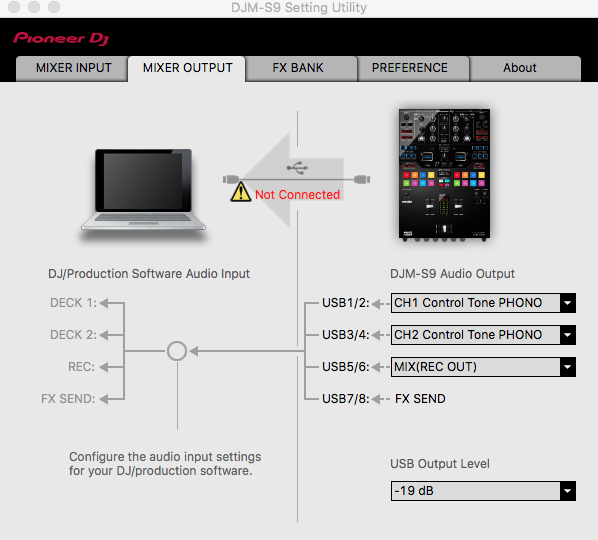
Peace.
-NC


Aktionen für Kommentare

I hope I'm posting this in the correct place. If not, my apologies.
I have searched around on this topic on these forums and on the Serato forums and I can't seem to get any help.
Here's the issue. When I record a mix on my SX, all I really have to do is hit the record button on Serato with the default level being at 12 o'clock and I monitor my levels by staying out of the red. When I go to edit the mix on sound forge to add radio station drops my levels peak at 0db (which is perfect). throughout the entire mix, my recording does not show any red.
Now, with the s9 with the recording dial still at default 12 o'clock, start my recording and on both channels I peak at the 1st red meter and recording sounds extremely low. I have tried raising the volume on the Serato record dial and the sound does come up but the levels are all over the place. Once I've finished the mix I'll import into sound forge and the levels are low, I have to add more volume which doesn't work because when 2 songs are being mixed, it makes the levels on soundforge go over 0db and into 2 or 3+db. This problem, has made it quite uncomfortable to deal with since I want my recordings to sound professional and I love using my turntables but I have had to settle with specifically recording only with the SX since all recordings sounds perfect.
I guess what I'm asking is, is there a setting I'm not seeing that will get my S9 to record my mix the same way that my SX does??
Post ist für Kommentare geschlossen.
Hi there,
You may want to adjust the USB output level for your usb outs 5/6. I'm guessing you're recording in Serato via those channels?
Peace.
-NC