Have a feature request or suggestion? Post your idea here!

Post

4 Follower Folgen
0
Avatar

Track Separation: Rekordbox 6.7 + DDJ FLX10 - Sound Crackling or Stopping randomly - when analyzing for track separation

Having this issue when enabling track separation on Rekordbox 6.7. Random Crackling. Using DDJ FLX10 ASIO driver. There is no way to reduce/increase buffer size.

It does not happen often, but when it does, it just completely brakes the audio, and at times stops it. If I disable the Track Separation engine, I do not experience it.

LatencyMon has determined that computer is capable for Audio Processing/Streaming without issues.

Oscar Zamora

Post ist für Kommentare geschlossen.

19 Kommentare

1
Avatar

The issue persists with Rekordbox 6.7.1 and Firmware 1.12 for the FLX10. In order to mitigate this, need to avoid jumping around the track in Cue as I listen to it, but rather just start from preset cue points. Cue points will need to be set before the session.

Oscar Zamora 1 Stimme
Aktionen für Kommentare Permalink
0
Avatar

Disable multi thread analysis on the extensions page. I have an AMD Ryzen 7 5700G at 3.8 gigs and it can't keep up. Think they should limit each thread at about 50% maybe less because it takes the entire CPU which leads to the artifacts. Single thread analysis is a bit slower but you'll have absolutely no artifacts. Also check to increase memory if you have a lot of RAM on board. Minimum configurations won't cut for track separation analysis. 

Nestor Delgado 0 Stimmen
Aktionen für Kommentare Permalink
1
Avatar

I played with lowering for both track analysis and track separation, and still hear audio artifacts. Laptop is 5 years old, so might be pushing the boundaries already. Wonder if Pioneer can consider offloading processing into the GPU instead.

Oscar Zamora 1 Stimme
Aktionen für Kommentare Permalink
0
Avatar

I was wondering the same or use a combo of CPU and GPU but in the end I think they'll figure it out. In your case, make sure you have nothing else running but Rekordbox. Even turn off services that are not needed and start up app. No browsers, nothing. Or if you can do a clean install of your OS because over time the background apps pile up. Ultimately however, you're probably going to have to upgrade the laptop for sure. 

Nestor Delgado 0 Stimmen
Aktionen für Kommentare Permalink
0
Avatar

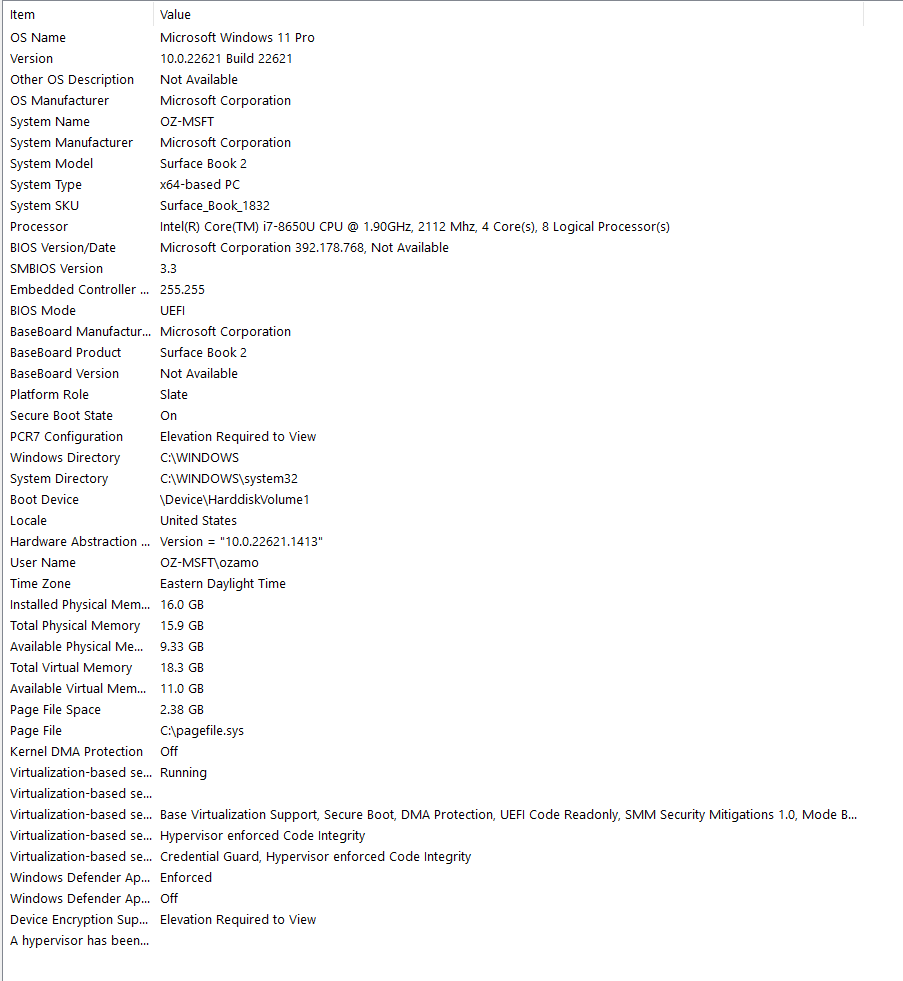
my computer is an intel I5 8th gen with 16GB and I have the same problem. Sometimes the clipping is very intense and annoying.

iñaki Cereceda 0 Stimmen
Aktionen für Kommentare Permalink
0
Avatar

Does anyone have an update on this?  I just got my FLX10 and the crackling is insane.  It completely disappears when using the Windows audio output, but is there when using the ASIO driver.  There is no option to adjust the buffer size when using the ASIO driver.

I have the latest version of rekordbox, as well as the updated driver and firmware.  This is really disappointing.  I just dropped $2500CAD on this thing and the sound quality is worse than my DDJ 400.

Samantha Fast 0 Stimmen
Aktionen für Kommentare Permalink
0
Avatar

Pioneer has dropped the ball on this one, and I would assume that they are expecting us to drop another $1,000 or so on a newer laptop to avoid crackling. At this stage, might as well pick the Opus Quad and work with it solo, instead.

The recommendations I can provide, from my own experiences:

* Close, disable or uninstall programs that are not required, and disable virus & threat protection during the session.

* Pre analyze all tracks. Avoid loading new ones as you are already DJing.

* This is a bummer but avoid tracks with multiple cue points. The problem I am seeing with these, multiple part separation thread analysis will start, each starting at each set cue points. If you have 4, then 4 threads will run in parallel. You will experience a lot of audio crackling. 

* If all of the sudden you experience crackling randomly for an extended period, stop of a couple of minutes and resume. Maybe rebooting the laptop also.

And I ask Pioneer to figure this one out also. 8th gen laptops with 16 GB soldered RAM are not that old. They were expensive at the time anyways.

Oscar Zamora 0 Stimmen
Aktionen für Kommentare Permalink
0
Avatar

This is my LatencyMon report.  I have no idea what this means or how to fix it.  I have already changed the power settings so as not to throttle the CPU.  I don't know what DPC or ISR are.  

This is a $2500 computer and is only three years old.  I have tons of space on it.

Why would this only be an issue when using the installed driver and not the windows sound system?

What else can I do to fix this?  I'm not a tech savvy person so I don't know how to do a lot of the suggestions people have when I search for solutions online.

_________________________________________________________________________________________________________
CONCLUSION
_________________________________________________________________________________________________________
Your system appears to be having trouble handling real-time audio and other tasks. You are likely to experience buffer underruns appearing as drop outs, clicks or pops. One or more DPC routines that belong to a driver running in your system appear to be executing for too long. Also one or more ISR routines that belong to a driver running in your system appear to be executing for too long. At least one detected problem appears to be network related. In case you are using a WLAN adapter, try disabling it to get better results. One problem may be related to power management, disable CPU throttling settings in Control Panel and BIOS setup. Check for BIOS updates. 
LatencyMon has been analyzing your system for  0:03:55  (h:mm:ss) on all processors.


_________________________________________________________________________________________________________
SYSTEM INFORMATION
_________________________________________________________________________________________________________
Computer name:                                        DESKTOP-BMIG60E
OS version:                                           Windows 10, 10.0, version 2009, build: 19045 (x64)
Hardware:                                             HP EliteBook 850 G7 Notebook PC, HP
BIOS:                                                 S73 Ver. 01.13.00
CPU:                                                  GenuineIntel Intel(R) Core(TM) i7-10510U CPU @ 1.80GHz
Logical processors:                                   8
Processor groups:                                     1
Processor group size:                                 8
RAM:                                                  16157 MB total


_________________________________________________________________________________________________________
CPU SPEED
_________________________________________________________________________________________________________
Reported CPU speed (WMI):                             1803 MHz
Reported CPU speed (registry):                        2304 MHz

Note: reported execution times may be calculated based on a fixed reported CPU speed. Disable variable speed settings like Intel Speed Step and AMD Cool N Quiet in the BIOS setup for more accurate results.


_________________________________________________________________________________________________________
MEASURED INTERRUPT TO USER PROCESS LATENCIES
_________________________________________________________________________________________________________
The interrupt to process latency reflects the measured interval that a usermode process needed to respond to a hardware request from the moment the interrupt service routine started execution. This includes the scheduling and execution of a DPC routine, the signaling of an event and the waking up of a usermode thread from an idle wait state in response to that event.

Highest measured interrupt to process latency (µs):   1440.20
Average measured interrupt to process latency (µs):   15.154101

Highest measured interrupt to DPC latency (µs):       1436.30
Average measured interrupt to DPC latency (µs):       5.125479


_________________________________________________________________________________________________________
 REPORTED ISRs
_________________________________________________________________________________________________________
Interrupt service routines are routines installed by the OS and device drivers that execute in response to a hardware interrupt signal.

Highest ISR routine execution time (µs):              2233.596354
Driver with highest ISR routine execution time:       Wdf01000.sys - Kernel Mode Driver Framework Runtime, Microsoft Corporation

Highest reported total ISR routine time (%):          0.153341
Driver with highest ISR total time:                   Wdf01000.sys - Kernel Mode Driver Framework Runtime, Microsoft Corporation

Total time spent in ISRs (%)                          0.153733

ISR count (execution time <250 µs):                   173817
ISR count (execution time 250-500 µs):                0
ISR count (execution time 500-1000 µs):               0
ISR count (execution time 1000-2000 µs):              0
ISR count (execution time 2000-4000 µs):              1
ISR count (execution time >=4000 µs):                 0


_________________________________________________________________________________________________________
REPORTED DPCs
_________________________________________________________________________________________________________
DPC routines are part of the interrupt servicing dispatch mechanism and disable the possibility for a process to utilize the CPU while it is interrupted until the DPC has finished execution.

Highest DPC routine execution time (µs):              2619.421875
Driver with highest DPC routine execution time:       Wdf01000.sys - Kernel Mode Driver Framework Runtime, Microsoft Corporation

Highest reported total DPC routine time (%):          0.045959
Driver with highest DPC total execution time:         Wdf01000.sys - Kernel Mode Driver Framework Runtime, Microsoft Corporation

Total time spent in DPCs (%)                          0.107872

DPC count (execution time <250 µs):                   200245
DPC count (execution time 250-500 µs):                0
DPC count (execution time 500-10000 µs):              62
DPC count (execution time 1000-2000 µs):              0
DPC count (execution time 2000-4000 µs):              5
DPC count (execution time >=4000 µs):                 0


_________________________________________________________________________________________________________
 REPORTED HARD PAGEFAULTS
_________________________________________________________________________________________________________
Hard pagefaults are events that get triggered by making use of virtual memory that is not resident in RAM but backed by a memory mapped file on disk. The process of resolving the hard pagefault requires reading in the memory from disk while the process is interrupted and blocked from execution.

NOTE: some processes were hit by hard pagefaults. If these were programs producing audio, they are likely to interrupt the audio stream resulting in dropouts, clicks and pops. Check the Processes tab to see which programs were hit.

Process with highest pagefault count:                 chrome.exe

Total number of hard pagefaults                       1106
Hard pagefault count of hardest hit process:          251
Number of processes hit:                              27


_________________________________________________________________________________________________________
 PER CPU DATA
_________________________________________________________________________________________________________
CPU 0 Interrupt cycle time (s):                       10.896458
CPU 0 ISR highest execution time (µs):                2233.596354
CPU 0 ISR total execution time (s):                   2.866125
CPU 0 ISR count:                                      171274
CPU 0 DPC highest execution time (µs):                2619.421875
CPU 0 DPC total execution time (s):                   1.413653
CPU 0 DPC count:                                      142466
_________________________________________________________________________________________________________
CPU 1 Interrupt cycle time (s):                       5.541827
CPU 1 ISR highest execution time (µs):                100.510417
CPU 1 ISR total execution time (s):                   0.035105
CPU 1 ISR count:                                      2511
CPU 1 DPC highest execution time (µs):                427.015625
CPU 1 DPC total execution time (s):                   0.410655
CPU 1 DPC count:                                      39262
_________________________________________________________________________________________________________
CPU 2 Interrupt cycle time (s):                       2.522328
CPU 2 ISR highest execution time (µs):                0.0
CPU 2 ISR total execution time (s):                   0.0
CPU 2 ISR count:                                      0
CPU 2 DPC highest execution time (µs):                389.527778
CPU 2 DPC total execution time (s):                   0.049999
CPU 2 DPC count:                                      5047
_________________________________________________________________________________________________________
CPU 3 Interrupt cycle time (s):                       2.547361
CPU 3 ISR highest execution time (µs):                21.098090
CPU 3 ISR total execution time (s):                   0.000292
CPU 3 ISR count:                                      33
CPU 3 DPC highest execution time (µs):                269.993924
CPU 3 DPC total execution time (s):                   0.015868
CPU 3 DPC count:                                      1792
_________________________________________________________________________________________________________
CPU 4 Interrupt cycle time (s):                       1.713019
CPU 4 ISR highest execution time (µs):                0.0
CPU 4 ISR total execution time (s):                   0.0
CPU 4 ISR count:                                      0
CPU 4 DPC highest execution time (µs):                127.471354
CPU 4 DPC total execution time (s):                   0.030191
CPU 4 DPC count:                                      3670
_________________________________________________________________________________________________________
CPU 5 Interrupt cycle time (s):                       1.569164
CPU 5 ISR highest execution time (µs):                0.0
CPU 5 ISR total execution time (s):                   0.0
CPU 5 ISR count:                                      0
CPU 5 DPC highest execution time (µs):                180.744792
CPU 5 DPC total execution time (s):                   0.008495
CPU 5 DPC count:                                      1309
_________________________________________________________________________________________________________
CPU 6 Interrupt cycle time (s):                       2.682425
CPU 6 ISR highest execution time (µs):                0.0
CPU 6 ISR total execution time (s):                   0.0
CPU 6 ISR count:                                      0
CPU 6 DPC highest execution time (µs):                211.045139
CPU 6 DPC total execution time (s):                   0.095338
CPU 6 DPC count:                                      5429
_________________________________________________________________________________________________________
CPU 7 Interrupt cycle time (s):                       2.380672
CPU 7 ISR highest execution time (µs):                0.0
CPU 7 ISR total execution time (s):                   0.0
CPU 7 ISR count:                                      0
CPU 7 DPC highest execution time (µs):                131.500868
CPU 7 DPC total execution time (s):                   0.011757
CPU 7 DPC count:                                      1337
_________________________________________________________________________________________________________

Samantha Fast 0 Stimmen
Aktionen für Kommentare Permalink
0
Avatar

I can offer 2 recommendations. One is to get access to your BIOS and disable Intel Speed Step - you might want to search on how to do this on your computer. The second is to enable high performance on your computer, to run at 100% all the time. Google is your friend.

Note: ensure that all browsers (Chrome) are stopped and not even running in the background while Rekordbox is running.

Oscar Zamora 0 Stimmen
Aktionen für Kommentare Permalink
0
Avatar

That's really frustrating.  I'm going to be taking my computer to an IT guy to see what can be done to improve the CPU etc. from the LatencyMon report.  My computer is only three years old and was a $2500 piece of equipment with 16G of RAM.  There is NO WAY that I should be having these issues when using over $5k worth of equipment, and NO WAY that I am buying a new computer for this.

I will also be backing up my music, uninstalling rekordbox and the driver, reinstalling them both.  Frustrating but I've read some reviews from other similar issues that this seemed to help.

Interestingly, I also sent a request to Pioneer to ask them about this and have not yet heard back.  I watched two in-depth reviews on the FLX10 online, and can't fathom how no reviewer has run into this problem.  It renders the system unusable.

Keep me updated if you figure anything out.

Samantha Fast 0 Stimmen
Aktionen für Kommentare Permalink
0
Avatar

In the meantime, I am turning the track separation OFF in the setting, which seems to solve the problem when using the AIOS driver.  Still not sure why it would be an issue only when using the AIOS and not the Windows output.  Someone make this make sense to me.

Samantha Fast 0 Stimmen
Aktionen für Kommentare Permalink
0
Avatar

Samantha. If I change the priority of Rekordbox to High, I minimize the sound crackling. At least I was able to record yesterday, without issues. 

CTRL + SHIFT + ESC
Details
Find rekordbox.exe (the one using the most memory)
Right click, Set Priority, Choose High

Hope this helps mitigate the issue


Oscar Zamora 0 Stimmen
Aktionen für Kommentare Permalink
0
Avatar

Hey, thanks for your previous message!  I'm glad you found something that seems to help.

I have been on a rough journey the past two days trying to figure this out.  I hired an IT guy to come look at my computer, and we ended up reinstalling the entire operating system without all the bloatware in order to cut down on programs dragging on the CPU.  Reinstalled rekordbox and the drivers, and also did all the CPU optimization recommendations that I got from Pioneer and that you sent me.  Four hours later and this still didn't work, and now turning off track separation actually didn't help as much.  I ended up taking the machine and my computer to the store where I purchased it.  The repair guy took a look at the deck, it is not a hardware issue.  His conclusion was that it was a buffer size issue.  No kidding.

The buffer size is greyed out on audio settings, making one think that it can't be adjusted.  HOWEVER, under "audio" if you go to "Setting Utility" under "Input Channels", you can adjust the buffer size in there.  Changed it to 512, and the crackling is completely GONE.

Try this and let me know if it helps.

Samantha Fast 0 Stimmen
Aktionen für Kommentare Permalink
0
Avatar

Samantha. You might have discovered the holy workaround to the audio crackling. I was testing this morning, with having multiple tracks analyzed and pulling 2 new tracks into channels 1/2 and playing while analyzing. I have not yet experienced the issue again.

I have also upped to 512. Who would have thought that the "Setting Utility" was a clickable button? What is Pioneer thinking? We have wasted so many days and resources for something simple to fix.

Oscar Zamora 0 Stimmen
Aktionen für Kommentare Permalink
0
Avatar

Yay!  I'm glad this worked for you as well!

I agree, there's no reason we should have had to spend this much time on trying to figure it out.  But at least now we know, and hopefully others will be able to find this thread to help them too.

I am wondering if you can help me with one other issue?  My tempo sliders don't work on decks 1 and 2.  They do work on decks 3 and 4.  I have no idea why this would be.  Do you know if there is a setting somewhere that can be adjusted?

Tks!

Samantha Fast 0 Stimmen
Aktionen für Kommentare Permalink
0
Avatar

If both decks were on one side, then I would point to a hardware problem, but not in this case. Regardless, the immediate way to test if the issue is the deck, install and try Serato. If the issue doesn't persist there, then it's rekordbox.

I recommend calling Pioneer directly for support. 1-844-784-0000

Oscar Zamora 0 Stimmen
Aktionen für Kommentare Permalink
1
Avatar

Thanks!  It's randomly working now.  If I brought the sliders to the very end of the range, it randomly kicked in and started working.  Not sure why, but at this point I'm not going to ask questions.

Enjoy your new deck!  I'm feeling a lot less stressed now that we've figured this out!

Here's my SoundCloud if you're interested:

https://soundcloud.com/djsavvykiz

Samantha Fast 1 Stimme
Aktionen für Kommentare Permalink