
Once you have created your playlist then click it into alphabetical order then right click the top tab and renumber track order.
Then export to the device and it will be in that order.
Aktionen für Kommentare

Is it possible to sort the mp3's in the playlist like alphabeticaly and not by date? I mean, i see that option in rekordbox, but when i export a new mp3 to my hdd, then in the players i get that track last in the list because it's newer i guess.. I don't wannt that, i wannt just alphabeticaly sorting in the players, can i get that somehow?
And the other thing is the numbering.. In a list i get always:
001
002
....
How can i disable that and just show the tittle in alphabetic order? (i'm afraid i can't...)
Post ist für Kommentare geschlossen.
Once you have created your playlist then click it into alphabetical order then right click the top tab and renumber track order.
Then export to the device and it will be in that order.
Thank you very much. At least i can hadle alphabetic order.. Something about the numbering...? I think there should be an option to show or not in the next rekordbox update, or next cdj's firmware..

@tasos > The tracks aren't sorted by date within Rekordbox unless you select that column. The player is the same; tracks are sorted by name or whatever other "sort" criteria you select from the MENU button.
Pulse thanks, i saw that today with the options at the menu button, but by default when i export a track, it will be available at the end of the list. I have to do that what Pionix
....says to get it alphabeticaly as default in the players.
(ps something is going on with the messages and they get cutted)

if you are in a playlist, by default the cdj sorts by #, So in RB once you add a bunch of tracks to a playlist, sort by alphabetical by clicking on the "TITLE" column header, once sorted, right click on the header and choose "renumber track order", this is the way by default the players will display tracks on the players
Once you are in a playlist however on the cdj, you can choose "MENU" then "SORT" and sort how you want, alphabetical, bpm, etc.... you can add/sort these categories in RB with the external drive connected
I think there should be an option to "set default" so i don't need to do this everytime i import mp3's to my library and then export to my hdd..
I may be wrong, as I haven't looked at this in a while, but can you not set whichever sort you want as default to the top of the list and have it come up automatically?
no not yet Pulse, For instance in RB I have the "sort" in prefs set as "alphabet" at the top, yet every playlist I go into is sorted by number and I have to select sort by alphabet in order to have it sort out that wat
K, thanks, like I said, it's been a while since I've even looked at that. I'll suggest it to the engineers.
sounds good, Thanks

Is possible to sort buy two different option? I'd like to sort buy rate and for the same rate sort buy key
@david x > Sorry, by "rate"?
excuseme, I use it in italian.It was "rating", the sars.
Ah - thanks, I understand. Unfortunately the player is not capable of doing a two-tier sort; you can use one of the display methods then use a sort method as explained in this video:
Thanks, i hope in a database most powerfull in the next rekorbox version. I'd like to work in link between rekordbox and 4 cdj through djm2000

"I think there should be an option to "set default" so i don't need to do this everytime i import mp3's to my library and then export to my hdd.."
Yes, Please!
@Frank > Have you checked the latest version of rekordbox for what you're quoting?
I think I misunderstood.. I want to be able to change the "default" to whatever parameter I want, without having to "renumber sort order" on that column. Basically I have to do that on every playlist when I add new music to have it show up as I want on the cdj, which is alot of extra work.
@Frank > I'm not exactly sure if you're talking about the external device (for use on a CDJ), but within rekordbox you can set the sort order preferences:
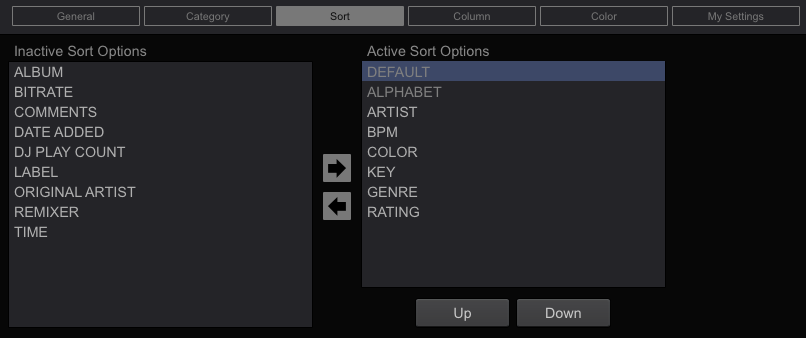
Unfortunately you can't change the DEFAULT sort order.
I'd like every playlist to appear on the cdjs, in the order I had them in the program. In iTunes, the numbering changes with the sort option, or you can re-arrange in the order you like manually not sure why Rekordbox is set up differently. Seems counter intuitive. Am I missing something?
Your playlists SHOULD appear in the order you have stored them in. Are you changing the playlists within iTunes?
Without having to re-number sort order. So if one playlist was in numerical order, another by "date added" when viewing in rekordbox, the usb/CdJs would reflect that without the extra step. In other words, "default" would be whatever the last state in rekordbox and "numerical" would just be another option.
Ahhh, okay, I finally understand what you're trying to do.
Sorry, the default sort order is by the numerical order so that you can manually have them in a specific order -- simply having them sorted by date in rekordbox, does not have them numerically sorted in that same order and there is no ability for you to set that order as the default. You must select the sort order from the menu button.
I do have a group of playlists I sync from itunes, but I have to sort and renumber each one everytime I add new music. I wish this would simply reflect the order of the itunes playlist on synching
Maybe an easier angle would be to allow for batch renumbering. You could highlight a folder or group of playlists and renumber sort order for the group in whatever state they are in as opposed to having to open each one and right click etc. BTW - thx for you responsiveness ;-)
Actually, a "Renumber in current order" option in a right-click would be a good idea. I'll pass it to the engineers for future consideration.

Hi Pulse,
I agree with Frank on this issue. I operate entirely off playlists, and as such I want some playlists to be in ascending BPM order, some playlists to be in ascending key order, some playlists (particularly those sweated-over mixes) to be in an "as added" order, etc. iTunes accomodates this very nicely as each playlist is individually controlled, however Rekordbox applies one sort to all the playlists.
It would nice if either (a) Rekordbox accomodated individualised playlist sorting like iTunes, or (b) the sort settings from iTune were copied over directly (as you noted).
Would be a nice feature for the next update :)
Cheers,
Andy.
Yeah, it doesn't keep a "default view" per playlist, but I'll add it to the suggestions list.
So there already is a method of renumbering tracks, but the reason neither you or I found it is we were clicking in the wrong place. Try right-clicking at the column header for any column on your playlist and you will see "Renumber" at the top of the menu.

