

@Kevin > The AERO doesn't automatically load itself into Traktor's config settings with the TSI file; you need to manually select it.
With the drivers installed and the device connected, in OSX go to Utilities > Audio MIDI Setup. You should see this:
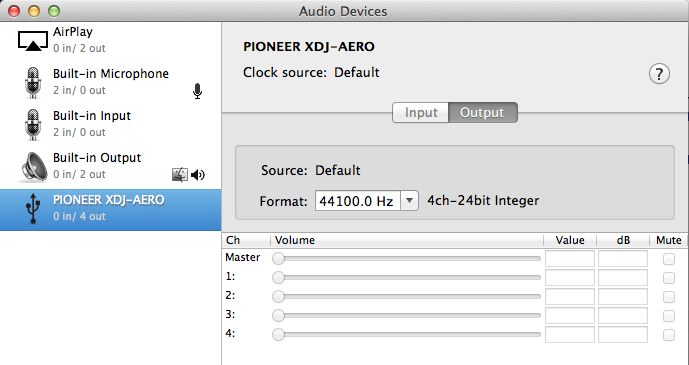
This confirms the device is connected. Next, open Traktor and go to the preferences and select the Audio Setup item:
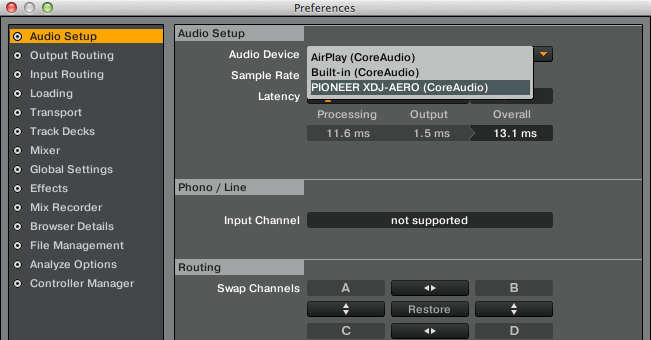
Select the AERO as your audio device.
Go to the Output Routing item and set the Mixing Mode to INTERNAL and then set decks 1 & 2 to have outputs matching what you see here:

Also be sure to check that the MIDI ports are assigned! While I had imported the TSI properly, the In and Out ports for the device were "n/a" at first!
Go to the Controller Manager item:
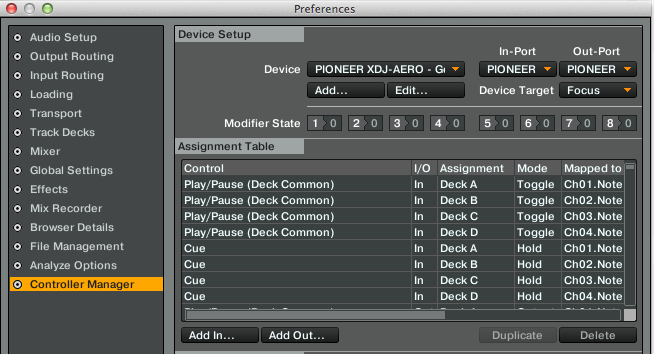
Change the device to show the Pioneer AREO and then make it so the In and Out are set to the AERO as well.
Presto.


