Have a feature request or suggestion? Post your idea here!

Post

7 Follower Folgen
0
Avatar

XDJ Aero & Rekordbox DJ

I haven't seen an official announcement yet but this site says it is compatible.

https://www.rekordbox.com/en/support/link.php

Has Aero support come at last?

DJ Phil

Offizieller Kommentar

Avatar

I know sometimes the window can have scrollbars with the devices listed off the visible area, can you please check that it's not sitting elsewhere on the screen?

If it's not visible, and is nowhere to be found, follow these instructions:

1) Create a new configuration from the drop-down (yours probably says "Default" as mine shows):
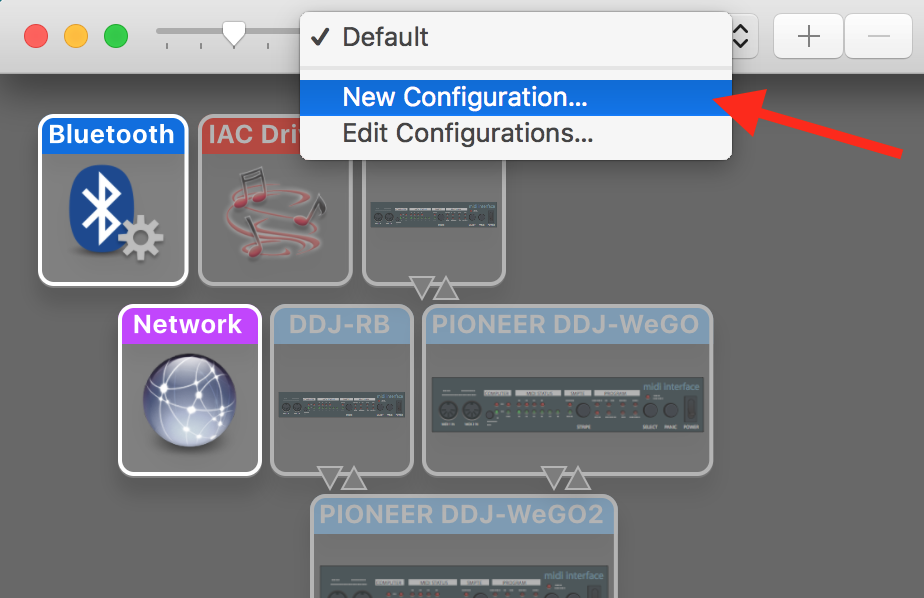
2) Name the new configuration:
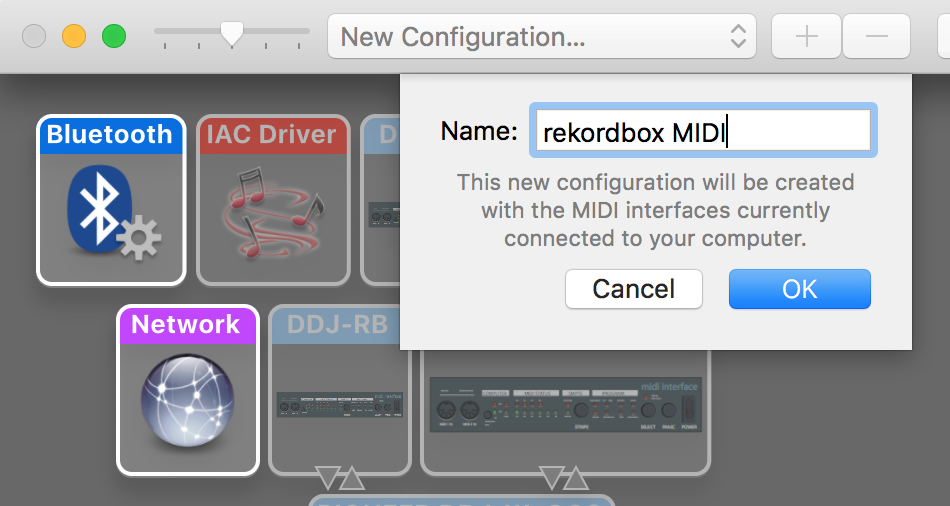
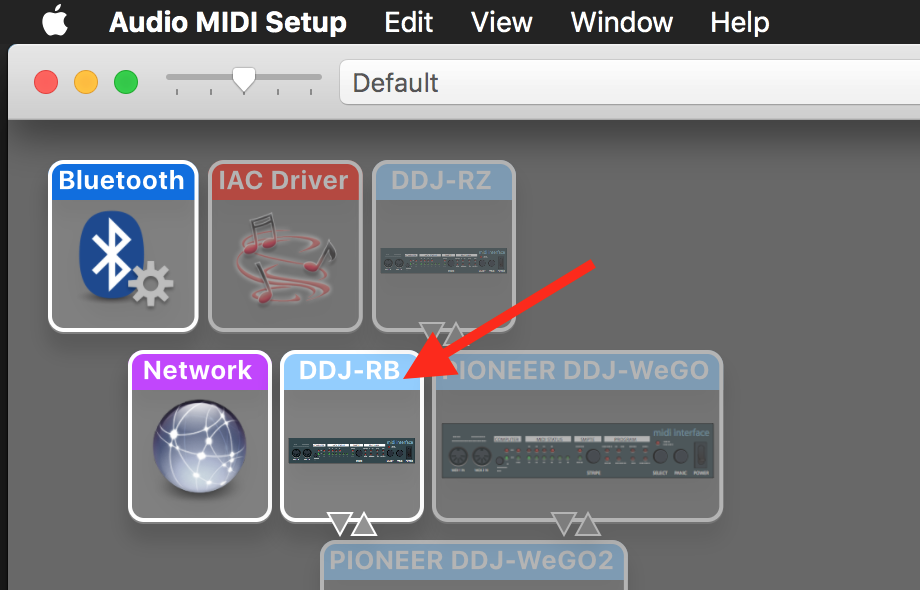
...and click OK. The currently connected MIDI devices will be scanned; any device not connected will NOT appear on the screen (such as the DDJ-RB, which you can see "ghosted" in the image above).

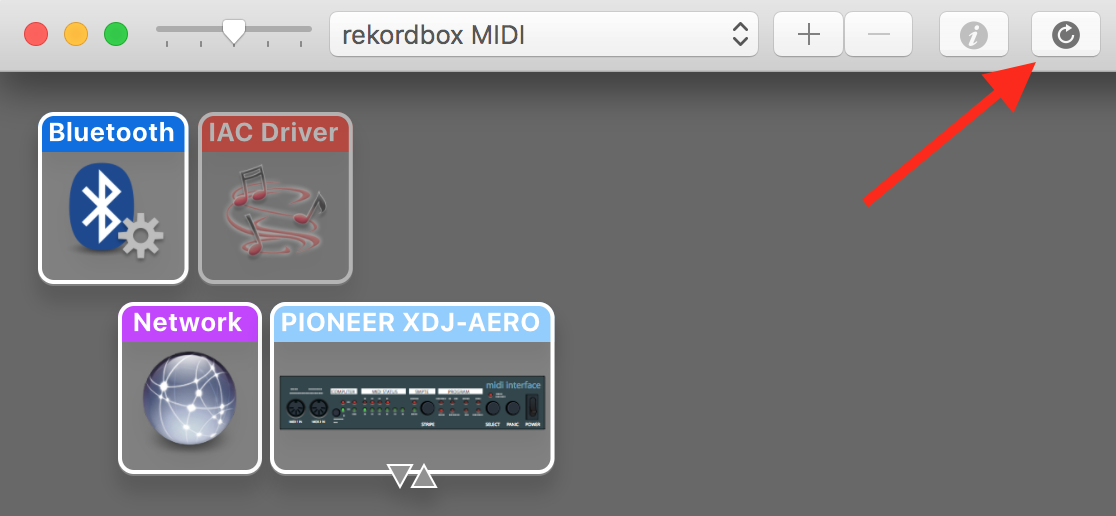
3) If your XDJ-AERO does not appear, click the re-scan button:
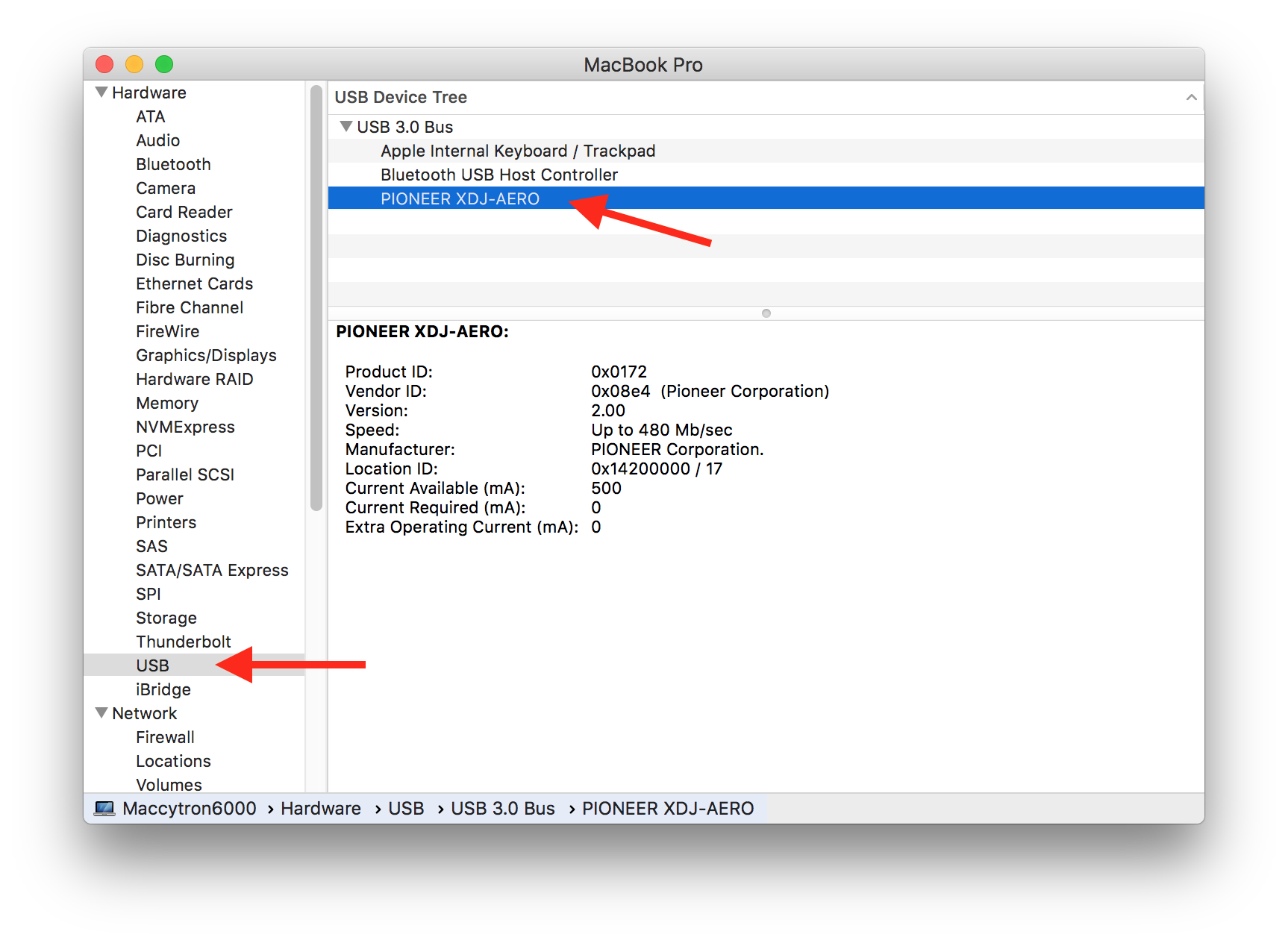
4) If it STILL doesn't appear after that, click the Apple icon (top left), then hold the Option key on your keyboard and click System Information...

Click the USB item on the left tree, and if your DDJ-AERO appears on the list at the right, click it:
Post a screen-shot of that window (command+shift+4, then hover the mouse over that window, press the space bar, then click - the screen shot will be saved to your desktop).

Pulse
Aktionen für Kommentare Permalink

Post ist für Kommentare geschlossen.

22 Kommentare

0
Avatar

@Phil > Just so we know where to provide information like this in future, where was it you might expect to see such an announcement?

Pulse 0 Stimmen
Aktionen für Kommentare Permalink
0
Avatar

I am happy to see this. Thank you Pioneer! Where can I find information about setting this up correctly to work? I have the Xdj-Aero setup as a MIDI device and I am in performance mode in the latest version 4.04. It is functioning somewhat. However, it seems that there are some serious midi mapping issues and I don't know how to address them. I get control over both deck volumes on just one side (Deck A).

Tymnus 0 Stimmen
Aktionen für Kommentare Permalink
0
Avatar

Hi Vinnytion, I found a fix. Looks like the Mixer Mode needs to be set to PC on your XDJ unit. This seems to be working for me with my Aero.

Tymnus 0 Stimmen
Aktionen für Kommentare Permalink
0
Avatar

You first need to install the drivers for the XDJ-AERO if you haven't already done so (they can be found under the rekordbox application folder), then ensure that through the UTILITY mode on your AERO that you change the mixer mode from XDJ to PC.

Pulse 0 Stimmen
Aktionen für Kommentare Permalink
0
Avatar

Hi tymn urban pulse sorted out i did not change to midi mode in the mixer section on the utility and same thing you are saying but i had to put it to midi not xdj rx so thank you for your help

vinnytion 0 Stimmen
Aktionen für Kommentare Permalink
0
Avatar

Hi Pulse,

The changelog you maintain in News is the best location.

One suggestion is the possibility of 1 pinned item for each subforum which is used to alert visitors to updates in the News section relevant to it. The age of the item will make it obvious there is something new in News.

No big deal but with all the links at the bottom of this forum why do none link back to Pioneer DJ or Rekordbox? I can go Support Contacts>Products but this isn't obvious.

DJ Phil 0 Stimmen
Aktionen für Kommentare Permalink
0
Avatar

Hi all,

Installed RB 4.0.5 and hooked it with my Aero...very nice indeed.

- I get lower volumes when fader at each ends (and maximum at center), any idea why ?

- after a while the BPM of both decks drops to around a 100bpm, to recover only after i joggle the slider. feels like it lost its connection...

other than that there is a lot for me to learn (played vinil at the past and until now with USB-no waveform)

Cheers

oren elimelech 0 Stimmen
Aktionen für Kommentare Permalink
0
Avatar

I can not run rekordbox DJ and XDJ aero properly, I installed the program, the console firmware is updated to 3.0, but imposed as the console with the USB connection to the PC? I tried a number of ways, such as midi, as rekordbox but nothing to do, the music always comes from two decks by the slider on deck 1, either.

Carlo Canedoli 0 Stimmen
Aktionen für Kommentare Permalink
0
Avatar

Rekordbox Dj is not yet fully compatible with the Xdj Aero, I have suffered some serious problems with my Aero on connecting to Rekordbox DJ 4.05, including no sound output, loss of headphone cue function, wi-fi dropout with my Ipad, unable to switch from Usb to Midi, and program crash, I think the problem lies with conflict between the Asio Driver and the Aero, I had the same problem when I owned the Xdj R-1 ,it used to have a mini stroke when connecting my VDJ program,

I love my Aero and the Rekordbox software, unfortunately in real world conditions its just not trustworthy enough, I will have to go back to using rival DJ software until these problems are looked at, and ironed out.

Ade 0 Stimmen
Aktionen für Kommentare Permalink
0
Avatar

Hi everybody. I'm trying rekordbox DJ 5 in performance mode with my XDJ Aero. Unfortunately, although it is indicated as compatible, I can't control rekordbox from my XDJ Aero. I put the mixer mode as "PC", I installed the XDJ-AERO_M_1.0.0_GK2 driver, I'm connected using USB, I have firmware v2.00 and a MacBook with OS El Capitan. The only thing I can't get is the sound output using the XDJ Aero Master (not really useful).

Can anybody tell me what's wrong ?

Vivien Duflot 0 Stimmen
Aktionen für Kommentare Permalink
0
Avatar

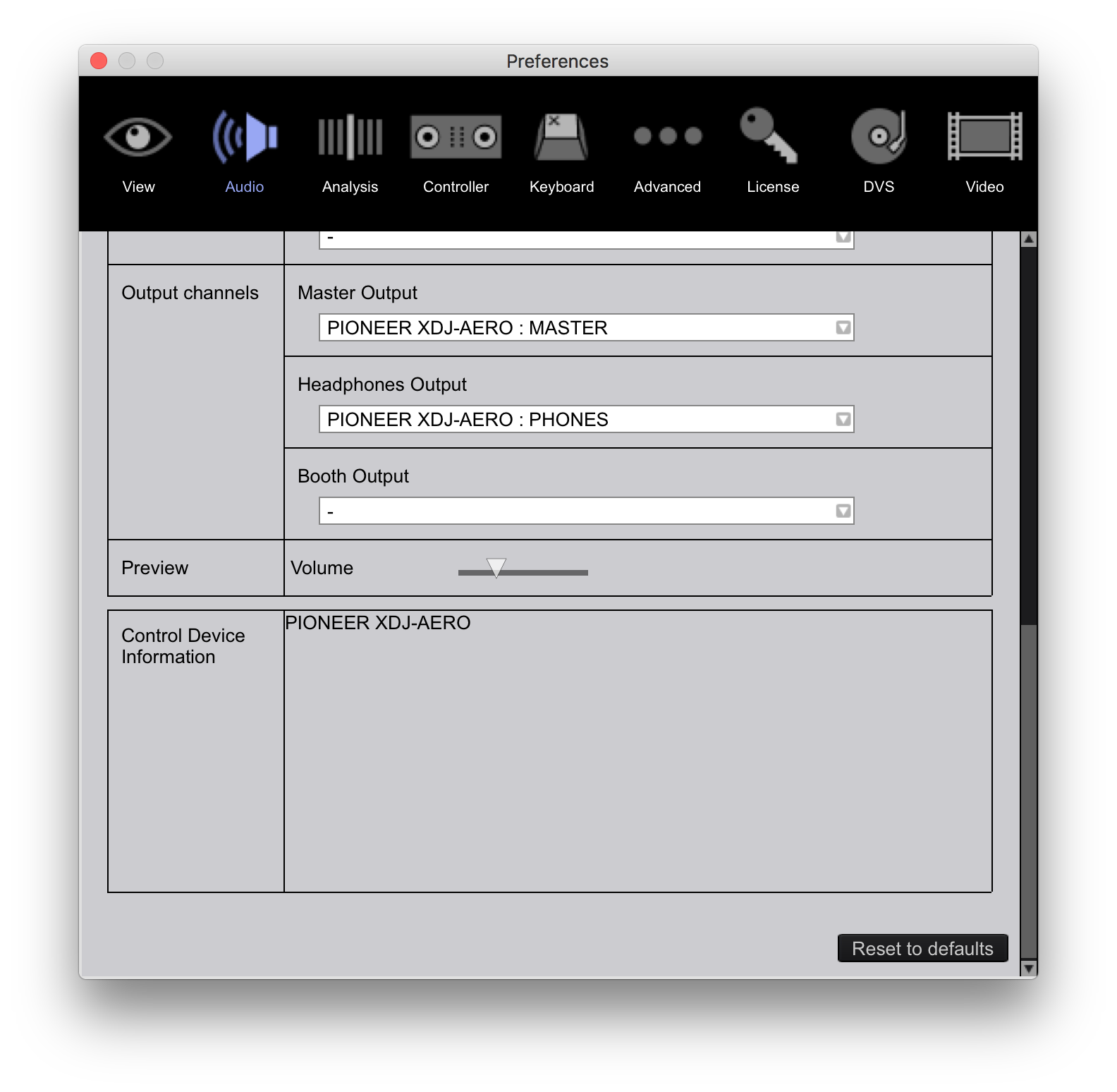
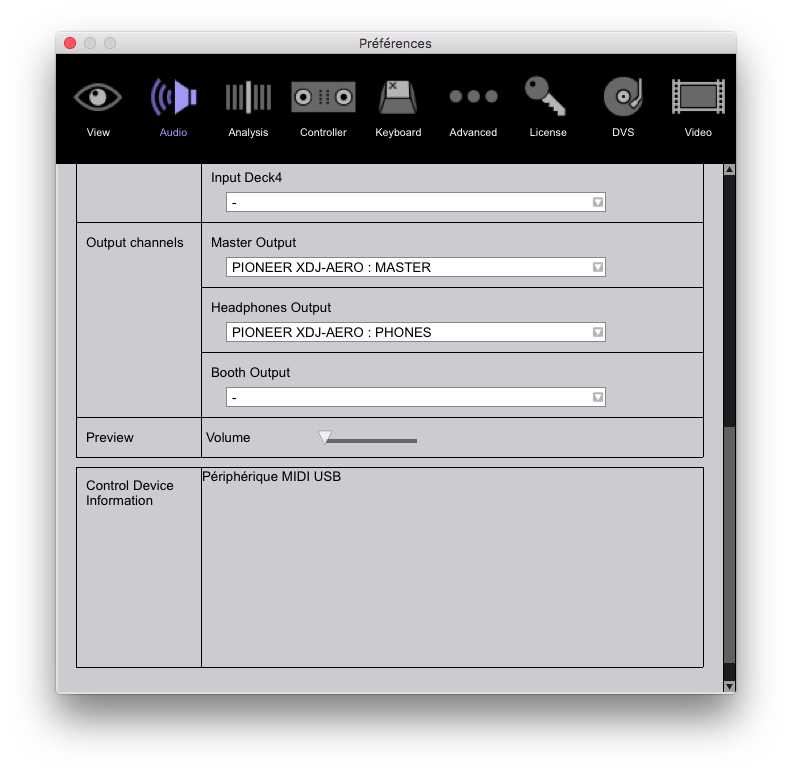
@Vivien > Please ensure rekordbox is configured as follows:

Pulse 0 Stimmen
Aktionen für Kommentare Permalink
0
Avatar

Thanks for you quick answer. Everything looks fine except the "Control Device Information". I don't understand why.

Vivien Duflot 0 Stimmen
Aktionen für Kommentare Permalink
0
Avatar

Not better. I wonder if it could be related to the firmware version (even if there is nothing about it in the history file).

Vivien Duflot 0 Stimmen
Aktionen für Kommentare Permalink
0
Avatar

Sorry - that comment I've deleted was for the PC!

Please open your Audio MIDI Setup application, look in the MIDI Studio window and tell me if the DDJ-RB is listed there?


Pulse 0 Stimmen
Aktionen für Kommentare Permalink
0
Avatar

No is not, although the Aero is there in the audio window of this application.

Vivien Duflot 0 Stimmen
Aktionen für Kommentare Permalink
0
Avatar

Great, it works! Creating a brand new MIDI configuration resolve the issue. It was probably a conflict with my MIDI master keyboard. Many, many thanks Pulse for your help. I can now try the new rekordbox DJ and the amazing Key Sync feature.

Just one more detail for those who want to use the XDJ Aero with rekordbox DJ: you have to select the MIDI mode on the controller, not the rekordbox one.

Vivien Duflot 0 Stimmen
Aktionen für Kommentare Permalink
0
Avatar

Glad to hear you got it to work with the MIDI configuration change!

Correct; the "rekordbox" mode on the AERO is for using it in the wifi-link mode.

Pulse 0 Stimmen
Aktionen für Kommentare Permalink