Offizieller Kommentar

For the more traditional rekordbox look, all you have to do is adjust your preferences.



Aktionen für Kommentare

I am unable to upgrade from Rekordbox 3 to Rekordbox 4 as under El Capitan the waveform display is unuable in 4. It was fine in 3.
Here is the Rekordbox 3 waveform for a track:-

And here is the same track in Rekordbox 4 which as you can see is screwed up as you cant see the markers correctly or the waveform

Model Name: MacBook Pro
Model Identifier: MacBookPro8,3
Processor Name: Intel Core i7
Processor Speed: 2.3 GHz
System Version: OS X 10.11.3 (15D21)
Kernel Version: Darwin 15.3.0
Chipset Model: AMD Radeon HD 6750M
Type: GPU
Bus: PCIe
PCIe Lane Width: x8
VRAM (Total): 1024 MB
Vendor: ATI (0x1002)
Device ID: 0x6741
Revision ID: 0x0000
ROM Revision: 113-C0170L-573
gMux Version: 1.9.24
EFI Driver Version: 01.00.573
For the more traditional rekordbox look, all you have to do is adjust your preferences.
Post ist für Kommentare geschlossen.
Hi,
I still have a problem even when using the options you mention. The waveform is still not really legable. The position of the cue points cant be seen and also memory markers the same. check the below screenshot
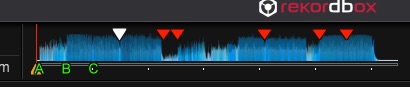
I'm not sure why you need more detail than this. I've never heard the song in the image above yet I can clearly tell where the cue points and hot cues are simply by looking at the image. That waveform is only a "preview." If you want the full details, you should be looking at the large, detailed, waveform.

