
I'm sorry, I don't understand what the problem is...?
Aktionen für Kommentare

There is a chance (for me 1/50 track) that analyzed track have missing data in waveform. Re-analyze solve the problem, but this is still a bug.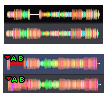
Post ist für Kommentare geschlossen.
I'm sorry, I don't understand what the problem is...?
In the first waweform the missing data are the white line in picture. The waweform under it its after re-analyzing the track. The waveform is correct.
On the second track the missing waveform data is the red line under AB hotcues. And also re-analyze the track help to fix it.
When did this occur? Were those tracks imported in an older version of rekordbox?
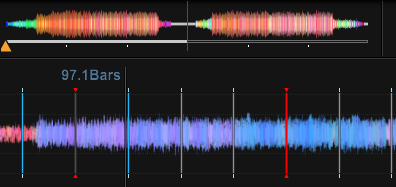
I add some new tracks to rekordbox, to be sure. The track on the first analyze process was all good. On the second re-analyze, the problem reappeared. So it happend to new files and also to old file that i have in rekordbox before version 4.0.6 where the new analyzation process for colorull wave start. I hit the bug on re-analyze but I'm sure, that i had a case where this happend also on first analyze process.
I tried it also with different analyze process. This bug appeared in 'normal' analyze process. I switch on the analyze to 'performance' and it reappeared there too, but on different track.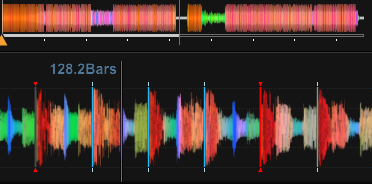
Can I ask why you are re-analysing tracks a second time?
Now, because i want to reproduce the issue.
I can try to constantly add and remove tracks to rekordbox, if you think the re-analyze (right click on the tracks and hit 'Analyze track') operate different way. But as I write i remember that this happend to me also for new tracks just added to rekordbox.
I'll pass this along to the engineers and see if they have any input.
@Roman > If you remove a track from rekordbox and re-import it, does it do the same thing?
I'm still not clear on why you are running a re-analysis on a track after the import process would have already done that.
Can you also tell me which operating system you're running and whether it only occurs with certain types of files (WAVs or MP3s, etc)?
Hi Pulse,
the thing with this is random, or it look for me as that.
If I put 1000 new songs to rekordbox, so the analyze process start on this new songs (never have been in rekordbox program). And after that some can have this droputs.
If i re-analyze, or remove the songs from rekordbox and import them again. Some other can have the dropouts.
I have win7 64bit and files are mp3 format. I will try It later with wav files later to have some response on them too.
It would really help if someone other can confirm the same problem, because so far it looks like problem only for me, and maybe the hardware have som problem :( But it's not that bad, because it don't have any problem on play of that file.
I understand it's a visual nuisance, but so far, you do seem to be the only one with the issue and the engineers are trying to identify why and what's causing it!
With those MP3s, are they constant bitrate or variable bitrate? Do you know how to determine which encoder was used to create them? I can provide some information on finding that info if needed, as that may be a constant across those tracks.
all files are fixed bitrate 320kbit/s. I don't know how could I find out information about in which encoder the mp3 files was made (i don't have this infomation stored in ID3 tag). I only know on files, that i create. They have LAME 3.99.3 encoder.
But i can not say, now, in which encoder the songs that have droputs are.
I will write down songs, that will have this droputs and try find out the encoder.
But more important is, if i can confirm this on the wav files, If yes we can forget about the encoder. Give me some time, and I will try it.
Okay, thanks! :D
Hi Pulse,
So i made a few wav files and finally can say, that I have the problem also with wav file :(
Also I change setting in windows to run rekordbox in nvdia graphic procesor. For this moment rekordbox was using internal video card in intel procesor. So also the graphic card is not the problem.


