
@Peter > Did you use the sync manager in rekordbox to put them there?
Aktionen für Kommentare

I have changed my playlists in iTunes having added some and deleted some, but they are still showing in Rekordbox on the iPad. How can I get rid of them? The new playlists I have created are all there and are OK.
Post ist für Kommentare geschlossen.
@Peter > Did you use the sync manager in rekordbox to put them there?
Yes - I set everything up in iTunes and then sync to Rekordbox. I later removed them in iTunes and they are not showing on the PC rekordbox list of playlists, but after syncing my 128gb USB with the PC and plugging it into the XDJ-R1, the Rekordbox app on the iPad I use with the XDJ still shows the playlists.
> I later removed them in iTunes...
Why would you remove them from iTunes?
> ...and they are not showing on the PC rekordbox list of playlists...
And that's likely because you removed them from iTunes.
The playlists would still show anywhere you exported them, but the source (which, I'm going to assume was iTunes) was removed, so rekordbox also lost them (they should either be missing or the playlists gone).
My gigs are usually private parties where people give me a playlist or suggestions. I create a playlist for that evening, but then need to delete it, but I cannot see how to remove it from the iPad list. Strangely, although I have removed them from iTunes and rekordbox on the PC, they are still live and active on the iPad. Overtime, if I cannot remove them from the iPad, I will end up with too many to sort through.
I appreciate your time on this - thank you.
When you sync your playlist from iTunes into rekordbox, then copy that playlist over to your iPad, and remove the playlist in iTunes, it doesn't automatically remove it from either rekordbox OR the iPad.
You CAN remove the playlist from the iPad but it has to be done manually -- over on the device tree, below your device name, you'll see the Playlist folder with all of your playlists within. Delete the ones you want:
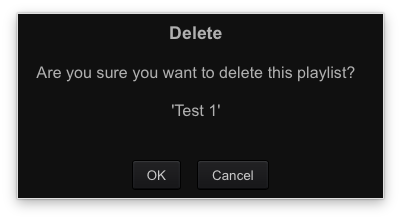
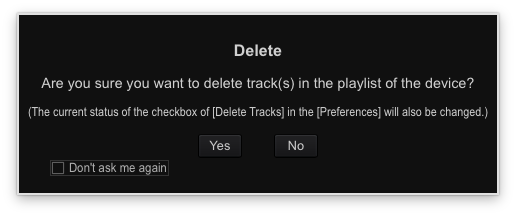
And you'll also be prompted with the option to remove the files as well:
Thank you for your help. All sorted now. Just a question of knowing where to look!

