
Thank you for your time .
Aktionen für Kommentare
Hi Pioneer , Can you be honest over these 64 bit drivers ?? Not getting much back here , If you say only 32 bit programs work thats fine and 64 are in production we can wait DON`T LIE TO US !!!
Post ist für Kommentare geschlossen.
Thank you for your time .
If its my fault i will be the first to post on here and say i was wrong and apoligize to Pioneer , That is what i am about .

@John > You complain about how much you spent on your hardware but then do yourself the disservice of not learning how it all works and how to set it up? I'm sorry, but the fault here is certainly on your end as a user-error, nothing to do with Pioneer DJ's drivers or software. Both @Frank and I have shown you that it can be configured, and this is not something mysterious or difficult to figure out.
I certainly don't appreciate your attitude or negative comments towards @Chris, he was trying to help. Consider this your first and only warning on that issue.
If you need help, act like it instead of coming in and throwing around blame and accusations.

Hi ,I have tried the above instructions , I have manage to the get the music coming through mixer on one channel ? All the switches are now pointing On computer A , When I push to connect both cdj there is no option for choosing Deck ABCD ? Also my time code vinyl is not showing as if it's coming through traktor .

John.
When saying all Switches pointing to Computer A, does it mean all you Input Selector on your DJM for all 4 Channels having USB A selected? If yes the DJM accepts Music on all channels coming from the Computer.
Traktor will Need this Output Setup to have
Traktor Deck 1 -> DJM Ch 1
Traktor Deck 2 -> DJM Ch 2
Traktor Deck 3 -> DJM Ch 3
Traktor Deck 4 -> DJM Ch 4
This does not require your CDJ's or Turntables - this would work for Music loaded to the Traktor Decks.


got some pics mate , The vinyl time code is not coming through either on deck c& d
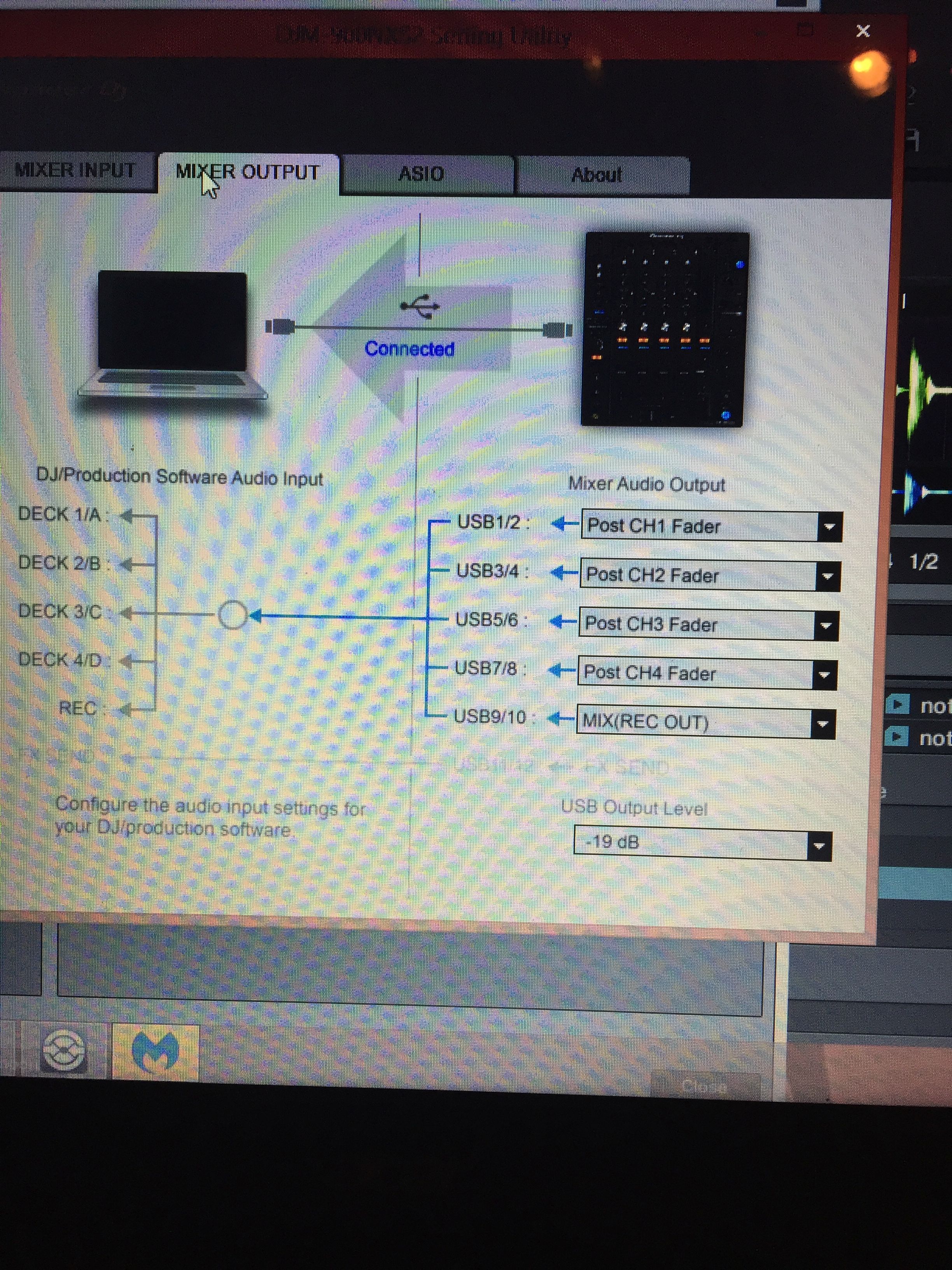
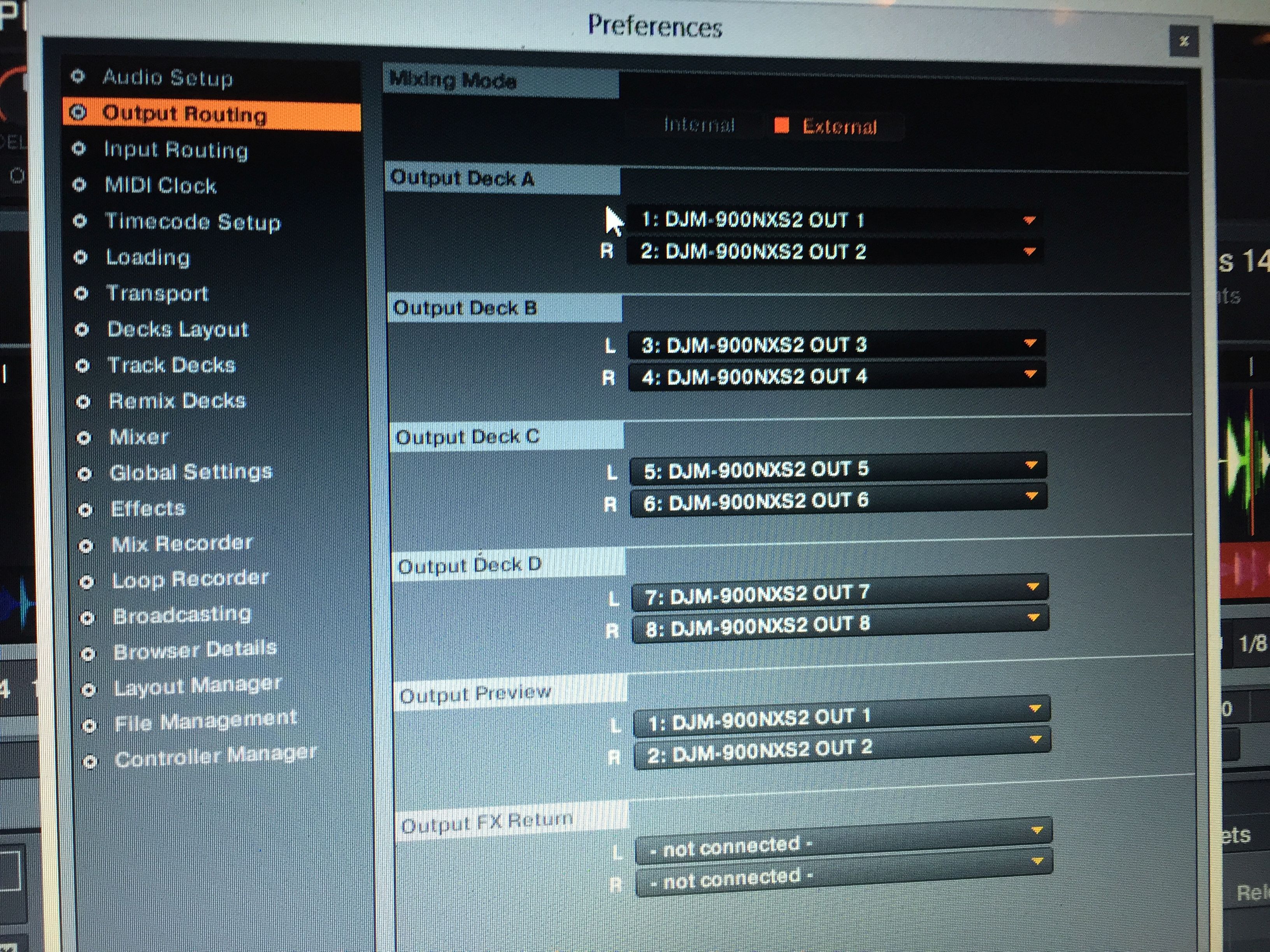
Do I recall you got CDJ-2000nxs2?
Remember they do not have HID Support in Traktor right now if I recall correctly. Are you trying to get the timecode through your Turntables?
I am not a DVS expert and would have a look by myself to see what else Need to be configured.
yes mate nexus 2 set up decks & mixer , On channel 1 & 4 is time code vinyl and 2 & 3 is my cdj nexus 2
So am i right in saying 32 bit is the way on this ? Because this worked but you could not record or open any other programs to record , Traktor over rides this process .
Hi frank, Did you manage to find anymore info out ? I am probably going back to 32 bit then ,Then i still have the same issue of recording again !!! going round in circles .:(
This is off the pioneer website very misleading
USB-HID (Human Interface Device) lets you control your DJ software directly from our DJ products. Just connect your Pioneer DJ gear to your computer via a USB cable and you will be able to access all the features of your DJ software, no control disc required.
HID control is more accurate than traditional MIDI control and allows for more data to be shared between the product and software (e.g. artwork, waveform data).
DVS (Digital Vinyl System) allows you to control your DJ software using a control disc containing a timecode signal. Using a control vinyl DJs have a physical connection to their music, which makes this feature very popular for scratching and turntablism.
Connect DJ decks or turntables to your DJ mixer and connect the mixer to your computer via USB to unlock the DVS abilities of Pioneer DJ Certified DJ software
So the 64 bit drivers do not work to control HID ?
This unit supports DVS control of Native Instruments’ TRAKTOR SCRATCH PRO 2 DJ software. Plug your PC/Mac into this unit and use the TRAKTOR SCRATCH PRO 2 control media (control vinyl or CDs) to intuitively control and scratch with digital audio files stored on your computer.
Not on 64 Bit ot does not .


