Have a feature request or suggestion? Post your idea here!

Post

7 Follower Folgen
0
Avatar

DDJ-1000 Headphone cue Issue

I just purchased a DDJ-1000 a week ago and it came in this week.  I've been doing my mixes on it and now, just today, the headphone cue only plays on one side of my headphones and not the other.  I can cue every channel and it works but only plays through on the left side of my headphone.  I checked my headphones and they are working fine from other audio devices but I don't know why it's only coming to one side when plugged into the DDJ-1000.  Do I have a faulty unit?  Any mono/stereo setting switch in Rekordbox for headphone cueing that I missed?  I've been looking around for this and can't find a solution.  Any help is appreciated.  Thanks!

mityfang Beantwortet

Offizieller Kommentar

Avatar

The DDJ-1000 itself doesn't support the split cue function, where I had seen it before was with other hardware connected.

There are users who have found the preference files can be edited to create a split-cue function; I can't provide that information here my self (officially), but if you search the forums for it, you'll find it.

Pulse
Aktionen für Kommentare Permalink

Post ist für Kommentare geschlossen.

15 Kommentare

0
Avatar

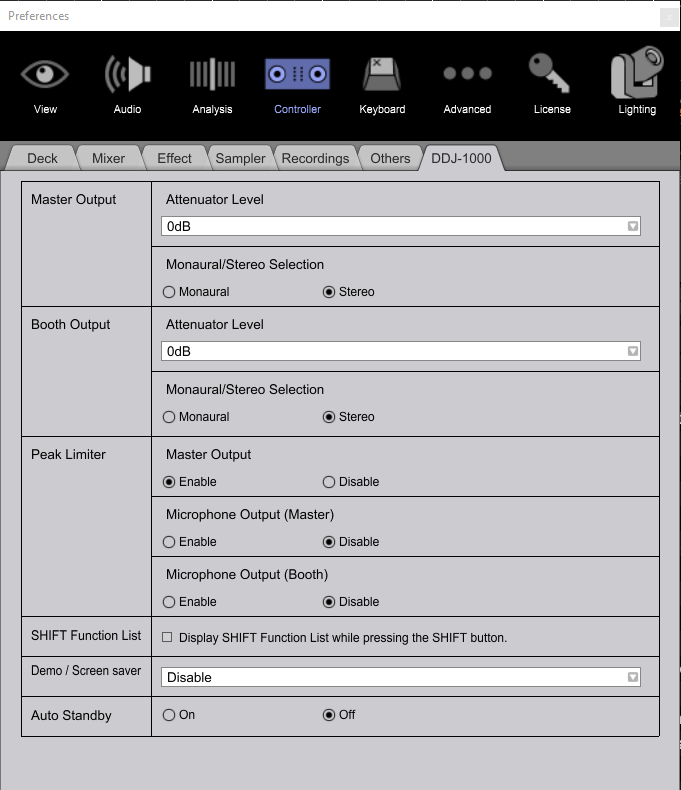
There is a split cue option in the rekordbox preferences. I don't have one here to connect and provide a screenshot, but I know it's in there!

Pulse 0 Stimmen
Aktionen für Kommentare Permalink
0
Avatar

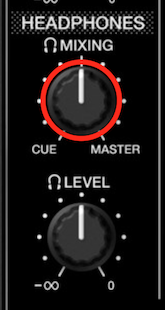
hi pioneer dj, as experienced on my ddj 1000, i can only monitor thru my headphones the channels with the cue button on and the master out, sound comes in equal levels on the left and right cups of the headphones. when i turn the mix knob, it does the same thing as the headphone volume fader knob. is there something wrong with my unit?

johnny dls 0 Stimmen
Aktionen für Kommentare Permalink
0
Avatar

@Johnny > It sounds like a misunderstanding in usage.

Start with all headphone CUE buttons un-lit (nothing selected), audio playing on channels 1 and 2, but only channel 1's fader should be open (with the crossfader to that side or disabled).

To hear the master in your headphones, you press the MASTER CUE button (the one below the booth monitor knob; that's not the booth cue, that's the master cue). Press it again to disable it.

To hear channel 1, press the CH1 CUE button. Press it again to disable it.

To hear channel 2, press the CH2 CUE button. Press it again to disable it.

To hear the master AND channel 2, press both the MASTER CUE and CH2 CUE. Because channel 2 is not "live" to the master, you can then use the cue-mix knob to blend between them.

Turn it to the left to hear less of the master, turn it to the right to hear less of the channel. At any point you can press the CH2 CUE or MASTER CUE buttons to toggle that signal off or on, regardless of the mix amount.

At no point should you hear any of the headphone cueing selections through the master; that audio should only be going to the headphones when you press any CUE button provided the channel fader is down. Likewise, with no channel faders up, you will have no audio going to the master, so there will be nothing heard on the MASTER CUE.

Pulse 0 Stimmen
Aktionen für Kommentare Permalink
0
Avatar

thank you very much for this information pulse, i totally misunderstood the cue button below the booth monitor knob :(

i will try this right away. thanks again!

johnny dls 0 Stimmen
Aktionen für Kommentare Permalink
0
Avatar

Hi pulse where is split cue in the software? Thanks

Mgplant 0 Stimmen
Aktionen für Kommentare Permalink
0
Avatar

dude I can  hear master ok but not cue 1 or cue 2 on their own...is my unit knackered


DJ Levy 0 Stimmen
Aktionen für Kommentare Permalink
0
Avatar

@Mgplant > The S9 does not have Split Cue.

@Levy > There are a few reasons that might happen... did you configure the audio device properly within the software? Do you still have the MASTER CUE selected? Did you adjust the HEADPHONE MIX knob?

Pulse 0 Stimmen
Aktionen für Kommentare Permalink
0
Avatar

@ => Official comment

Avatar

There is a split cue option in the rekordbox preferences. I don't have one here to connect and provide a screenshot, but I know it's in there!

================

Please provide a screenshot or a path to activate split cue/mono cue function(cue to the left headphone chanel, master to the right, or master to both, but cue to one).

I have RB 5.4.1 and DDJ1000 - cant find this function.

Thanks in advance

igor vini 0 Stimmen
Aktionen für Kommentare Permalink
0
Avatar

Hi Guys.

I had the same problem and was wrecking my head but turned out to be an easy fix.

Go to preferences..Audio..In Mixer mode switch off the booth output.

Hope this helps


Daniel McHugh 0 Stimmen
Aktionen für Kommentare Permalink
0
Avatar

Expanding on this, when disconnected from usb, does the 1000 retain the last setting for split cue and cross fader curve setting?

Eg. I have the split cue enabled in Rekordbox, I then disconnect the usb from ddj-1000 and use external turntables, will the split cue still be enabled in standalone mode?

Dav 0 Stimmen
Aktionen für Kommentare Permalink
1
Avatar

Am I blind? :) I cant see split cue option.. read 3 times all the options. PLEASE point on it!

igor vini 1 Stimme
Aktionen für Kommentare Permalink